mgrechanik/image-points-searcher
Composer 安装命令:
composer require mgrechanik/image-points-searcher
包简介
This library allows to find the coordinates of the points you are looking for on an image
README 文档
README
Table of contents
Goal
This library allows to find the coordinates of the points you are looking for on an image (jpg format).
The point is the set of nearby pixels of choosen color.
For example, when you draw a graph on the image, we will find it's vertices.
Out of the box we have two strategies to determite our points.
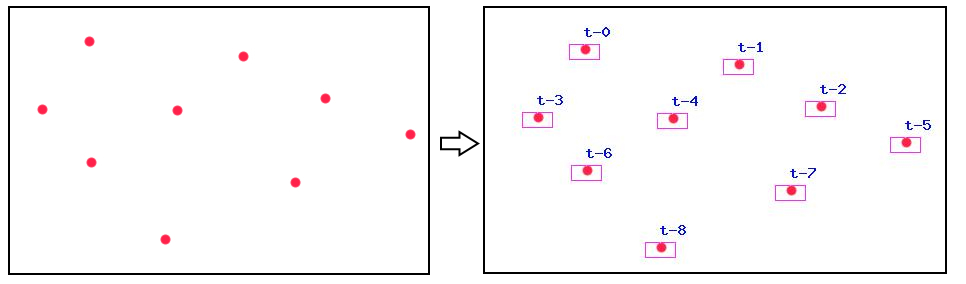
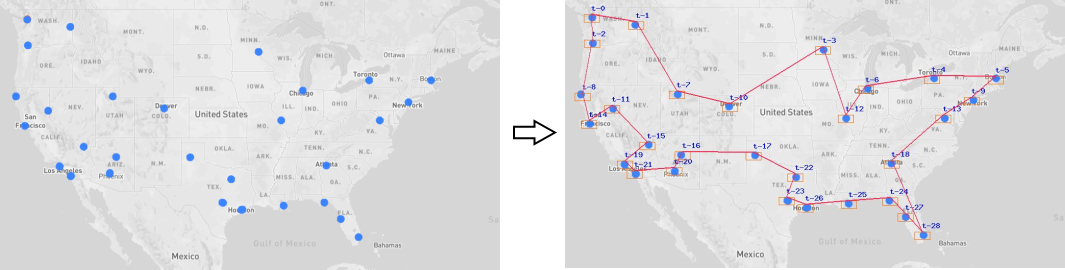
DifferentColorsStrategy- when the point is different from background color. Default behavior. See Demo, picture 1.ChoosenColorStrategy- when point is defined by it's exact color. See Demo, picture 2.
You can create your own strategy and use it.
Points could be of different size, so they could be easily seen, not just 1px size. We use parameter Searcher::$margin to determine all those pixels as one point.
The result of the search work is an array of points, represented by their X and Y coordinates.
We also give you ImageResult, who creates the image of the search result:
- We can add labels to points we found
- The borders of the points we found could be shown to better understand search process
- We could draw a path between points
Demo
Determine points with DifferentColorsStrategy strategy , Picture 1:
Determine points with ChoosenColorStrategy strategy, Picture 2:
Installing
Installing through composer:
The preferred way to install this library is through composer.
Either run
composer require --prefer-dist mgrechanik/image-points-searcher
or add
"mgrechanik/image-points-searcher" : "~1.0.0"
to the require section of your composer.json.
Search for points
Search for points with DifferentColorsStrategy strategy
try {
  $searcher = new \mgrechanik\imagepointssearcher\Searcher(
    './images/graph.jpg'
  );
  $count = $searcher->run();
  print 'Found - ' . $count;
  $points = $searcher->getPoints();
  var_dump($points);
} catch (Exception $e) {

}
The result will be like this:
Found - 2
[
	['x' => 10, 'y' => 10],
	['x' => 80, 'y' => 80],
]
Search for points with ChoosenColorStrategy strategy
try {
  $searcher = new \mgrechanik\imagepointssearcher\Searcher(
    './images/usa.jpg',
    new \mgrechanik\imagepointssearcher\ChoosenColorStrategy(60, 132, 253)
  );
  $count = $searcher->run();
  print 'Found - ' . $count;
  $points = $searcher->getPoints();
  var_dump($points);
} catch (Exception $e) {

}
Display search result
$imageResult = new \mgrechanik\imagepointssearcher\ImageResult($searcher);

// We can set colors
$imageResult->setLabelsColor(1, 14, 230);
$imageResult->setLinesColor(255, 33, 73);
$imageResult->setMarginsColor(255, 106, 0);


// Draw default labels
$imageResult->drawLabels();
// Draw labels with the text we want
$imageResult->drawLabels(function($key, $point) { return "{$point['x']},{$point['y']}";});

// Draw borders of the points we found
$imageResult->drawMargins();

// Draw the path between points
$imageResult->drawPath([2,9,20,28,41,48,44]);

// Save the result as the image. See Demo.
$imageResult->save('./images/result.jpg');
mgrechanik/image-points-searcher 适用场景与选型建议
mgrechanik/image-points-searcher 是一款 基于 PHP 开发的 Composer 扩展包,目前已累计 28 次下载、GitHub Stars 达 0, 最近一次更新时间为 2023 年 11 月 08 日, 在 PHP 生态内属于活跃度较高的组件。
它主要适用于以下技术方向: 「php」 「image」 「graph」 「coordinates」 「search points on image」 「tsp」 等业务场景。在实际项目中,围绕这些方向常见需要落地的问题包括:接口对接、性能调优、并发安全、与既有框架(Laravel / ThinkPHP / Yii / Webman 等)的兼容适配,以及生产环境的日志埋点与稳定性保障。
我们在过去多个企业项目中使用过 mgrechanik/image-points-searcher 或与其功能相近的方案,如果你在选型或落地过程中遇到问题,例如 版本兼容、二次改造、私有化封装、与内部系统对接、生产 BUG 排查,欢迎联系我们协助评估。
基于 mgrechanik/image-points-searcher 在你已有业务上做功能扩展、字段裁剪、UI 适配、与内部账号 / 权限 / 日志系统的深度对接。
线上偶发问题、内存泄漏、慢查询、并发异常等排查修复;针对高流量场景做缓存、队列、索引层面的调优。
承接完整的项目从需求 → 设计 → 开发 → 上线 → 长期运维;也可按月提供技术保姆服务。
与 mgrechanik/image-points-searcher 相关的其它包
同方向 / 同关键字的高下载量 PHP Composer 包推荐,方便对比选型:
Netgen Open Graph Bundle is an Ibexa Platform bundle that allows simple integration with Open Graph protocol.
Yii2 LightBox image galary widget uses Lightbox v2.10.0 by Lokesh Dhakar
The Yii2 extension uses jQuery jquery.carousel-1.1.min.js and makes image carousel from php array of structure defined.
A tool for scraping URL resources (oEmbed, OpenGraph, Twitter cards, JSON-LD)
The Yii2 extension uses jQuery PrettyPhoto and OwlCarousel js and makes image galary from php array of structure defined.
Neo4j-PHP-Client is the most advanced PHP Client for Neo4j
统计信息
- 总下载量: 28
- 月度下载量: 0
- 日度下载量: 0
- 收藏数: 0
- 点击次数: 15
- 依赖项目数: 0
- 推荐数: 0
其他信息
- 授权协议: BSD-3-Clause
- 更新时间: 2023-11-08