microman/kirby-components
最新稳定版本:1.0.1
Composer 安装命令:
composer require microman/kirby-components
包简介
Brings blueprints and snippets to one place.
README 文档
README
Overview
Do you love to make awesome projects with Kirby CMS? Do you also find it difficult to switch between snippets and blueprints folders?
This Plugin will change your life!

Watch the video tutorial or check the example project
Installation
Manually
Download and copy the plugin into your plugin folder: /site/plugins/
With Composer
composer require microman/kirby-components
First step
- Create a components folderfolder
site/components - Make a subfolder for your component, e.g.
components/my_component - Create at least one blueprint with the same name as the folder. e.g.
my_component/my_component.yml - Create at least one snippet. e.g.
my_component//my_component.php
You can create more snippets and blueprints in your components folder. (called sub components) To access them later, declaring the location
my_component/my_subcomponent
You can set label, title and icons in your blueprint. Even tabs and columns, if you like.
Using in your template
To output your component, use the component helper:
component('my_component');
Pass values to this component:
component('my_component', $page, ['title' => 'This is a different title.']);
The first and the second parameter could be an array or an Kirby object, that contains a content object. Try it out what is working for you.
Using in your panel
The component field
my_field:
  type: component
  fieldsets: my_component
You can also use Kirby blocks in here:
fieldsets: blocks/heading
$page->my_field()->toComponent();
Extend your component like in the example above:
$page->my_field()->toComponent(['new_value' => 'My new value']);
The variables in the components snippet are accessible with $content
$content->field_in_component();
The component selector
If you add more than one component to the fieldsets, a selector appears:
my_field:
  type: component
  fieldsets:
    - my_component
    - my_component/my_subcomponent
    - my_other_component
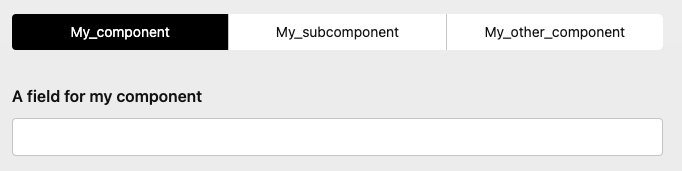
By choosing, the fields of the selected component will appear.
To change the labels in the selector, set the property 'title' of the component.
Component selector with images
Adding images to your component folder (with the same name as the component itself)
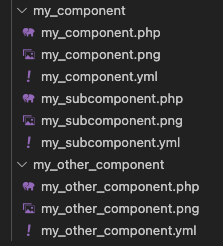
These images will shown in the selector and you can be styled with the selector property:
my_field:
  type: component
  selector:
    columns: 3
    background: var(--color-yellow-200)
    ratio: 3/1
    fit: contain
    gap: 1em
  fieldsets:
    - my_component
    - my_component/my_subcomponent
    - my_other_component

Images toggles field
You can use the component selector also standalone:
images_toggles:
  type: imagetoggles
  root: location/of/the/images
  ratio: 2/1
  fit: cover
  gap: 1.2em
  options:
    - text: Text1
     value: value1
     image: image1.png
    - text: Text2
     value: value2
     image: image2.png
    - text: Text3
     value: value3
     image: image3.png
It follows the same rules as the togglesfield.
Output the component field
Use the toComponent()method.
$page->my_field()->toComponent();
Or you can extend the values (with an array or an Kirby object):
$page->my_field()->toComponent(['my_component_field' => 'My existing or new value']);
$page->my_field()->toComponent($page->any_section());
The toComponent() method delivers the selected component.
If you like to use all the available components of the component fields use toComponents():
<?php foreach ($page->my_field()->toComponents() as $component): ?>
  <?= $component ?>
<?php endforeach ?>
The components field
Add more than one component by using the components field.
It follows the same rules as the Kirby blocks field.
multiple_components:
  type: components
  fieldset:
    - my_component
    - my_component/my_subcomponent
    - my_other_component
    - blocks/heading
    - blocks/text
    - blocks/list
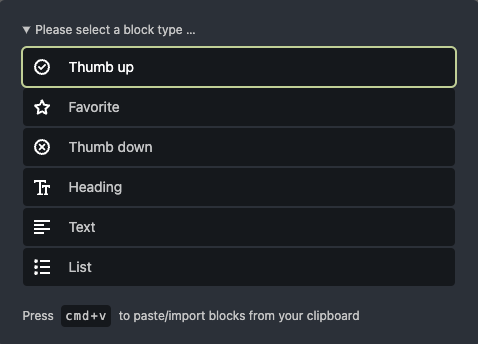
Tab injection
Add a tabs with components to the component(s) fields.
multiple_components:
  type: components
  tabs:
    my_component/my_subcomponent:
      position: after
      label: Injected tab
  fieldset:
    - my_component
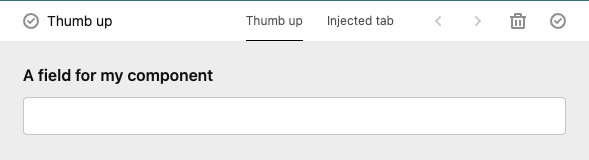
you can also extend your component there:
multiple_components:
  type: components
  tabs:
    my_component/my_subcomponent:
      position: after
      label: Injected tab
      fields:
        existing_field:
          label: Another Label
        new_field:
          type: text
  fieldset:
    - my_component
License
This is a free trial version of Kirby Components Plugin, which grants you the right to use the plugin for testing purposes. If you wish to use this plugin on one website or if you intend to use it for commercial purposes, you must purchase a license.
A license is required for those who wish to use the plugin to generate revenue, including but not limited to: e-commerce websites, affiliate marketing websites, and websites that require payment to access content. Licenses are non-transferable and cannot be shared with other users or websites.
By downloading and using this plugin, you agree to the terms and conditions of the License Agreement. Failure to comply with the terms of the License Agreement may result in revocation of your license and legal action.
To purchase a license or learn more about our licensing options, please visit our website or contact us at Contact Email. Thank you for your interest in Kirby Components Plugin!
microman/kirby-components 适用场景与选型建议
microman/kirby-components 是一款 基于 JavaScript 开发的 Composer 扩展包,目前已累计 26 次下载、GitHub Stars 达 9, 最近一次更新时间为 2023 年 05 月 19 日, 在 PHP 生态内属于活跃度较高的组件。
我们在过去多个企业项目中使用过 microman/kirby-components 或与其功能相近的方案,如果你在选型或落地过程中遇到问题,例如 版本兼容、二次改造、私有化封装、与内部系统对接、生产 BUG 排查,欢迎联系我们协助评估。
基于 microman/kirby-components 在你已有业务上做功能扩展、字段裁剪、UI 适配、与内部账号 / 权限 / 日志系统的深度对接。
线上偶发问题、内存泄漏、慢查询、并发异常等排查修复;针对高流量场景做缓存、队列、索引层面的调优。
承接完整的项目从需求 → 设计 → 开发 → 上线 → 长期运维;也可按月提供技术保姆服务。
统计信息
- 总下载量: 26
- 月度下载量: 0
- 日度下载量: 0
- 收藏数: 9
- 点击次数: 13
- 依赖项目数: 1
- 推荐数: 0
其他信息
- 授权协议: proprietary
- 更新时间: 2023-05-19