mmockelyn/laravel-totem
Composer 安装命令:
composer require mmockelyn/laravel-totem
包简介
A Laravel package to manage your cron jobs through a beautiful dashboard
README 文档
README


Introduction
Manage your Laravel Schedule from a pretty dashboard. Schedule your Laravel Console Commands to your liking. Enable/Disable scheduled tasks on the fly without going back to your code again.
Documentation
Compatiblity Matrix
| Laravel | Totem |
|---|---|
| 8.x | 8.x |
| 7.x | 7.x |
| 6.x | 6.x |
| 5.8 | 5.x |
| 5.7 | 4.x |
| 5.6 | 3.x |
| 5.5 | 2.x |
| 5.4 | 1.x |
Installing
Totem requires Laravel v5.4 and above, please refer to the above table for compatability. Use composer to install totem to your Laravel project
composer require studio/laravel-totem
Laravel Totem supports auto package discovery for Laravel v5.5+, therefore service provider registration is not required in Laravel v5.5+
Add TotemServiceProvider to the providers array of your Laravel v5.4 application's config/app.php
Studio\Totem\Providers\TotemServiceProvider::class,
Once Laravel Totem is installed & registered,
- Run the migration
php artisan migrate
- Publish
Totemassets to your public folder using the following command
php artisan totem:assets
Table Prefix
Totems' tables use generic names which may conflict with existing tables in a project. To alleviate this the .env param TOTEM_TABLE_PREFIX can be set which will apply a prefix to all of Totems tables and their models.
Updating
Please republish totem assets after updating totem to a new version
php artisan totem:assets
Configuration
Cron Job
This package assumes that you have a good understanding of Laravel's Task Scheduling and Laravel Console Commands. Before any of this works please make sure you have a cron running as follows:
* * * * * php /path-to-your-project/artisan schedule:run >> /dev/null 2>&1
Web Dashboard
Laravel Totem's dashboard is inspired by Laravel Horizon. Just like Horizon you can configure authentication to Totem's dashboard. Add the following to the boot method of your AppServiceProvider or wherever you might seem fit.
use Studio\Totem\Totem;

Totem::auth(function($request) {
    // return true / false . For e.g.
    return Auth::check();
});
By default Totem's dashboard only works in local environment. To view the dashboard point your browser to /totem of your app. For e.g. laravel.dev/totem.
Filter Commands Dropdown
By default Totem outputs all Artisan commands on the Create/Edit tasks. To make this dropdown more concise there is a filter config feature that can be set in the totem.php config file.
Example filters
'artisan' => [
    'command_filter' => [
        'stats:*',
        'email:daily-reports'
    ],
],
This feature uses fnmatch syntax to filter displayed commands. stats:* will match all Artisan commands that start with stats: while email:daily-reports will only match the command named email:daily-reports.
This filter can be used as either a whitelist or a blacklist. By default it acts as a whitelist but an option flag can be set to instead act as a blacklist.
'artisan' => [
    'command_filter' => [
        'stats:*',
        'email:daily-reports'
    ],
    'whitelist' => true,
],
If the value of whitelist is false then the filter acts as a blacklist.
'whitelist' => false
Middleware
Laravel Totem uses the default web and api middleware but if customization is required the middleware can be changed by setting the appropriate .env value. These values can be found in config/totem.php.
Making Commands available in Laravel Totem
All artisan commands can be scheduled. If you want to hide a command from Totem make sure you have the hidden attribute set to true in your command. For e.g.
protected $hidden = true;
From L5.5 onwards all commands are auto registered, so this wouldn't be a problem.
Command Parameters
If your command requires arguments or options please use the optional command parameters field. You can provide parameters to your command as a string in the following manner
name=john.doe --greetings='Welcome to the new world'
In the example above, name is an argument while greetings is an option
Console Command
In addition to the dashboard, Totem provides an artisan command to view a list of scheduled task.
php artisan schedule:list
Screenshots
Task List
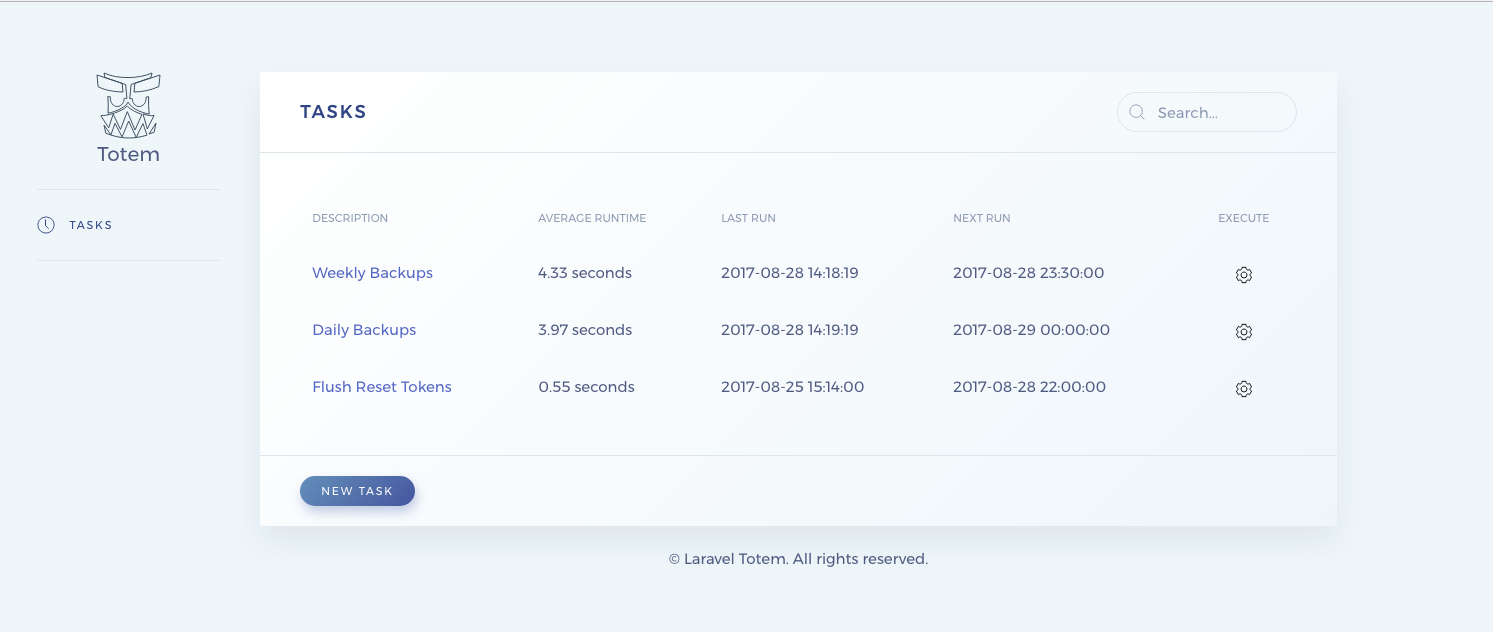
Task Details

Edit Task

Artisan Command to view scheduled tasks

Changelog
Important versions listed below. Refer to the Changelog for a full history of the project.
Credits
Bug reports, feature requests, and pull requests can be submitted by following our Contribution Guide.
Contributing & Protocols
License
This software is released under the MIT License.
© 2020 Roshan Gautam, All rights reserved.
mmockelyn/laravel-totem 适用场景与选型建议
mmockelyn/laravel-totem 是一款 基于 PHP 开发的 Composer 扩展包,目前已累计 154 次下载、GitHub Stars 达 0, 最近一次更新时间为 2022 年 03 月 27 日, 在 PHP 生态内属于活跃度较高的组件。
它主要适用于以下技术方向: 「manager」 「schedule」 「laravel」 「totem」 「Code Studio」 等业务场景。在实际项目中,围绕这些方向常见需要落地的问题包括:接口对接、性能调优、并发安全、与既有框架(Laravel / ThinkPHP / Yii / Webman 等)的兼容适配,以及生产环境的日志埋点与稳定性保障。
我们在过去多个企业项目中使用过 mmockelyn/laravel-totem 或与其功能相近的方案,如果你在选型或落地过程中遇到问题,例如 版本兼容、二次改造、私有化封装、与内部系统对接、生产 BUG 排查,欢迎联系我们协助评估。
基于 mmockelyn/laravel-totem 在你已有业务上做功能扩展、字段裁剪、UI 适配、与内部账号 / 权限 / 日志系统的深度对接。
线上偶发问题、内存泄漏、慢查询、并发异常等排查修复;针对高流量场景做缓存、队列、索引层面的调优。
承接完整的项目从需求 → 设计 → 开发 → 上线 → 长期运维;也可按月提供技术保姆服务。
与 mmockelyn/laravel-totem 相关的其它包
同方向 / 同关键字的高下载量 PHP Composer 包推荐,方便对比选型:
The file manager intended for using Laravel with CKEditor / TinyMCE / Colorbox
Enables the creation of cron-jobs tasks to be consumed by symfony/messenger
A Deployment/Change Log Schedule and Notes system for SilverStripe sites
Monitoring for scheduled jobs
KCFinder web file manager
Publish / Subscribe / Event Manager
统计信息
- 总下载量: 154
- 月度下载量: 0
- 日度下载量: 0
- 收藏数: 0
- 点击次数: 25
- 依赖项目数: 0
- 推荐数: 0
其他信息
- 授权协议: MIT
- 更新时间: 2022-03-27