nafigator/bash-helpers
Composer 安装命令:
composer require nafigator/bash-helpers
包简介
Collections of useful functions for usage in Bash scripts.
README 文档
README
bash-helpers

Collection of useful functions for usage in Bash scripts
Usage
Without installation
#!/usr/bin/env bash

source <(curl -s https://raw.githubusercontent.com/nafigator/bash-helpers/1.1.4/src/bash-helpers.sh)

inform 'Bash helpers ready!'
Preinstalled
#!/usr/bin/env bash

. /usr/local/lib/bash/includes/bash-helpers.sh

inform 'Bash helpers ready!'
Installation
- Put bash libs into
/usr/local/lib/bash/includesdir. - Source
bash-helpers.shin executable script:. /usr/local/lib/bash/includes/bash-helpers.sh
Example
[ -d /usr/local/lib/bash/includes ] || sudo mkdir -p /usr/local/lib/bash/includes
sudo curl -o /usr/local/lib/bash/includes/bash-helpers.sh https://raw.githubusercontent.com/nafigator/bash-helpers/master/src/bash-helpers.sh
sudo chmod +x /usr/local/lib/bash/includes/bash-helpers.sh
Via functions
#!/usr/bin/env bash

download_bash_helpers() {
	printf "Installing bash-helpers\n"
	[[ ! -d /usr/local/lib/bash/includes ]] || sudo mkdir -p /usr/local/lib/bash/includes

	sudo curl -so /usr/local/lib/bash/includes/bash-helpers.sh https://raw.githubusercontent.com/nafigator/bash-helpers/master/src/bash-helpers.sh
	sudo chmod +x /usr/local/lib/bash/includes/bash-helpers.sh

	return 0
}

init_bash_helpers() {
	[[ -e /usr/local/lib/bash/includes/bash-helpers.sh ]] || download_bash_helpers

	if [[ ! -x /usr/local/lib/bash/includes/bash-helpers.sh ]]; then
		printf "Insufficient permissions for bash-helpers execute\n"; return 1
	fi

	. /usr/local/lib/bash/includes/bash-helpers.sh

	return 0
}

init_bash_helpers || exit 1
Via composer
composer require nafigator/bash-helpers
Features:
-
Defines human-readable functions for colors and formatting:
- black()
- red()
- green()
- yellow()
- blue()
- magenta()
- cyan()
- white()
- gray()
- bold()
- clr()
Examples:
printf "$(bold)$(red)ATTENTION$(clr) Save $(cyan)failure$(clr)"

NOTE: For logging purpose colors may be disabled by global
INTERACTIVEvariable:INTERACTIVE=
-
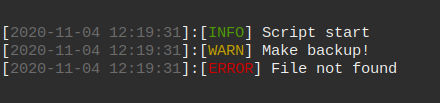
Functions for nicely formatted messages
error,inform,warning.Examples:
 inform 'Script start'
 warning 'Make backup!'
 error 'File not found'
-
Libs including.
Example:
 include google/client || exit 1
 include mysql/query-builder || exit 1
 include logger; status 'Logger including' $? || exit 1
-
Status messages.
Example:
 test -d /usr/local/nonexistent
 status 'Check /usr/local/nonexistent dir' $?
 test -d /usr/local/bin
 status 'Check /usr/local/bin dir' $?

-
Checking dependencies.
Example:
check_dependencies yarn rust || exit 1

-
Debug messages and statuses.
Example:
 debug 'This message is hidden'
 status_dbg 'This status is hidden' $?
 DEBUG=1
 debug 'Visible because of DEBUG variable'
 test -d /nonexists
 status_dbg 'Visible because of DEBUG variable' $?
 test -d /var/log
 status_dbg 'Visible because of DEBUG variable' $?

Message statuses
[ OK ] - success status
[FAIL] - fail status
[ ?? ] - debug message
[ ++ ] - success debug status
[ -- ] - fail debug status
Versioning
This software follows "Semantic Versioning" specifications. All function signatures declared as public API.
Read more on SemVer.org.
统计信息
- 总下载量: 8.98k
- 月度下载量: 0
- 日度下载量: 0
- 收藏数: 5
- 点击次数: 2
- 依赖项目数: 1
- 推荐数: 0
其他信息
- 授权协议: MIT
- 更新时间: 2019-08-04