nahid/qarray
Composer 安装命令:
composer require nahid/qarray
包简介
QArray is a PHP abstraction for querying array
README 文档
README
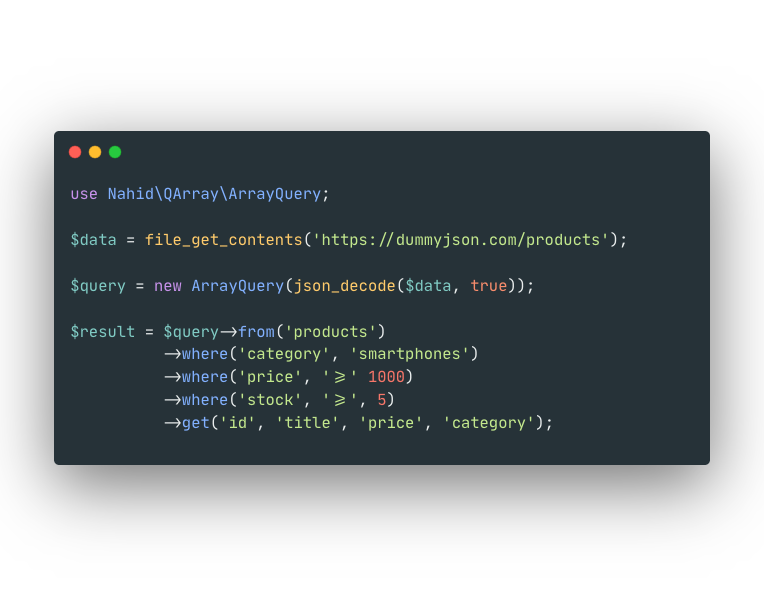
QArray is query engine for PHP array data. It helps to developers querying any kind of array data with ORM like feel.
Installation
composer require nahid/qarray
Implementation
Since QArray is an abstract layer of code, so you have to implement your own system with a lots of pre build functionality.
Lets start our first implementation for JSON data.
class JsonQueryEngine extends \Nahid\QArray\QueryEngine
{
    public function readPath($path)
    {
        $data = file_get_contents($path);

        return json_decode($data, true);
    }

    public function parseData($data)
    {
        return json_decode($data, true);
    }
}
Here you see we implement a new engine for JSON data. QueryEngine is an abstract class, so we have to implement its two abstract function readPath and parseData
Usage
Our implementation were complete, now we can use this implementation.
class Product
{
    protected $query;

    public function __construct(\Nahid\QArray\QueryEngine $query)
    {
        $this->query = $query;
    }

    public function getMacbook()
    {
        try {
            return $this->query
                ->from('.')
                ->where('cat', 2)
                ->get();
        } catch (\Exception $e) {
           return false;
        }

    }
}
Here we develop a class for Products and this class use JsonQueryEngine for fetch data from JSON file.
Lets see, how to use it.
here is our JSON file data.json
[
  {"id":1, "name":"iPhone", "cat":1, "price": 80000},
  {"id":2, "name":"macbook pro 2017", "cat": 2, "price": 210000},
  {"id":3, "name":"Redmi 3S Prime", "cat": 1, "price": 12000},
  {"id":4, "name":"Redmi 4X", "cat":1, "price": 15000},
  {"id":5, "name":"macbook air", "cat": 2, "price": 110000}
]
And now we read it to querying data.
$data = new JsonQueryEngine('data.json');
$query = new SomethingBuilder($data);

dump($query->getMacbook()->toArray());
Output
array:2 [
  1 => array:4 [
    "id" => 2
    "name" => "macbook pro 2017"
    "cat" => 2
    "price" => 210000
  ]
  4 => array:4 [
    "id" => 5
    "name" => "macbook air"
    "cat" => 2
    "price" => 110000
  ]
]
Pretty neat, huh?
Let's explore the full API to see what else magic this library can do for you. Shall we?
API
List of API:
- fetch
- find
- at
- from
- select
- except
- then
- collect
- json
- import
- where
- orWhere
- whereIn
- whereNotIn
- whereNull
- whereNotNull
- whereStartsWith
- whereEndsWith
- whereContains
- whereMatch
- whereInstance
- whereDataType
- sum
- count
- size
- max
- min
- avg
- first
- last
- nth
- column
- implode
- exists
- groupBy
- sort
- sortBy
- reset
- copy
- toJson
- keys
- values
- filter
- transform
- each
- pipe
- chunk
- macro
Available operation for where clause
-
key-- the property name of the data. Or you can pass a Function here to group multiple query inside it. See details in example -
val-- value to be matched with. It can be a int, string, bool or even Function - depending on theop. -
op-- operand to be used for matching. The following operands are available to use:=: For weak equality matchingeq: Same as=!=: For weak not equality matchingneq: Same as!===: For strict equality matchingseq: Same as==!==: For strict not equality matchingsneq: Same as!==>: Check if value of given key in data is Greater than valgt: Same as><: Check if value of given key in data is Less than vallt: Same as<>=: Check if value of given key in data is Greater than or Equal of valgte: Same as>=<=: Check if value of given key in data is Less than or Equal of vallte: Same as<=null: Check if the value of given key in data is null (valparameter inwhere()can be omitted for thisop)notnull: Check if the value of given key in data is not null (valparameter inwhere()can be omitted for thisop)in: Check if the value of given key in data is exists in given val. val should be a plain Array.notin: Check if the value of given key in data is not exists in given val. val should be a plain Array.startswith: Check if the value of given key in data starts with (has a prefix of) the given val. This would only works for String type data.endswith: Check if the value of given key in data ends with (has a suffix of) the given val. This would only works for String type data.contains: Check if the value of given key in data has a substring of given val. This would only works for String type data.match: Check if the value of given key in data has a Regular Expression match with the given val. Thevalparameter should be a RegExp for thisop.instance: Check it the value of givenkeyin data has an instance.
example:
Let's say you want to find the 'users' who has id of 1. You can do it like this:
$q = new Jsonq('data.json');
$res = $q->from('users')->where('id', '=', 1)->get();
You can add multiple where conditions. It'll give the result by AND-ing between these multiple where conditions.
$q = new Jsonq('data.json');
$res = $q->from('users')
->where('id', '=', 1)
->where('location', '=', 'barisal')
->get();
See a detail example here.
orWhere(key, op, val)
Parameters of orWhere() are the same as where(). The only difference between where() and orWhere() is: condition given by the orWhere() method will OR-ed the result with other conditions.
For example, if you want to find the users with id of 1 or 2, you can do it like this:
$q = new Jsonq('data.json');
$res = $q->from('users')
->where('id', '=', 1)
->orWhere('id', '=', 2)
->get();
See detail example here.
whereIn(key, val)
key-- the property name of the dataval-- it should be an Array
This method will behave like where(key, 'in', val) method call.
whereNotIn(key, val)
key-- the property name of the dataval-- it should be an Array
This method will behave like where(key, 'notin', val) method call.
whereNull(key)
key-- the property name of the data
This method will behave like where(key, 'null') or where(key, '=', null) method call.
whereNotNull(key)
key-- the property name of the data
This method will behave like where(key, 'notnull') or where(key, '!=', null) method call.
whereStartsWith(key, val)
key-- the property name of the dataval-- it should be a String
This method will behave like where(key, 'startswith', val) method call.
whereEndsWith(key, val)
key-- the property name of the dataval-- it should be a String
This method will behave like where(key, 'endswith', val) method call.
whereContains(key, val)
key-- the property name of the dataval-- it should be a String
This method will behave like where(key, 'contains', val) method call.
whereDataType(key, val)
key-- the property name of the dataval-- it should be a String
This method will behave like whereDataType(key, 'type', val) method call.
sum(column)
column-- the property name of the data
Bugs and Issues
If you encounter any bugs or issues, feel free to open an issue at github.
Also, you can shoot me an email to mailto:nahid.dns@gmail.com for hugs or bugs.
nahid/qarray 适用场景与选型建议
nahid/qarray 是一款 基于 PHP 开发的 Composer 扩展包,目前已累计 414.26k 次下载、GitHub Stars 达 108, 最近一次更新时间为 2018 年 12 月 19 日, 在 PHP 生态内属于活跃度较高的组件。
它主要适用于以下技术方向: 「php」 「array」 「query」 等业务场景。在实际项目中,围绕这些方向常见需要落地的问题包括:接口对接、性能调优、并发安全、与既有框架(Laravel / ThinkPHP / Yii / Webman 等)的兼容适配,以及生产环境的日志埋点与稳定性保障。
我们在过去多个企业项目中使用过 nahid/qarray 或与其功能相近的方案,如果你在选型或落地过程中遇到问题,例如 版本兼容、二次改造、私有化封装、与内部系统对接、生产 BUG 排查,欢迎联系我们协助评估。
基于 nahid/qarray 在你已有业务上做功能扩展、字段裁剪、UI 适配、与内部账号 / 权限 / 日志系统的深度对接。
线上偶发问题、内存泄漏、慢查询、并发异常等排查修复;针对高流量场景做缓存、队列、索引层面的调优。
承接完整的项目从需求 → 设计 → 开发 → 上线 → 长期运维;也可按月提供技术保姆服务。
与 nahid/qarray 相关的其它包
同方向 / 同关键字的高下载量 PHP Composer 包推荐,方便对比选型:
A set of useful PHP classes.
Query filtering in your frontend
Anax Database Active Record module for model classes.
Trait providing methods to set class properties with an array.
Traits to build collections of specific objects
This adds functions about array. If you feel like there few php built-in functions about array, this will be useful.
统计信息
- 总下载量: 414.26k
- 月度下载量: 0
- 日度下载量: 0
- 收藏数: 108
- 点击次数: 19
- 依赖项目数: 3
- 推荐数: 0
其他信息
- 授权协议: MIT
- 更新时间: 2018-12-19