neuron-core/neuron-laravel
Composer 安装命令:
composer require neuron-core/neuron-laravel
包简介
Official Neuron AI Laravel SDK.
README 文档
README
Important
Get early access to new features, exclusive tutorials, and expert tips for building AI agents in PHP. Join a community of PHP developers pioneering the future of AI development. Subscribe to the newsletter
In this package we provide you with a development kit specifically designed for Laravel integration points without limiting the access to the Neuron native components. You can also use this package as an inspiration to design your own custom integration pattern.
This package aims to make it easier for Laravel developers to get started with AI agent development using Neuron AI framework. Neuron doesn't need invasive abstractions, it already has a very simple syntax, 100% typed code, and clear interfaces you can rely on to develop your agentic system or create custom plugins and extensions.
What this package provides
- A ready-to-use configuration file for AI providers, embeddings providers credentials
- A few artisan commands to create the most used components and reduce boilerplate code
- Facades to automatically instantiate providers and vector stores
- Ready-to-run migrations if you want to use the EloquentChatHistory component
- AI coding assistant guidelines integrated with Laravel Boost to help AI write better code
What is Neuron?
Neuron is the leading PHP framework for creating and orchestrating AI Agents. It allows you to integrate AI entities in your PHP applications with a powerful and flexible architecture. We provide tools for the entire agentic application development lifecycle, from LLM interfaces, data loading, to multi-agent orchestration, monitoring and debugging. In addition, we provide tutorials and other educational content to help you get started using AI Agents in your projects.
Requirements
- PHP >= 8.2
- Laravel >= 10.x
Install
Install the latest version by:
composer require neuron-core/neuron-laravel
Configuration file
If you want to customize the configuration file beyond the environment variables, you can copy the package configuration file
in your project config/neuron.php folder:
php artisan vendor:publish --tag=neuron-config
Neuron Facade
The package includes a Neuron facade that gives you an immediate entry point to the agent without creating a dedicated class. It reads the default provider and system prompt from the package configuration and exposes the three core interaction modes.
Set your default provider in the environment file:
NEURON_AI_PROVIDER=anthropic
ANTHROPIC_KEY=your-key-here
ANTHROPIC_MODEL=claude-3-7-sonnet-latest
Then use the facade directly in your controllers or services:
use NeuronAI\Laravel\Facades\Neuron;
use NeuronAI\Chat\Messages\UserMessage;

// Chat (synchronous)
$response = Neuron::chat(new UserMessage('Hello!'))->getMessage();
echo $response->getContent();

// Stream (real-time chunks)
foreach (Neuron::stream(new UserMessage('Hello'))->events() as $event) {
    echo $event->content;
}

// Structured output
$person = Neuron::structured(new UserMessage('I am John and I like pizza!'), Person::class);
Customizing a call
The facade resolves a singleton, so configuration methods never mutate the
shared instance — they return a fresh, independent copy you chain into the call.
This means every Neuron::chat(...) starts from the clean, configured default
unless you explicitly attach tools or middleware.
Attach tools or toolkits before a call. Pass a single instance or an array:
use NeuronAI\Laravel\Facades\Neuron;
use NeuronAI\Chat\Messages\UserMessage;

$response = Neuron::tools(new SearchTool())
    ->chat(new UserMessage('Hello!'))
    ->getMessage();

$response = Neuron::tools([new SearchTool(), CalculatorToolkit::make()])
    ->chat(new UserMessage('Hello!'))
    ->getMessage();
Attach middleware to specific agent nodes. The first argument is the node
class (or an array of node classes) the middleware should run on; the second is
a middleware instance (or an array of instances). Each Neuron interaction mode
is backed by its own node — ChatNode for chat(), StreamingNode for
stream(), StructuredOutputNode for structured(), and ToolNode for tool
execution — so target the node the middleware is meant to observe:
use NeuronAI\Laravel\Facades\Neuron;
use NeuronAI\Agent\Middleware\ToolApproval;
use NeuronAI\Agent\Nodes\ChatNode;
use NeuronAI\Agent\Nodes\ToolNode;
use NeuronAI\Chat\Messages\UserMessage;

// Require human approval before the agent executes any tool
$response = Neuron::middleware(ToolNode::class, new ToolApproval())
    ->chat(new UserMessage('Delete the oldest log file'))
    ->getMessage();

// Both arguments accept arrays: attach multiple middleware to multiple nodes
$neuron = Neuron::middleware([ChatNode::class, ToolNode::class], [new ToolApproval()]);

$response = $neuron->chat(new UserMessage('Delete the oldest log file'))->getMessage();
You can chain multiple calls together, and the original facade instance is never affected:
use NeuronAI\Agent\Middleware\ToolApproval;
use NeuronAI\Agent\Nodes\ToolNode;

$response = Neuron::tools(new SearchTool())
    ->middleware(ToolNode::class, new ToolApproval())
    ->chat(new UserMessage('Hello!'))
    ->getMessage();

// The singleton is untouched — this call has no tools or middleware
Neuron::chat(new UserMessage('Hello!'));
For custom memory, multiple middleware, or more advanced agent behaviour, create
a dedicated agent class using php artisan neuron:agent.
Create an Agent
To create a new AI agent, run the following command:
php artisan neuron:agent MyAgent
This will create a new agent class in your app/Neuron/Agents folder with the name MyAgent.php and a couple of
basic methods inside.
Available Artisan Commands
The package ships with a few artisan commands to reduce boilerplate code and make the setup process easier for the most common Neuron AI components.
# Create an agent
php artisan neuron:agent MyAgent

# Create a RAG
php artisan neuron:rag MyRAG

# Create a tool
php artisan neuron:tool MyTool

# Create a workflow
php artisan neuron:workflow MyWorkflow

# Create a node
php artisan neuron:node CustomNode

# Create a middleware
php artisan neuron:middleware CustomMiddleware
AI Providers
Neuron allows you to implement AI agents using many different providers, like Anthropic, Gemini, OpenAI, Ollama, Mistral, and many more. Learn more about supported providers in the Neuron AI documentation: https://docs.neuron-ai.dev/the-basics/ai-provider
To get an instance of the AI Provider you want to attach to your agent, you can use the NeuronAI\Laravel\Facades\AIProvider facade.
namespace App\Neuron;

use NeuronAI\Agent;
use NeuronAI\SystemPrompt;
use NeuronAI\Laravel\Facades\AIProvider;
use NeuronAI\Providers\AIProviderInterface;

class YouTubeAgent extends Agent
{
    protected function provider(): AIProviderInterface
    {
        // return an instance of Anthropic, OpenAI, Gemini, Ollama, etc...
        return AIProvider::driver('anthropic');
    }

    public function instructions(): string
    {
        return (string) new SystemPrompt(...config('neuron.system_prompt');
    }
}
You can see all the available providers in the documentation: https://docs.neuron-ai.dev/the-basics/ai-provider
You can configure the appropriate API key in your environment file:
# Support for: anthropic, gemini, openai, openai-responses, mistral, ollama, huggingface, deepseek
NEURON_AI_PROVIDER=anthropic

ANTHROPIC_KEY=
ANTHROPIC_MODEL=

GEMINI_KEY=
GEMINI_MODEL=

OPENAI_KEY=
OPENAI_MODEL=

MISTRAL_KEY=
MISTRAL_MODEL=

OLLAMA_URL=
OLLAMA_MODEL=

# And many others
RAG (embeddings & vector stores)
If you want to implement a RAG kind of system, the configuration file also allows you to configure the embedding provider and vector store you want to use in your RAG agents, and the connection parameters (API key, model, etc.).
Here is an example of how to configure the embedding provider and vector store in the RAG component:
namespace App\Neuron;

use NeuronAI\Laravel\Facades\AIProvider;
use NeuronAI\Laravel\Facades\EmbeddingProvider;
use NeuronAI\Laravel\Facades\VectorStore;
use NeuronAI\Providers\AIProviderInterface;
use NeuronAI\RAG\Embeddings\EmbeddingsProviderInterface;
use NeuronAI\RAG\RAG;
use NeuronAI\RAG\VectorStore\VectorStoreInterface;

class MyChatBot extends RAG
{
    protected function provider(): AIProviderInterface
    {
        return AIProvider::driver('anthropic');
    }

    protected function embeddings(): EmbeddingsProviderInterface
    {
        return EmbeddingProvider::driver('openai');
    }

    protected function vectorStore(): VectorStoreInterface
    {
        return VectorStore::driver('file');
    }
}
You can go to the Neuron AI documentation to learn more about RAG and its available configuration options: https://docs.neuron-ai.dev/rag/rag
EloquentChatHistory
Neuron provides you with a built-in system to manage the memory of a chat session you perform with the agent. In many Q&A applications you can have a back-and-forth conversation with the LLM, meaning the application needs some sort of "memory" of past questions and answers, and some logic for incorporating those into its current thinking.
Here is the documentation: https://docs.neuron-ai.dev/agent/chat-history-and-memory
The package ships with a ready-to-use migration for the ElquentChatHistory component. Here is the command to copy the migration
in your project database/migrations/neuron folder:
php artisan vendor:publish --tag=neuron-migrations
And then run the migrations:
php artisan migrate --path=/database/migrations/neuron
This package also provides the ChatMessage model you can use to store the messages in the database.
namespace App\Neuron;

use NeuronAI\Agent\Agent;
use NeuronAI\Chat\History\ChatHistoryInterface;
use NeuronAI\Chat\History\EloquentChatHistory;
use NeuronAI\Laravel\Models\ChatMessage;

class MyAgent extends Agent
{
    ...

    protected function chatHistory(): ChatHistoryInterface
    {
        return new EloquentChatHistory(
            thread_id: 'THREAD_ID',
            modelClass: ChatMessage::class,
            contextWindow: 100000
        );
    }
}
Read more about Eloquent Chat History in the Neuron AI documentation.
Eloquent workflow persistence
Neuron provides you with a built-in system to persist the state of a workflow. This package contains the WorkflowInterrupt eloquent model
you can use to instrument the workflow:
use NeuronAI\Laravel\Models\WorkflowInterrupt;
use NeuronAI\Workflow\Persistence\EloquentPersistence;

// Creating a workflow
$workflow = WorkflowAgent(
    persistence: new EloquentPersistence(WorkflowInterrupt::class)
);
Learn more on the Neuron AI documentation.
Monitoring & Debugging
Integrating AI Agents into your application, you’re not working only with functions and deterministic code, you program your agent also influencing probability distributions. Same input ≠ output. That means reproducibility, versioning, and debugging become real problems.
Many of the Agents you build with Neuron will contain multiple steps with multiple invocations of LLM calls, tool usage, access to external memories, etc. As these applications get more and more complex, it becomes crucial to be able to inspect what exactly your agent is doing and why.
Why is the model taking certain decisions? What data is the model reacting to? Prompting is not programming in the common sense. No static types, small changes break output, long prompts cost latency, and no two models behave exactly the same with the same prompt.
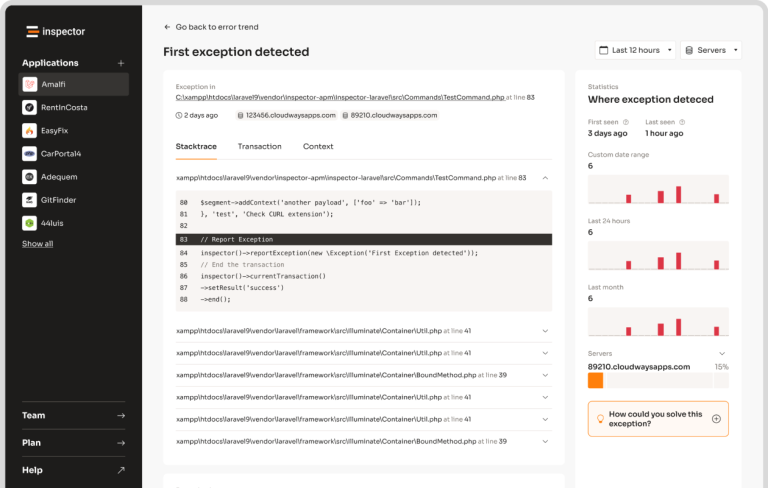
The best way to take your AI application under control is with Inspector. After you sign up,
make sure to set the INSPECTOR_INGESTION_KEY variable in the application environment file to start monitoring your agents:
INSPECTOR_INGESTION_KEY=fwe45gtxxxxxxxxxxxxxxxxxxxxxxxxxxxx
After configuring the environment variable, you will see the agent execution timeline in your Inspector dashboard.
Learn more about Monitoring in the documentation.
neuron-core/neuron-laravel 适用场景与选型建议
neuron-core/neuron-laravel 是一款 基于 PHP 开发的 Composer 扩展包,目前已累计 36.96k 次下载、GitHub Stars 达 113, 最近一次更新时间为 2025 年 12 月 23 日, 在 PHP 生态内属于活跃度较高的组件。
它主要适用于以下技术方向: 「laravel」 「ai」 「llm」 「ai-agent」 等业务场景。在实际项目中,围绕这些方向常见需要落地的问题包括:接口对接、性能调优、并发安全、与既有框架(Laravel / ThinkPHP / Yii / Webman 等)的兼容适配,以及生产环境的日志埋点与稳定性保障。
我们在过去多个企业项目中使用过 neuron-core/neuron-laravel 或与其功能相近的方案,如果你在选型或落地过程中遇到问题,例如 版本兼容、二次改造、私有化封装、与内部系统对接、生产 BUG 排查,欢迎联系我们协助评估。
基于 neuron-core/neuron-laravel 在你已有业务上做功能扩展、字段裁剪、UI 适配、与内部账号 / 权限 / 日志系统的深度对接。
线上偶发问题、内存泄漏、慢查询、并发异常等排查修复;针对高流量场景做缓存、队列、索引层面的调优。
承接完整的项目从需求 → 设计 → 开发 → 上线 → 长期运维;也可按月提供技术保姆服务。
与 neuron-core/neuron-laravel 相关的其它包
同方向 / 同关键字的高下载量 PHP Composer 包推荐,方便对比选型:
Read-only MCP (Model Context Protocol) server for Laravel. Give Claude Code, Cursor, and AI coding agents safe live access to your database, logs, queue, cache, routes, and config. No Sanctum, no user table, no write access.
Standalone CLI that generates codebase context (JSON + Markdown) for AI agents.
Enterprise-grade WhatsApp Cloud API integration for Laravel with multi-phone support, batch processing, and AI agent workflows.
Alfabank REST API integration
A Laravel package for AI agent with multi-provider support
Netresearch AI skill for generating AGENTS.md, copilot-instructions.md, and other agent rule files
统计信息
- 总下载量: 36.96k
- 月度下载量: 0
- 日度下载量: 0
- 收藏数: 113
- 点击次数: 18
- 依赖项目数: 0
- 推荐数: 0
其他信息
- 授权协议: MIT
- 更新时间: 2025-12-23