opscale-co/nova-service-desk
Composer 安装命令:
composer require opscale-co/nova-service-desk
包简介
Manage tasks
README 文档
README
At Opscale, we're passionate about contributing to the open-source community by providing solutions that help businesses scale efficiently. If you've found our tools helpful, here are a few ways you can show your support:
⭐ Star this repository to help others discover our work and be part of our growing community. Every star makes a difference!
💬 Share your experience by leaving a review on Trustpilot or sharing your thoughts on social media. Your feedback helps us improve and grow!
📧 Send us feedback on what we can improve at feedback@opscale.co. We value your input to make our tools even better for everyone.
🙏 Get involved by actively contributing to our open-source repositories. Your participation benefits the entire community and helps push the boundaries of what's possible.
💼 Hire us if you need custom dashboards, admin panels, internal tools or MVPs tailored to your business. With our expertise, we can help you systematize operations or enhance your existing product. Contact us at hire@opscale.co to discuss your project needs.
Thanks for helping Opscale continue to scale! 🚀
Description
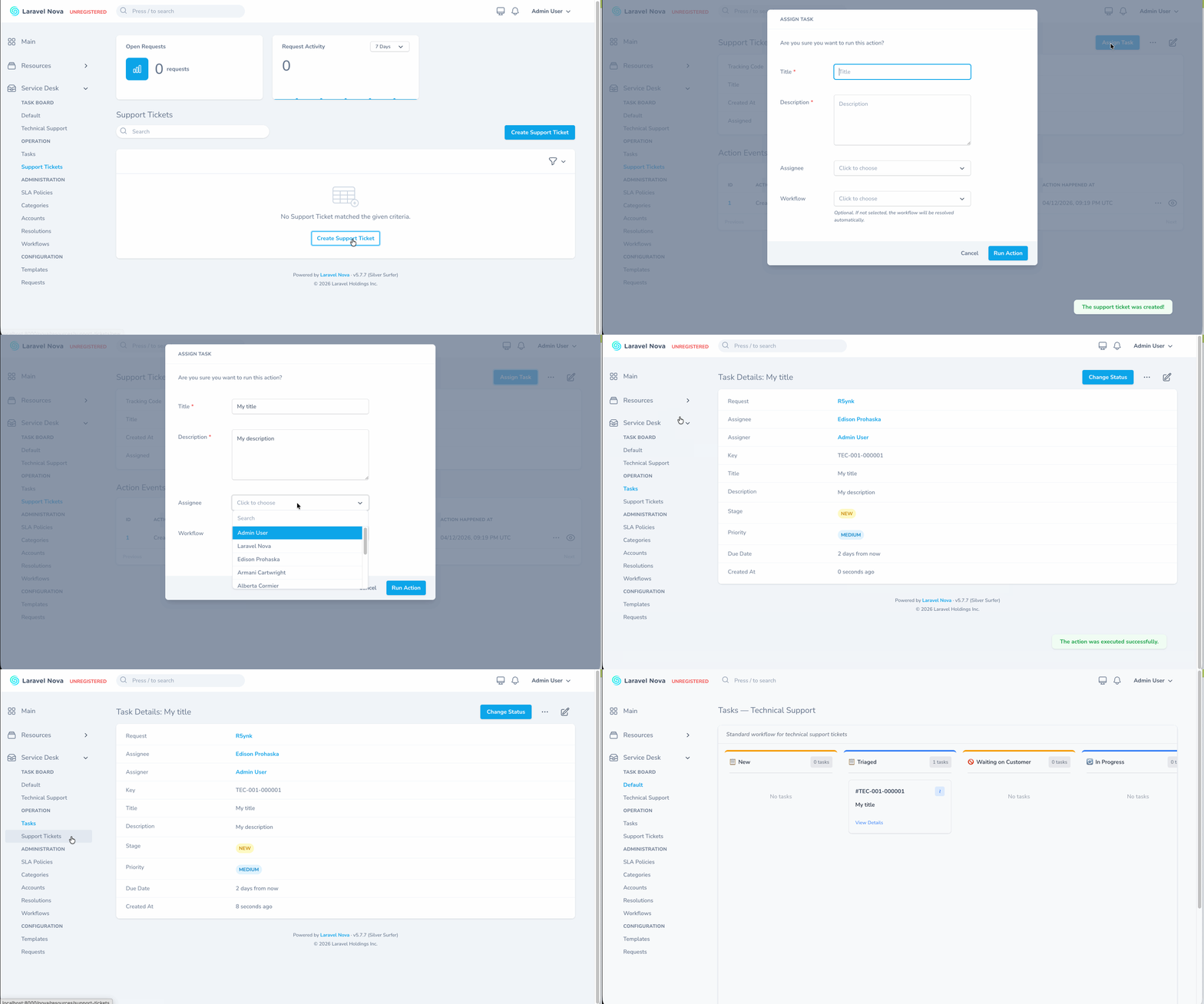
Resolve customer requests on time, every time. Service Desk for Laravel Nova gives you a complete ticketing pipeline — intake forms, SLA-driven prioritization, custom workflows with stage guards and a drag-and-drop Kanban board — so your team stays focused on the right work and nothing falls through the cracks.
Installation
Install the package in a Laravel app that uses Nova:
composer require opscale-co/nova-service-desk
Publish and run the migrations:
php artisan vendor:publish --tag="nova-service-desk-migrations"
php artisan migrate
Optionally publish the configuration file:
php artisan vendor:publish --tag="nova-service-desk-config"
Register the tool in your NovaServiceProvider:
// in app/Providers/NovaServiceProvider.php
public function tools()
{
    return [
        // ...
        new \Opscale\NovaServiceDesk\Tool(),
    ];
}
The tool's menu() method automatically adds a Service Desk sidebar section grouped into:
- Task Board — the Kanban view, with one entry per workflow
- Operation — Tasks and the dynamic Request resources (one per Template)
- Administration — SLA Policies, Categories, Accounts, Resolutions, Workflows
- Configuration — Templates, base Request resource
Configuration
config/nova-service-desk.php exposes a single resolver map keyed by template key (the first three uppercase characters of a task key):
return [

    // Workflow transition rules + custom priority scoring per template
    'workflow_resolvers' => [
        // 'TEC' => \App\Resolvers\TechnicalSupportWorkflowResolver::class,
    ],

];
Each resolver implements Opscale\NovaServiceDesk\Contracts\WorkflowResolver, which is the single extension point for per-template behavior:
| Method | Purpose |
|---|---|
allowedTransitions(Task, WorkflowStage) |
Returns the stage IDs the task can move to from the given current stage |
canTransitionTo(Task, WorkflowStage) |
Guard rule executed before applying a transition (e.g. required fields, role checks) |
message() |
Error message surfaced when canTransitionTo() returns false |
priorityScore(Task) |
Optional custom priority score. Return null to fall back to the default priority → score mapping in CalculatePriority |
The package also exposes two strategy contracts and an enum contract:
| Contract | Purpose |
|---|---|
RequiresService |
Strategy contract — servedEntities(): array returns the entities apt to have tasks placed on them (Customers, Departments, devices…) |
ProvidesService |
Strategy contract — servingAgents(): array returns the agents that deliver the service. AssignTask resolves this from the container to populate the assignee dropdown |
CanTransition |
Implemented by status enums (TaskStatus) to declare allowed master-status transitions |
RequiresServiceandProvidesServiceare NOT marker interfaces meant to be inherited by Eloquent models. They are strategy interfaces with a single implementation per app. The application binds one resolver class to both contracts in the service container — package code (AssignTask, theAccountNova resource) then resolves the implementation viaapp(ProvidesService::class)/app(RequiresService::class)instead of scanning models.
Worked examples live in workbench/app/Resolvers/:
ServiceResolver.php— implements BOTHRequiresServiceandProvidesServicein a single class.servedEntities()returns the workbenchDepartmentrecords (entities that need service),servingAgents()returns the workbenchUserrecords (agents). It is wired as a singleton inWorkbenchServiceProvider::register():$this->app->singleton(ServiceResolver::class); $this->app->bind(RequiresService::class, ServiceResolver::class); $this->app->bind(ProvidesService::class, ServiceResolver::class);
TechnicalSupportWorkflowResolver.php—WorkflowResolverexample with a stage map, a guard ("a task must have an assignee before it can be escalated"), and an overdue-aware priority bump.
Usage
1. Bootstrap data
Configure the records that drive the service desk via Nova:
- Templates — define the intake form (fields + actions). Used to create dynamic Request resources
- Categories / Subcategories — Categorize requests; subcategories carry the default
impactandurgency - SLA Policies — One per priority. Each defines
max_contact_time,max_resolution_time, supported channels, service hours and exceptions - Accounts — Link a customer (
Useror any morphable model) to one or more SLA policies and categories - Workflows — Optional. Each workflow has a unique
key(matches the template key prefix), a URLslug, and a list of stages. Stages can be created inline with the workflow via the Stages repeater field
2. Create requests
Requests are created from a Template. The Template's URI key (Str::slug($label)) becomes the Nova resource — e.g. a "Support Tickets" template lives at /nova/resources/support-tickets.
If the template has preset categorization (account_id, category_id, subcategory_id), those fields are hidden in the form. Otherwise the user picks them at intake time.
3. Assign tasks
From a Request's detail page, click Assign Task. The action:
- Generates a sequential task
keyfrom the subcategory key (TEC-001-000001) - Calls
CalculatePriority(impact × urgency matrix →Critical/High/Medium/Low/Planning) - Calls
CalculateDueDateagainst the Account's SLA policy for that priority - Resolves a workflow — first tries the explicit selection, then falls back to
Workflow::resolveForTemplate($templateKey) - Sets the task to the workflow's first stage (if any) and copies its
maps_to_statusandname - Creates the task and marks the request as assigned
4. Transition tasks
The unified Change Status action handles both modes:
- Workflow tasks — shows only the stages reachable from the current stage. If a
WorkflowResolveris registered for the template key, itsallowedTransitions()andcanTransitionTo()decide which stages are valid; otherwise all sibling stages are shown - Default tasks (no workflow) — shows the
TaskStatuscases reachable viaTaskStatus::allowedTransitions()
The action surfaces as a toolbar button on task detail pages thanks to opscale-co/nova-toolbar-actions.
5. Kanban board
Visit /nova-service-desk for the Kanban view. The URL accepts a ?workflow=<slug> query string that selects which workflow to render:
/nova-service-desk— default lifecycle (TaskStatus enum, only tasks without a workflow)/nova-service-desk?workflow=technical-support— the Technical Support workflow with its stages
Drag-and-drop between columns calls the same ChangeStatus action under the hood, so workflow guard rules apply identically. Browser back/forward and bookmarks work because the selected workflow is part of the URL.
The Nova menu auto-generates one entry per workflow under Service Desk → Task Board.
Architecture
The package follows the Opscale conventions:
- Domain layer —
src/Models/— Eloquent models, enums (TaskStatus,SLAPriority,SLAPolicyStatus,InsightScope,ServiceChannel), repository traits - Validation — Models use the
Opscale\Validations\Validatabletrait withpublic static array $validationRules - Business logic —
src/Services/Actions/— Opscale Actions (AssignTask,ChangeStatus,CalculatePriority,CalculateDueDate,GetTaskSequence,GetSubcategorySequence,GetCategorySequence). Each action implements one business operation and exposes aparameters()schema,handle()method, andasNovaAction()adapter - Nova layer —
src/Nova/— Resources, Repeatables (Stage,TimeSlot,Contact), Metrics (TasksByStatus,AverageTime,TaskActivity,OpenRequests,RequestActivity) - HTTP —
src/Http/Controllers/ToolController.phpexposesGET /workflows,GET /tasks?workflow=<slug>,PUT /tasks/{id}/transitionfor the Kanban frontend
Testing
The package ships three test suites:
npm run test           # Unit + Feature (Pest)
npm run test:unit      # Unit only
npm run test:feature   # Feature only
npm run test:web       # Browser (Dusk)
npm run analyse        # PHPStan level 9 with strict-rules
npm run check          # fix → refactor → lint → analyse → test
| Suite | Scope |
|---|---|
Unit (tests/Unit) |
Models, enums, repository helpers, transition rules — in-memory SQLite |
Feature (tests/Feature) |
Opscale Action integration — exercises CalculatePriority, ChangeStatus, GetSubcategorySequence, GetTaskSequence end-to-end against the package migrations |
Browser (tests/Browser) |
Dusk tests against Nova via orchestra/testbench-dusk. ConfigurationTest covers creating Category, Subcategory, SLA Policy and Workflow via the Nova UI; OperationTest covers the full operational lifecycle — create request from template, assign task, view task, transition stage |
Browser tests require a built workbench:
./vendor/bin/testbench workbench:build
./vendor/bin/testbench dusk:chrome-driver $(your-chrome-major-version)
npm run test:web
The workbench seeder (workbench/database/seeders/ServiceDeskSeeder.php) populates a complete fixture set so you can also run ./vendor/bin/testbench serve for manual exploration. The workbench's WorkbenchServiceProvider registers an example WorkflowResolver for the seeded TEC template that enforces sane stage transitions.
Changelog
Please see CHANGELOG for more information on what has changed recently.
Contributing
Please see CONTRIBUTING for details.
Security
If you discover any security related issues, please email development@opscale.co instead of using the issue tracker.
Credits
License
The MIT License (MIT). Please see License File for more information.
opscale-co/nova-service-desk 适用场景与选型建议
opscale-co/nova-service-desk 是一款 基于 PHP 开发的 Composer 扩展包,目前已累计 18 次下载、GitHub Stars 达 0, 最近一次更新时间为 2026 年 01 月 26 日, 在 PHP 生态内属于活跃度较高的组件。
它主要适用于以下技术方向: 「package」 「nova」 「tool」 「laravel」 「opscale」 等业务场景。在实际项目中,围绕这些方向常见需要落地的问题包括:接口对接、性能调优、并发安全、与既有框架(Laravel / ThinkPHP / Yii / Webman 等)的兼容适配,以及生产环境的日志埋点与稳定性保障。
我们在过去多个企业项目中使用过 opscale-co/nova-service-desk 或与其功能相近的方案,如果你在选型或落地过程中遇到问题,例如 版本兼容、二次改造、私有化封装、与内部系统对接、生产 BUG 排查,欢迎联系我们协助评估。
基于 opscale-co/nova-service-desk 在你已有业务上做功能扩展、字段裁剪、UI 适配、与内部账号 / 权限 / 日志系统的深度对接。
线上偶发问题、内存泄漏、慢查询、并发异常等排查修复;针对高流量场景做缓存、队列、索引层面的调优。
承接完整的项目从需求 → 设计 → 开发 → 上线 → 长期运维;也可按月提供技术保姆服务。
与 opscale-co/nova-service-desk 相关的其它包
同方向 / 同关键字的高下载量 PHP Composer 包推荐,方便对比选型:
A Laravel Nova card that shows you your system information.
A Laravel Nova card.
Backend Google Sign On for Magento 2
An app setting manager tool for laravel nova
A Laravel Nova package for publishable fields
A Laravel Nova package for translatable fields
统计信息
- 总下载量: 18
- 月度下载量: 0
- 日度下载量: 0
- 收藏数: 0
- 点击次数: 39
- 依赖项目数: 0
- 推荐数: 0
其他信息
- 授权协议: MIT
- 更新时间: 2026-01-26