promethys/revive
Composer 安装命令:
composer require promethys/revive
包简介
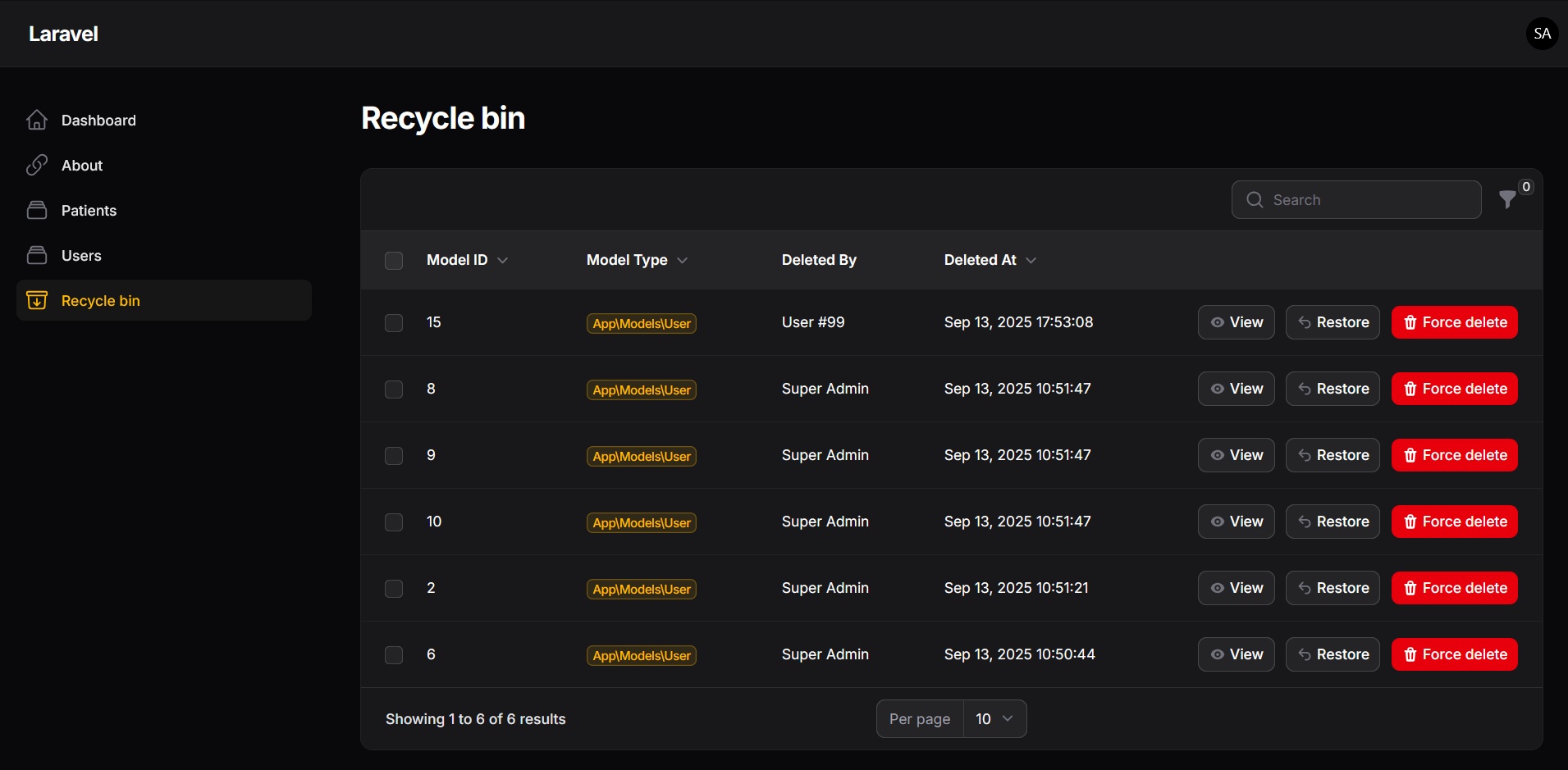
A 'RecycleBin' page where users can restore or delete permanently soft-deleted models.
README 文档
README
Filament RecycleBin for Laravel Models
If this plugin is useful to you, consider giving it a ⭐ on GitHub.
Revive is a plugin for FilamentPHP that brings a central Recycle Bin to your application. It lets you restore or permanently delete soft-deleted Eloquent models in just a few clicks.
This plugin is especially useful for SaaS applications, admin dashboards, or any multi-user platform where recovering accidentally deleted data is important.
Release Strategy
- V1.x: Legacy - Filament v3 (critical bug fixes only)
- V2.x: Maintenance mode - Filament v4
- V3.x: Active development - Filament v5
Features
- View, restore, and permanently delete soft-deleted records from a dedicated Filament page
- Register multiple models as "Recyclable" with a simple trait
- Filter items by model type or search through deleted records
- Customize the plugin's appearance and behavior with ease
- State snapshots - stores model data at deletion time for reference
- Discover existing soft-deleted records with CLI command
- User and multi-tenancy support (V2+)
Installation
Latest Version (V3 - Recommended - Filament v5)
Install the latest version for Filament v5:
composer require promethys/revive
php artisan revive:install
Requirements: PHP 8.2+, Laravel 11+, Filament v5
Version 2 (for Filament v4)
If you need to install V2 for Filament v4:
composer require promethys/revive:^2.0
php artisan revive:install
Version 1 (for Filament v3)
If you need to install V1 for Filament v3:
composer require promethys/revive:^1.0
php artisan revive:install
Manual Installation
If you prefer to manually publish and run the migrations:
php artisan vendor:publish --tag="revive-migrations"
php artisan migrate
Upgrading from V2 to V3
If you're currently using V2 and want to upgrade to V3 for Filament v5:
# 1. Ensure you have PHP 8.2+, Laravel 11+, and Filament v5

# 2. Update your composer constraint
composer require promethys/revive:^3.0

# 3. Clear caches
php artisan config:clear
php artisan cache:clear
Note: V3 has no database schema changes from V2. The upgrade primarily involves compatibility with Filament v5's API changes.
Upgrading from V1 to V2
If you're currently using V1 and want to upgrade to V2:
# 1. Update your composer constraint
composer require promethys/revive:^2.0

# 2. Publish and Run new migrations
php artisan vendor:publish --tag="revive-migrations"
php artisan migrate

# 3. Update your plugin configuration (see Configuration section below)
Configuration
Register the plugin in each panel where you want the recycle bin available:
use Promethys\Revive\RevivePlugin;

$panel->plugins([
    RevivePlugin::make()
]);
You can also customize the plugin using fluent configuration:
use Promethys\Revive\RevivePlugin;

$panel->plugins([
    RevivePlugin::make()
        ->authorize(auth()->user()->isAdmin()) // Accepts a boolean or Closure to control access
        ->navigationGroup('Settings') // Group the page under a custom sidebar section
        ->navigationIcon('heroicon-o-archive-box-arrow-down')
        ->activeNavigationIcon('heroicon-o-archive-box-arrow-down')
        ->navigationSort(1)
        ->navigationLabel('Custom Label')
        ->title('Custom Title')
        ->slug('custom-slug')
]);
User and Multi-Tenancy Configuration
Revive provides powerful scoping features that allow users to see only their own deleted items or items within their tenant/organization:
use Promethys\Revive\RevivePlugin;

// Basic user-scoped recycle bin (users only see their own deleted items)
$panel->plugins([
    RevivePlugin::make()
        ->enableUserScoping() // Default: true
        ->enableTenantScoping(false)
]);

// Multi-tenant recycle bin
$panel->plugins([
    RevivePlugin::make()
        ->enableTenantScoping() // Default: true
        ->enableUserScoping(false)
]);

// Admin panel - see all deleted items
$panel->plugins([
    RevivePlugin::make()
        ->showAllRecords() // Shows all records regardless of user/tenant
        ->authorize(fn () => auth()->user()->isAdmin())
]);

// Custom model filtering
$panel->plugins([
    RevivePlugin::make()
        ->models([Post::class, Comment::class]) // Only show these models
        ->enableUserScoping()
]);

// Completely disable scoping (like v1 behavior)
$panel->plugins([
    RevivePlugin::make()
        ->withoutScoping()
]);
Examples of configuration for Different Panel Types
User Panel Configuration:
// User panel - users only see their own deleted items
public function panel(Panel $panel): Panel
{
    return $panel
        ->id('user')
        ->plugins([
            RevivePlugin::make()
                ->navigationGroup('My Account')
                ->navigationLabel('My Deleted Items')
                ->title('My Recycle Bin')
                ->enableUserScoping(true)
                ->enableTenantScoping(false)
        ]);
}
Admin Panel Configuration:
// Admin panel - see all deleted items across all users/tenants
public function panel(Panel $panel): Panel
{
    return $panel
        ->id('admin')
        ->plugins([
            RevivePlugin::make()
                ->navigationGroup('Administration')
                ->navigationLabel('Global Recycle Bin')
                ->title('All Deleted Items')
                ->showAllRecords()
                ->authorize(fn () => auth()->user()->isAdmin())
        ]);
}
Tenant Panel Configuration:
// Tenant panel - see deleted items for current tenant only
public function panel(Panel $panel): Panel
{
    return $panel
        ->id('tenant')
        ->tenant(Team::class)
        ->plugins([
            RevivePlugin::make()
                ->navigationGroup('Team Management')
                ->navigationLabel('Team Recycle Bin')
                ->title('Team Deleted Items')
                ->enableTenantScoping()
                ->enableUserScoping(false) // All team members can see all team deletions
        ]);
}
Model namespaces
By default, the plugin scans the App\Models namespace for recyclable models. If your
models live elsewhere (DDD or modular layouts), pass one or more namespaces to
modelsNamespace(). Each namespace is resolved to its directory through Composer's
PSR-4 autoload map, so no path configuration is required.
public function panel(Panel $panel): Panel
{
    return $panel
        ->plugins([
            RevivePlugin::make()
                // A single custom namespace...
                ->modelsNamespace('App\\Domain\\Models')

                // ...or several at once (this replaces the default App\Models):
                ->modelsNamespace([
                    'App\\Models',
                    'App\\Domain\\Blog\\Models',
                    'Modules\\Shop\\Models',
                ]),
        ]);
}
ℹ️ Passing an array replaces the default
App\Models. Include it explicitly if you still want it scanned. A namespace that can't be resolved to an existing directory is skipped (and logged), never fatal.
⚠️ To register a third-party model (e.g., from another package) without exposing its namespace, create a wrapper class in one of your scanned namespaces that extends it and adds the
Recyclabletrait:
namespace App\Models;

use Promethys\Revive\Concerns\Recyclable;
use Vendor\Package\Models\Foo as BaseFoo;

class Foo extends BaseFoo
{
    use SoftDeletes;
    use Recyclable;
}
Usage
Once the plugin is installed and configured, you'll see a new page in your Filament navigation menu.
From there, users can restore deleted data or permanently remove it.
1. Add the Recyclable trait to any soft-deletable model
use Promethys\Revive\Concerns\Recyclable;

class Post extends Model
{
    use SoftDeletes;
    use Recyclable;
}
ℹ️ Important: Adding the
Recyclabletrait without usingSoftDeleteswill throw an exception.
2. Advanced User Scoping
Custom User and Tenant Detection
Override these methods in your models to customize how users and tenants are detected:
class Post extends Model
{
    use SoftDeletes, Recyclable;

    /**
     * Get the user who should be recorded as deleting this model
     * This would override the default method
     */
    public function getDeletedByUser()
    {
        // Custom logic - maybe you store it in a different field
        return $this->deleted_by_user_id ?? auth()->id();
    }

    /**
     * Get the tenant ID for this model
     * This would override the default method
     */
    public function getTenantId()
    {
        // For teams/organizations
        return $this->organization_id;

        // Or for complex tenant relationships
        return $this->workspace->tenant_id ?? null;
    }
}
Multi-Tenancy Patterns
Filament Multi-Tenancy Integration: The plugin automatically detects Filament tenancy:
// In your panel service provider
$panel->plugins([
    RevivePlugin::make()
        ->enableTenantScoping() // Automatically uses filament()->getTenant()
]);
Custom Tenant Models:
class Post extends Model
{
    use SoftDeletes, Recyclable;

    public function getTenantId()
    {
        // For Filament Multi-tenancy
        return filament()->getTenant()->id ?? null;

        // For custom team-based tenancy
        return $this->team_id;

        // For organization-based tenancy
        return $this->organization_id;
    }
}
3. Optional: Discover existing soft-deleted records
If you already have soft-deleted records before installing the plugin, you can "discover" them by running:
php artisan revive:discover-soft-deleted
This command will:
- Scan all models that use the
Recyclabletrait - Find existing soft-deleted records that aren't already tracked in the recycle bin
- Add them to the plugin's tracking system so they appear in the Filament page
Command Options
Preview changes without making them:
php artisan revive:discover-soft-deleted --dry-run
Include user/tenant scoping information:
php artisan revive:discover-soft-deleted --with-scope
This option attempts to determine who deleted each record and includes tenant information.
Discover records for a specific model:
php artisan revive:discover-soft-deleted --model=Product
# or use the full class name
php artisan revive:discover-soft-deleted --model="App\Models\Shop\Product"
Target a specific panel:
php artisan revive:discover-soft-deleted --panel=admin
The command reads which model namespaces to scan from a panel's RevivePlugin
configuration (see Model namespaces). On the command line no
panel is "current", so Revive uses your default panel unless you pass --panel.
If your recyclable models live outside App\Models and aren't being discovered,
make sure the panel you target is the one configured with ->modelsNamespace(...).
Combine options:
php artisan revive:discover-soft-deleted --model=Category --dry-run --with-scope
Example Output
$ php artisan revive:discover-soft-deleted --with-scope

Discovering soft-deleted records...

🔍 Scanning Category...
   No soft-deleted records found.
🔍 Scanning Comment...
   ✅ 0/3 records discovered
🔍 Scanning Brand...
   ✅ 8/8 records discovered
🔍 Scanning Category...
   ✅ 2/2 records discovered
🔍 Scanning Customer...
   ✅ 0/1 records discovered
🔍 Scanning Order...
   No soft-deleted records found.
🔍 Scanning Product...
   ✅ 12/15 records discovered

🔍 User/tenant scoping information was included

✨ Discovery completed:
   • 29 total soft-deleted records scanned
   • 22 new records discovered and added to recycle bin
💡 Tips:
- Run the command with
--dry-runfirst to preview what will be discovered, especially on production systems with large amounts of existing data.- Use
--with-scopewhen upgrading from V1 to V2 to include user/tenant information for existing records.- For large systems with extensive output, consider redirecting the command output to a file:
php artisan revive:discover-soft-deleted > discovery-results.txt
Use the table outside the default page
You don't have to register the plugin in your panel to use the table.
Instead, you can render the Livewire component directly in a Blade view:
Basic Usage
@livewire(\Promethys\Revive\Tables\RecycleBin::class)
Advanced Usage with Scoping
<!-- User-scoped recycle bin -->
@livewire(\Promethys\Revive\Tables\RecycleBin::class, [
    'user' => auth()->user(),
    'enableUserScoping' => true,
    'enableTenantScoping' => false,
])

<!-- Admin view - all records -->
@livewire(\Promethys\Revive\Tables\RecycleBin::class, [
    'showAllRecords' => true,
])

<!-- Tenant-specific recycle bin -->
@livewire(\Promethys\Revive\Tables\RecycleBin::class, [
    'tenant' => filament()->getTenant(),
    'enableTenantScoping' => true,
    'enableUserScoping' => false,
])

<!-- Specific models only -->
@livewire(\Promethys\Revive\Tables\RecycleBin::class, [
    'models' => [App\Models\Post::class, App\Models\Comment::class],
    'user' => auth()->user(),
])
This is ideal if:
- You don't want to clutter your navigation
- You're not using Filament Panels but still want a recycle bin in your app
- You want different scoping rules for different parts of your application
Customization
The plugin allows you to fully customize both the RecycleBin page and RecycleBin table by extending the base classes and registering your custom implementations.
Customizing the Table
You can extend the RecycleBin table component to customize columns, filters, actions, and more.
1. Create a Custom Table Class
Create a class that extends Promethys\Revive\Tables\RecycleBin:
<?php

namespace App\Livewire;

use Filament\Tables\Columns\TextColumn;
use Filament\Tables\Filters\SelectFilter;
use Promethys\Revive\Tables\RecycleBin as BaseRecycleBinTable;

class CustomRecycleBinTable extends BaseRecycleBinTable
{
    // Customize table columns
    protected function getTableColumns(): array
    {
        return [
            ...parent::getTableColumns(), // Include default columns

            // Add your custom columns
            TextColumn::make('tenant_id')
                ->label('Tenant')
                ->sortable(),
        ];
    }

    // Customize table filters
    protected function getTableFilters(): array
    {
        return [
            ...parent::getTableFilters(), // Include default filters

            // Add your custom filters
            SelectFilter::make('deleted_by')
                ->label('Deleted By')
                ->searchable()
                ->multiple(),
        ];
    }

    // Customize record actions
    protected function getTableRecordActions(): array
    {
        // Option 1: Extend default actions
        return [
            ...parent::getTableRecordActions(),
            // Add custom actions here
        ];

        // Option 2: Completely replace default actions
        return [
            // Your custom actions only
        ];
    }

    // Customize bulk actions
    protected function getTableToolbarActions(): array
    {
        return [
            ...parent::getTableToolbarActions(),
            // Add custom bulk actions
        ];
    }
}
2. Register Your Custom Table
In your panel provider, register the custom table using registerTable():
use App\Livewire\CustomRecycleBinTable;
use Promethys\Revive\RevivePlugin;

$panel->plugins([
    RevivePlugin::make()
        ->registerTable(CustomRecycleBinTable::class)
]);
Available Table Methods to Override
| Method | Description |
|---|---|
getTableColumns() |
Define the table columns |
getTableFilters() |
Define table filters |
getTableRecordActions() |
Define actions for each row (view, restore, delete) |
getTableToolbarActions() |
Define bulk actions (toolbar actions) |
getTableHeaderActions() |
Define header actions |
getQuery() |
Customize the base query |
restoreModel($record) |
Customize restore behavior |
forceDeleteModel($record) |
Customize force delete behavior |
Customizing the Page
You can extend the RecycleBin page to customize its appearance, layout, or behavior.
1. Create a Custom Page Class
Create a class that extends Promethys\Revive\Pages\RecycleBin:
<?php

namespace App\Filament\Pages;

use Promethys\Revive\Pages\RecycleBin as BaseRecycleBinPage;

class CustomRecycleBinPage extends BaseRecycleBinPage
{
    // Use a custom view
    protected string $view = 'filament.pages.custom-recycle-bin';

    // Override page methods as needed
    public static function getNavigationBadge(): ?string
    {
        // Add a badge showing count of deleted items
        return RecycleBinItem::count();
    }
}
2. Create a Custom View (Optional)
If you specified a custom view, create it at resources/views/filament/pages/custom-recycle-bin.blade.php:
<x-filament-panels::page>
    {{-- Custom header or content --}}
    <div class="mb-4">
        <h2 class="text-xl font-bold">Custom Recycle Bin Header</h2>
        <p class="text-gray-600">Manage your deleted records here.</p>
    </div>

    {{-- Render the table --}}
    @livewire($this->recycleBinComponent, $this->componentParams)

    {{-- Custom footer or additional content --}}
    <div class="mt-4 text-sm text-gray-500">
        Remember to permanently delete old records regularly!
    </div>
</x-filament-panels::page>
3. Register Your Custom Page
In your panel provider, register the custom page using registerPage():
use App\Filament\Pages\CustomRecycleBinPage;
use Promethys\Revive\RevivePlugin;

$panel->plugins([
    RevivePlugin::make()
        ->registerPage(CustomRecycleBinPage::class)
]);
Advanced: Overriding Core Behavior
For advanced customization, you can override the restore and delete logic:
use Illuminate\Support\Facades\Log;

class CustomRecycleBinTable extends BaseRecycleBinTable
{
    protected function restoreModel($record)
    {
        // Add custom pre-restore logic
        Log::info("Restoring {$record->model_type}#{$record->model_id}");

        // Perform the restore
        $result = parent::restoreModel($record);

        // Add custom post-restore logic
        if ($result) {
            // Send notification, update cache, etc.
        }

        return $result;
    }

    protected function forceDeleteModel($record)
    {
        // Add custom pre-delete logic
        $this->cleanupRelatedData($record);

        // Perform the deletion
        return parent::forceDeleteModel($record);
    }

    private function cleanupRelatedData($record)
    {
        // Your custom cleanup logic
    }
}
Security Considerations
Authorization
Always ensure proper authorization:
RevivePlugin::make()
    ->authorize(function () {
        return auth()->user()->can('view-recycle-bin'); // Or any other logic. Ensure you return a boolean.
    });
If you use the Tenant scoping of the plugin, please check the Filament Multi-tenancy security section to understand the security implications of multi-tenancy and how to properly implement it.
Issue Guidelines
If you encounter a bug or unexpected behavior, please help us help you by following these guidelines:
- Create an issue on GitHub: Create an issue on GitHub
- Describe the issue clearly: What did you try to do? What did you expect to happen? What actually happened?
- Include relevant code snippets: Show any relevant model, config, or page setup related to the issue.
- Share error messages: The plugin logs many thown Exception. If possible, paste the full error output or stack trace in your default logging channel.
- Attach screenshots: Visuals often help us understand UI-related bugs or logic problems more quickly.
- Mention your setup: Let us know your PHP version, Laravel version, Filament version, and the version of this plugin.
The more details you provide, the faster and better we can help. Thank you!
Contributing
See CONTRIBUTING for guidelines.
Credits
- mintellity/laravel-recycle-bin — inspiration for this package
License
This project is open-sourced under the MIT license.
See LICENSE.md for more details.
promethys/revive 适用场景与选型建议
promethys/revive 是一款 基于 PHP 开发的 Composer 扩展包,目前已累计 2.87k 次下载、GitHub Stars 达 16, 最近一次更新时间为 2025 年 07 月 13 日, 在 PHP 生态内属于活跃度较高的组件。
它主要适用于以下技术方向: 「laravel」 「revive」 「filament」 「RecycleBin」 「Promethys」 等业务场景。在实际项目中,围绕这些方向常见需要落地的问题包括:接口对接、性能调优、并发安全、与既有框架(Laravel / ThinkPHP / Yii / Webman 等)的兼容适配,以及生产环境的日志埋点与稳定性保障。
我们在过去多个企业项目中使用过 promethys/revive 或与其功能相近的方案,如果你在选型或落地过程中遇到问题,例如 版本兼容、二次改造、私有化封装、与内部系统对接、生产 BUG 排查,欢迎联系我们协助评估。
基于 promethys/revive 在你已有业务上做功能扩展、字段裁剪、UI 适配、与内部账号 / 权限 / 日志系统的深度对接。
线上偶发问题、内存泄漏、慢查询、并发异常等排查修复;针对高流量场景做缓存、队列、索引层面的调优。
承接完整的项目从需求 → 设计 → 开发 → 上线 → 长期运维;也可按月提供技术保姆服务。
与 promethys/revive 相关的其它包
同方向 / 同关键字的高下载量 PHP Composer 包推荐,方便对比选型:
Fork of https://github.com/Artistan/Revive-XmlRpc
package of the library classes to provide XmlRpc routines for accessing revive ad servers
Alfabank REST API integration
Automatic configuration for Laravel apps to apply Devanox's standard linting & code standards.
Database-driven onboarding for Filament: progress checklists and guided spotlight tours, translatable to any locale.
Package for access to Api V2 Revive Ad Server
统计信息
- 总下载量: 2.87k
- 月度下载量: 0
- 日度下载量: 0
- 收藏数: 16
- 点击次数: 32
- 依赖项目数: 1
- 推荐数: 0
其他信息
- 授权协议: MIT
- 更新时间: 2025-07-13