psmb/createnodebutton
Composer 安装命令:
composer require psmb/createnodebutton
包简介
Create the nodes in Neos even without the tree...
README 文档
README
Create nodes in Neos even without using the tree...
Sometimes you have all of your nodes stored under one node and ordered by date (e.g. news nodes).
Using the tree for adding nodes doesn't make any sense, as it gets painfully slow with a lot of nodes,
and you have to manually select the correct position for the new node, which is error-prone.
This package provides an inspector view (for the new Neos UI) and Psmb.CreateNodeButton:CreateNodeButton Fusion object
(for the old UI), which allow you to create nodes in a predefined position in one click of a button.
composer require psmb/createnodebutton
Inspector View for the new Neos UI based on React (enabled by default in Neos 3.3 LTS+)

You can use the CreateNodeMixin which adds the view as a separate Tab. Override the node type settings as needed:
My.ExampleOrg:Example:
  superTypes:
    Neos.Neos:Document: true
    Psmb.CreateNodeButton:CreateNodeMixin: true
  ui:
    inspector:
      views:
        createNode:
          viewOptions:
            # Possible values are `before`, `into` and `after`
            position: 'into'
            # The type of the node to be created
            type: 'My.ExampleOrg:YourDocumentNodeType'
            # The path used as reference when creating the new node - e.g. the parent page when position is 'into'
            referenceNodePath: '/sites/your-site/node-name'
            # Text for the text input placeholder
            placeholder: 'Enter title...'
You can also use the create node button globally in the header of Neos (besides the Edit/Preview navigation). To make
use of this feature, you need to enable it in you Settings.yaml file:
Neos:
  Neos:
    Ui:
      frontendConfiguration:
        'Psmb.CreateNodeButton':
          enabled: true
Further options are identical with those in the CreateNodeMixin. Refer to Configuration/Settings.yaml of the package
for a full reference.
Fusion Object for the old Neos UI (enabled by default before Neos 3.3 LTS)
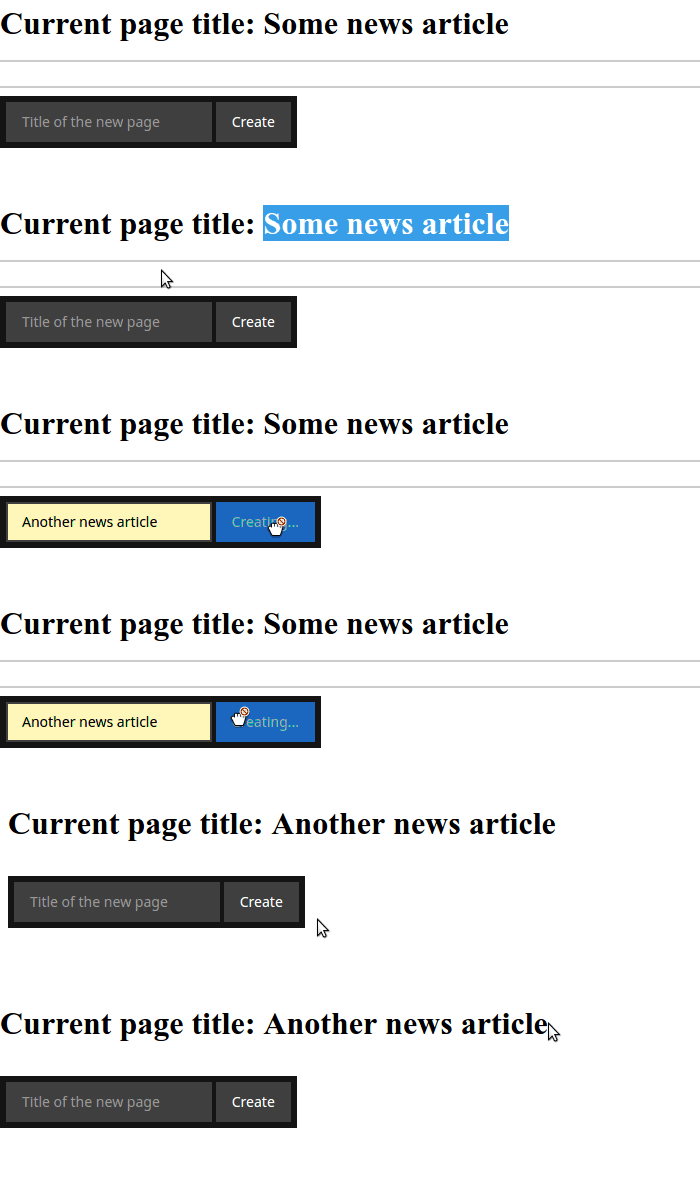
Just output this TS object somewhere on your page.
This will render a form, to create new nodes of type Your:NodeType, after the current node.
createNodeButton = Psmb.CreateNodeButton:CreateNodeButton {
  type = 'Your:NodeType'
}
You can modify it to create new nodes inside another page /sites/site/news node.
createNodeButton = Psmb.CreateNodeButton:CreateNodeButton {
  referenceNode = ${q(site).children('news').get(0)}
  type = 'Your:NodeType'
  position = 'into'
}
Possible values for the position are: before, into and after.
Note: If you use this on the site node with the default position, a new node will be created outside
the current site. You must use into in that case.
Hide nodes of a certain type in the tree
As initially stated, using this package makes sense of you have a lot of nodes, slowing down the trees and making it hard for editors to have a good user experience. Neos allows you to filter out nodes of a given type from the tree:
Neos:
  Neos:
    userInterface:
      navigateComponent:
        nodeTree:
          presets:
            default:
              # Allows configuring the baseNodeType used in the node tree. It is a filter, so this also
              # works: 'Neos.Neos:Document,!Acme.Com:SomeNodeTypeToIgnore'
              baseNodeType: 'Neos.Neos:Document,!My.ExampleOrg:YourDocumentNodeType'
Credits for the idea go to Aske Ertmann.
That's all, folks!
psmb/createnodebutton 适用场景与选型建议
psmb/createnodebutton 是一款 基于 HTML 开发的 Composer 扩展包,目前已累计 1.22k 次下载、GitHub Stars 达 15, 最近一次更新时间为 2016 年 05 月 27 日, 在 PHP 生态内属于活跃度较高的组件。
我们在过去多个企业项目中使用过 psmb/createnodebutton 或与其功能相近的方案,如果你在选型或落地过程中遇到问题,例如 版本兼容、二次改造、私有化封装、与内部系统对接、生产 BUG 排查,欢迎联系我们协助评估。
基于 psmb/createnodebutton 在你已有业务上做功能扩展、字段裁剪、UI 适配、与内部账号 / 权限 / 日志系统的深度对接。
线上偶发问题、内存泄漏、慢查询、并发异常等排查修复;针对高流量场景做缓存、队列、索引层面的调优。
承接完整的项目从需求 → 设计 → 开发 → 上线 → 长期运维;也可按月提供技术保姆服务。
统计信息
- 总下载量: 1.22k
- 月度下载量: 0
- 日度下载量: 0
- 收藏数: 15
- 点击次数: 5
- 依赖项目数: 0
- 推荐数: 0
其他信息
- 授权协议: GPL-3.0
- 更新时间: 2016-05-27