rainlab/pages-plugin
Composer 安装命令:
composer require rainlab/pages-plugin
包简介
Pages plugin for October CMS
关键字:
README 文档
README
This plugin allows end users to create and edit static pages and menus with a simple WYSIWYG user interface.
Managing Static Pages
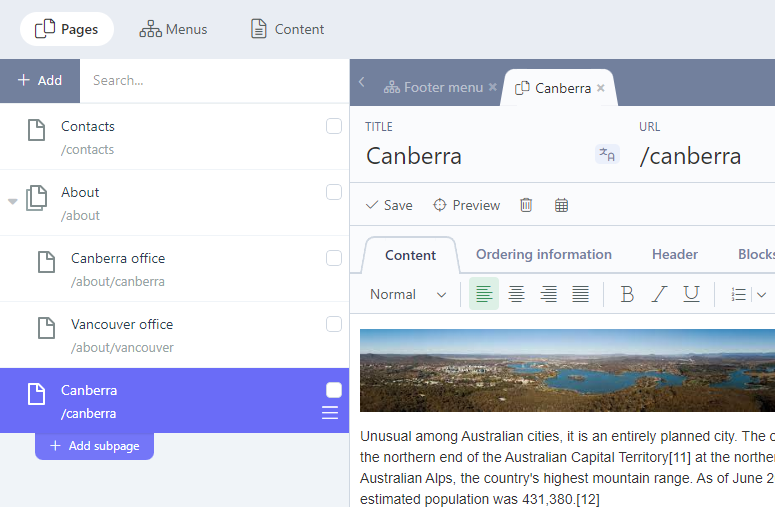
Static pages are managed on the Pages tab of the Static Pages plugin. Static pages have three required parameters - Title, URL and Layout. The URL is generated automatically when the Title is entered, but it could be changed manually. URLs must start with the forward slash character. The Layout drop-down allows to select a layout created with the CMS. Only layouts that include the staticPage component are displayed in the drop-down.
 {.img-responsive .frame}
Pages are hierarchical. The page hierarchy is used when a new page URL is generated, but as URLs can be changed manually, the hierarchy doesn't really affect the routing process. The only place where the page hierarchy matters is the generated Menus. The generated menus reflect the page hierarchy. You can manage the page hierarchy by dragging pages in the page tree. The page drag handle appears when you move the mouse cursor over page item in the tree.
Optional properties of static pages are Hidden and Hide in navigation. The Hidden checkbox allows to hide a page from the front-end. Hidden pages are still visible for administrators who are logged into the back-end. The Hide in navigation checkbox allows to hide a page from generated menus and breadcrumbs.
Placeholders
If a static layout contains placeholders, the static page editor will show tabs for editing the placeholder contents. The plugin automatically detects text and HTML placeholders and displays a corresponding editor for them - the WYSIWYG editor for HTML placeholders and a text editor for text placeholders.
Snippets
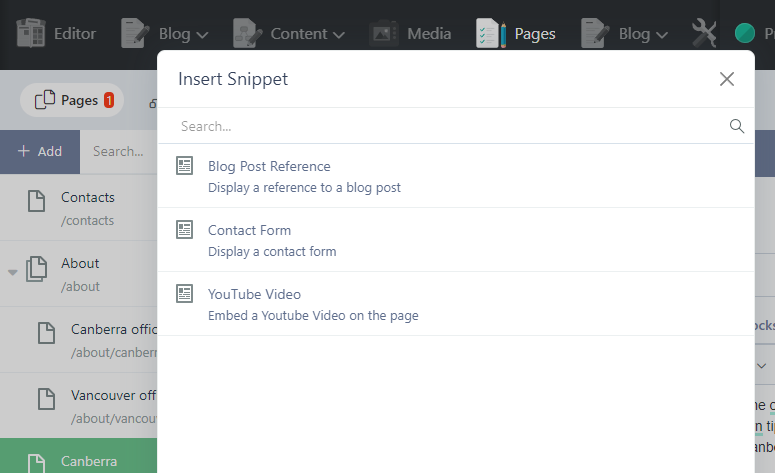
Snippets is a featured included with October CMS, with elements that can be added by a Static Page, in the rich text editor. They allow you to inject complex (and interactive) areas to pages. Snippets are configurable and have properties that users can manage with the Inspector.
Managing Menus
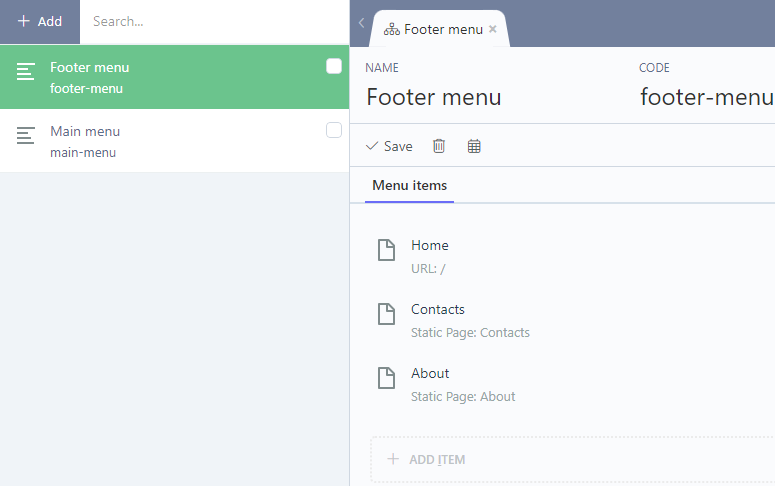
You can manage menus on the Menus tab of the Static Pages plugin. A website can contain multiple menus, for example the main menu, footer menu, sidebar menu, etc. A theme developer can include menus on a page layout with the staticMenu component.
Menus have two required properties - the menu Name and menu Code. The menu name is displayed in the menu list in the back-end. The menu code is required for referring menus in the layout code, it's the API parameter.
 {.img-responsive .frame}
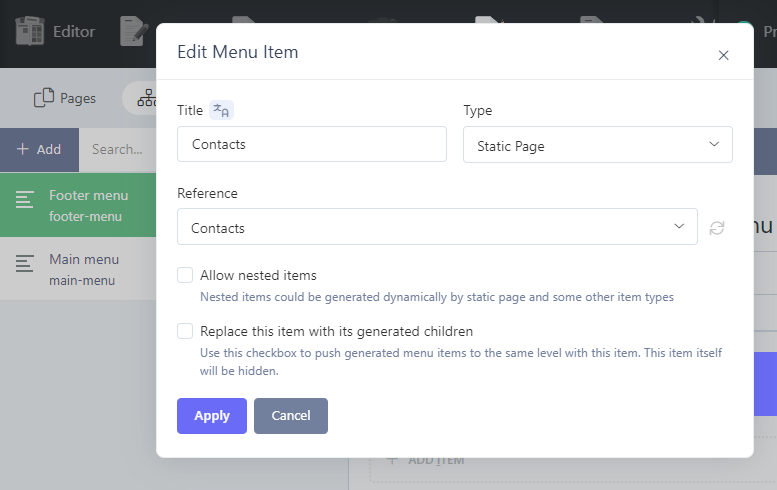
Menus can contain multiple menu items, and menu items can be nested. Each menu item has a number of properties. There are properties common for all menu item types, and some properties depend on the item type. The common menu item properties are Title and Type. The Title defines the menu item text. The Type is a drop-down list which displays all menu item types available in your OctoberCMS copy.
 {.img-responsive .frame}
Standard Menu Item Types
The available menu item types depend on the installed plugins, but there are three basic item types that are supported out of the box.
Header {.subheader}
Items of this type are used for displaying text and don't link to anything. The text could be used as a category heading for other menu items. This type will only show a title property.
URL {.subheader}
Items of this type are links to a specific fixed URL. That could be an URL of an or internal page. Items of this type don't have any other properties - just the title and URL.
Static Page {.subheader}
Items of this type refer to static pages. The static page should be selected in the Reference drop-down list described below.
All Static Pages {.subheader}
Items of this type expand to create links to all static pages defined in the theme. Nested pages are represented with nested menu items.
Custom Menu Item Types
Other plugins can supply new menu item types. For example, the Blog plugin by RainLab supplies two more types:
Blog Category {.subheader}
An item of this type represents a link to a specific blog category. The category should be selected in the Reference drop-down. This menu type also requires selecting a CMS page that outputs a blog category.
All Blog Categories {.subheader}
An item of this time expands into multiple items representing all blog existing categories. This menu type also requires selecting a CMS page.
Menu Item Properties
Depending on the selected menu item time you might need to provide other properties of the menu item. The available properties are described below.
Reference {.subheader}
A drop-down list of objects the menu item should refer to. The list content depends on the menu item type. For the Static page item type the list displays all static pages defined in the system. For the Blog category item type the list displays a list of blog categories.
Allow Nested Items {.subheader}
This checkbox is available only for menu item types that suppose nested objects. For example, static pages are hierarchical, and this property is available for the Static page item type. On the other hand, blog categories are not hierarchical, and the checkbox is hidden.
Replace This Item With Its Generated Children {.subheader}
A checkbox determining whether the menu item should be replaced with generated menu items. This property is available only for menu item types that suppose automatic item generating, for example for the Static page menu item type. The Blog category menu item type doesn't have this property because blog categories cannot be nested and menu items of this type always point to a specific blog category. This property is very handy when you want to include generated menu items to the root of the menu. For example, you can create the All blog categories menu item and enable the replacing. As a result you will get a menu that lists all blog categories on the first level of the menu. If you didn't enable the replacing, there would be a root menu item, with blog categories listed under it.
CMS Page {.subheader}
This drop-down is available for menu item types that require a special CMS page to refer to. For example, the Blog category menu item type requires a CMS page that hosts the blogPosts component. The CMS Page drop-down for this item type will only display pages that include this component.
Code {.subheader}
The Code field allows to assign the API code that you can use to set the active menu item explicitly in the page's onInit() handler described in the documentation.
See also
Read the Getting started with Static Pages tutorial in the Blog.
Documentation
Read the documentation to learn more about this plugin.
rainlab/pages-plugin 适用场景与选型建议
rainlab/pages-plugin 是一款 基于 PHP 开发的 Composer 扩展包,目前已累计 53.58k 次下载、GitHub Stars 达 123, 最近一次更新时间为 2016 年 07 月 16 日, 在 PHP 生态内属于活跃度较高的组件。
它主要适用于以下技术方向: 「pages」 「october」 「octobercms」 等业务场景。在实际项目中,围绕这些方向常见需要落地的问题包括:接口对接、性能调优、并发安全、与既有框架(Laravel / ThinkPHP / Yii / Webman 等)的兼容适配,以及生产环境的日志埋点与稳定性保障。
我们在过去多个企业项目中使用过 rainlab/pages-plugin 或与其功能相近的方案,如果你在选型或落地过程中遇到问题,例如 版本兼容、二次改造、私有化封装、与内部系统对接、生产 BUG 排查,欢迎联系我们协助评估。
基于 rainlab/pages-plugin 在你已有业务上做功能扩展、字段裁剪、UI 适配、与内部账号 / 权限 / 日志系统的深度对接。
线上偶发问题、内存泄漏、慢查询、并发异常等排查修复;针对高流量场景做缓存、队列、索引层面的调优。
承接完整的项目从需求 → 设计 → 开发 → 上线 → 长期运维;也可按月提供技术保姆服务。
与 rainlab/pages-plugin 相关的其它包
同方向 / 同关键字的高下载量 PHP Composer 包推荐,方便对比选型:
User plugin for October CMS
Laravel Horizon integration for October CMS
Maintenance page plugin
The "View Counter" bundle
Location plugin for October CMS
Adjacency List’ed Closure Table database design pattern implementation for Laravel. Includes restore of tree
统计信息
- 总下载量: 53.58k
- 月度下载量: 0
- 日度下载量: 0
- 收藏数: 123
- 点击次数: 8
- 依赖项目数: 4
- 推荐数: 1
其他信息
- 授权协议: MIT
- 更新时间: 2016-07-16