random-cuber/contextmenu_folder
Composer 安装命令:
composer require random-cuber/contextmenu_folder
包简介
Adds context menus with mailbox operations
README 文档
README
Technical plugin name is contextmenu_folder.
| Folder list context menu | Folder list control menu | Message list context menu |
|---|---|---|
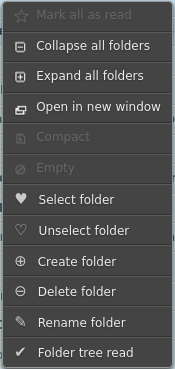 |
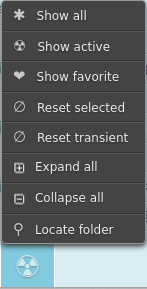 |
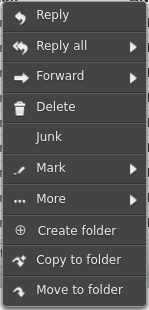 |
This plugin can be useful for users who want to work efficiently with large number of mailboxes or imap folders (anywhere form few hundred to few thousand folders).
Plugin contextmenu_folder provides context menus for the following folder operations:
- create/delete/rename/locate mailbox imap folder
- apply mailbox tree view filters, grouped in categories: [
active,favorite] - where each category uses filter selectors from: [
unread,special,selected,transient,predefined]
Filter selectors support these features:
unread: this filter finds mailboxes with unread messagesspecial: will include special imap folders: [inbox,drafts,sent,junk,trash]selected: represents folder collection which can be selected/unselected into by the usertransient: based on automatic folder collection, which tracks created/deleted/renamed mailboxespredefined: static user-defined list of mailbox folders, which is more "permanent" thenselected
Dependencies
Plugin contextmenu_folder requires few other plugins:
jqueryui: jquery ui plugin, included with roundcubecontextmenu: context menu plugin, from roundcube repo
Manual Install
Installation can be done in two steps: providing resources and activating configuration.
- Provision plugin resources. For example, for roundcube on archlinux:
cd /usr/share/webapps/roundcubemail/plugins

rm -r -f contextmenu
git clone https://github.com/random-cuber/contextmenu.git contextmenu

rm -r -f contextmenu_folder
git clone https://github.com/random-cuber/contextmenu_folder.git contextmenu_folder
- Activate plugin in
roundcubeconfiguration. For example, for roundcube on archlinux:
cat /etc/webapps/roundcubemail/config/config.inc.php

$config['plugins'] = array(
    'jqueryui',           // dependency
    'contextmenu',        // dependency
    'contextmenu_folder', // plugin proper
);
Settings
Navigate to:
Settings -> Preferences -> Mailbox View -> Folder Menu
Menu entries:
TODO: TODO
Available features are described in plugin default config.
Operation
- Folder list context menu:
Navigate to:
Mail -> [Mailbox list] -> [Access context menu]
Menu entries:
Select folder: append given mailbox to theselectedcollectionUnselect folder: remove given mailbox from theselectedcollectionCreate folder: create new sub folder using given mailbox as a parentDelete folder: completely remove given folder and its messagesRename folder: change mailbox name, keep existing messages in new folderFolder tree read: mark all read in the given folder and all of the descendants
- Folder list control menu:
Navigate to:
Mail -> [Mailbox list] -> [Click footer button]
Menu entries:
Show all: remove all filters and display all available mailboxesShow active: apply mailbox filters formactivecategory (see settings)Show favorite: apply mailbox filters formfavoritecategory (see settings)Reset selected: remove all mailboxes form theselectedcollectionReset transient: remove all mailboxes form thetransientcollectionExpand all: expand all mailboxes in the current viewCollapse all: collapse all mailboxes in the current viewLocate folder: present a search dialog to find a mailbox via simple name match
Note that footer button will change appearance to reflect all/active/favorite view.
- Message list context menu:
Navigate to:
Mail -> [Message list] -> [Access context menu]
Menu entries:
Create folder: create imap folder based on company/contact name derived from email headersCopy to folder: copy selected mailbox messages to a folder located by quick folder name searchMove to folder: move selected mailbox messages to a folder located by quick folder name search
Translation
Contribute to translation via transifex.
random-cuber/contextmenu_folder 适用场景与选型建议
random-cuber/contextmenu_folder 是一款 基于 JavaScript 开发的 Composer 扩展包,目前已累计 2.91k 次下载、GitHub Stars 达 9, 最近一次更新时间为 2020 年 08 月 13 日, 在 PHP 生态内属于活跃度较高的组件。
它主要适用于以下技术方向: 「menu」 「Context」 「view」 「filter」 「delete」 「folder」 等业务场景。在实际项目中,围绕这些方向常见需要落地的问题包括:接口对接、性能调优、并发安全、与既有框架(Laravel / ThinkPHP / Yii / Webman 等)的兼容适配,以及生产环境的日志埋点与稳定性保障。
我们在过去多个企业项目中使用过 random-cuber/contextmenu_folder 或与其功能相近的方案,如果你在选型或落地过程中遇到问题,例如 版本兼容、二次改造、私有化封装、与内部系统对接、生产 BUG 排查,欢迎联系我们协助评估。
基于 random-cuber/contextmenu_folder 在你已有业务上做功能扩展、字段裁剪、UI 适配、与内部账号 / 权限 / 日志系统的深度对接。
线上偶发问题、内存泄漏、慢查询、并发异常等排查修复;针对高流量场景做缓存、队列、索引层面的调优。
承接完整的项目从需求 → 设计 → 开发 → 上线 → 长期运维;也可按月提供技术保姆服务。
与 random-cuber/contextmenu_folder 相关的其它包
同方向 / 同关键字的高下载量 PHP Composer 包推荐,方便对比选型:
Behat Context for testing Symfony Api
Shoot aims to make providing data to your templates more manageable
Context support (request, session and application scope) for n2n framework.
A Symfony extension to get active class base on current bundle/controller/action
Illuminate View for Morningmedley.
Blade template for Kirby
统计信息
- 总下载量: 2.91k
- 月度下载量: 0
- 日度下载量: 0
- 收藏数: 10
- 点击次数: 19
- 依赖项目数: 0
- 推荐数: 0
其他信息
- 授权协议: Apache-2.0
- 更新时间: 2020-08-13