ratheeps/laravel-pub-sub-messaging
Composer 安装命令:
composer require ratheeps/laravel-pub-sub-messaging
包简介
A simple Laravel service provider which adds a new queue connector to handle SNS subscription queues.
关键字:
README 文档
README
Simple extension to the Illuminate/Queue queue system used in Laravel and Lumen.
Using this connector allows SQS messages originating from a SNS subscription to be worked on with Illuminate\Queue\Jobs\SqsJob.
This is especially useful in a miroservice architecture where multiple services subscribe to a common topic with their queues and publish an event to SNS.
Amazon SQS & SNS Extended Client Library
The Amazon SQS Extended Client Library for Laravel enables you to manage Amazon SQS message payloads with Amazon S3. This is especially useful for storing and retrieving messages with a message payload size greater than the current SQS limit of 256 KB, up to a maximum of 2 GB. Specifically, you can use this library to:
- Specify whether message payloads are always stored in Amazon S3 or only when a message's size exceeds a max size (defaults to 256 KB).
- Send a message that references a single message object stored in an Amazon S3 bucket.
- Get the corresponding message object from an Amazon S3 bucket.
- Note: This package under development not ready for production -
Requirements
- Laravel (tested with version >=7.0)
Installation
- First create a disk that will hold all of your large SQS payloads.
We highly recommend you use a private bucket when storing SQS payloads. Payloads can contain sensitive information and should never be shared publicly.
-
Run
composer require ratheeps/laravel-pub-sub-messagingto install the package. -
Then, add the following queue settings to your
queue.phpfile.
<?php
return [
    'connections' => [
        'pub-sub-messaging-sqs' => [
            'driver' => 'pub-sub-messaging-sqs',
            'key' => env('PUB_SUB_MESSAGING_AWS_ACCESS_ID'),
            'secret' => env('PUB_SUB_MESSAGING_AWS_SECRET_ACCESS_KEY'),
            'prefix' => env('PUB_SUB_MESSAGING_SQS_PREFIX', 'https://sqs.us-east-1.amazonaws.com/your-account-id'),
            'queue' => env('PUB_SUB_MESSAGING_SQS_QUEUE', 'default'),
            'suffix' => env('PUB_SUB_MESSAGING_SQS_SUFFIX'),
            'region' => env('PUB_SUB_MESSAGING_AWS_DEFAULT_REGION', 'us-east-1'),
            'after_commit' => false,
            'disk_options' => [
                'always_store' => true,
                'cleanup' => false,
                'disk' => env('PUB_SUB_MESSAGING_DISK', 'pub_sub_messaging_s3'),
                'prefix' => '',
            ],
        ],
    ],
];
4 Then, add the following disk settings to your filesystems.php file.
<?php
return [
    'disks' => [
        'pub_sub_messaging_s3' => [
            'driver' => 's3',
            'key' => env('PUB_SUB_MESSAGING_AWS_ACCESS_ID'),
            'secret' => env('PUB_SUB_MESSAGING_AWS_SECRET_ACCESS_KEY'),
            'region' => env('PUB_SUB_MESSAGING_AWS_DEFAULT_REGION'),
            'bucket' => env('PUB_SUB_MESSAGING_AWS_BUCKET'),
            'url' => env('PUB_SUB_MESSAGING_AWS_URL'),
            'endpoint' => env('PUB_SUB_MESSAGING_AWS_ENDPOINT'),
            'use_path_style_endpoint' => env('AWS_USE_PATH_STYLE_ENDPOINT', false),
        ],
    ],
];
- You can optionally publish the config file with
php artisan vendor:publish --provider="Ratheeps\PubSubMessaging\PubSubMessagingServiceProvider" --tag="config"this command Then, modify the following pub sub settings to yourpub-sub-messaging.phpfile.
<?php
return [
    'default_topic' => env('PUB_SUB_MESSAGING_DEFAULT_TOPIC'),
    'default_auth_driver' => null,
    // map the jobs to subscribe SNS topics to handle the consuming events
    'map' => [
//        \App\Jobs\TestSQSJob::class => 'arn:aws:sns:ap-southeast-1:931616835216:modelEvent',
    ],
    'published_attributes' => [
        'id',
        'created_at',
        'updated_at'
    ],
    'sns' => [
        'key' => env('PUB_SUB_MESSAGING_AWS_ACCESS_KEY'),
        'secret' => env('PUB_SUB_MESSAGING_AWS_SECRET_ACCESS_KEY'),
        'region' => env('PUB_SUB_MESSAGING_AWS_DEFAULT_REGION', 'us-east-1'),
        'disk_options' => [
            // Indicates when to send messages to S3., Allowed values are: ALWAYS, NEVER, IF_NEEDED.
            'store_payload' => 'IF_NEEDED',
            'disk' => env('PUB_SUB_MESSAGING_DISK', 'pub_sub_messaging_s3'),
            'prefix' => ''
        ]
    ]
];
- You'll need to configure .env file
PUB_SUB_MESSAGING_AWS_ACCESS_ID=
PUB_SUB_MESSAGING_AWS_SECRET_ACCESS_KEY=
PUB_SUB_MESSAGING_AWS_DEFAULT_REGION=ap-south-1

PUB_SUB_MESSAGING_DEFAULT_TOPIC=
PUB_SUB_MESSAGING_AWS_BUCKET=
PUB_SUB_MESSAGING_DISK=pub_sub_messaging_s3

QUEUE_CONNECTION=pub-sub-messaging-sqs
PUB_SUB_MESSAGING_SQS_QUEUE=
- Boot up your queues and profit without having to worry about SQS's 256KB limit :)
Consuming Event
Create a job like below to handle the event and then map that job to SNS topic in the pub-sub-messaging.php config file
<?php
use Illuminate\Bus\Queueable;
use Illuminate\Queue\SerializesModels;
use Illuminate\Queue\InteractsWithQueue;
use Illuminate\Contracts\Queue\ShouldQueue;
use Illuminate\Foundation\Bus\Dispatchable;
use Illuminate\Support\Facades\Log;

class TestSQSJob implements ShouldQueue
{
    use Dispatchable, InteractsWithQueue, Queueable, SerializesModels;

    protected $passedInData;

    /**
     * Create a new job instance.
     *
     * @param array $data
     */
    public function __construct(array $data)
    {
        // $data is array containing the msg content from SQS
        $this->passedInData = $data;
    }

    /**
     * Execute the job.
     *
     * @return void
     */
    public function handle()
    {
        Log::info(json_encode($this->passedInData));
        // Check laravel.log, it should now contain msg string.
    }
}
Published event
<?php
namespace App;

use Illuminate\Database\Eloquent\Model;
use Ratheeps\PubSubMessaging\Traits\SNSPublisher;

class Post extends Model
{
    use SNSPublisher;

    /**
     * @var array
     * Optional (default value is [] )
     * Witch are the attributes should only from SNS message
     */
    static $publishedAttributes = [
        'id',
        'created_at',
        'updated_at'
    ];

    /**
     * @var array
     * Optional  (default value is [created','updated','deleted','restored'] )
     * Witch events should send to SNS
     */
    static $publishEvents = ['created', 'updated'];

    /**
     * @var string
     * Optional (default value is load from config )
     * Publish SNS topic
     */
    static $publishTopic = 'SampleTopic';
    /**
     * Or
     * static $publishTopic = [
     *  'created' => 'SampleTopic'
     * ];
     */
}
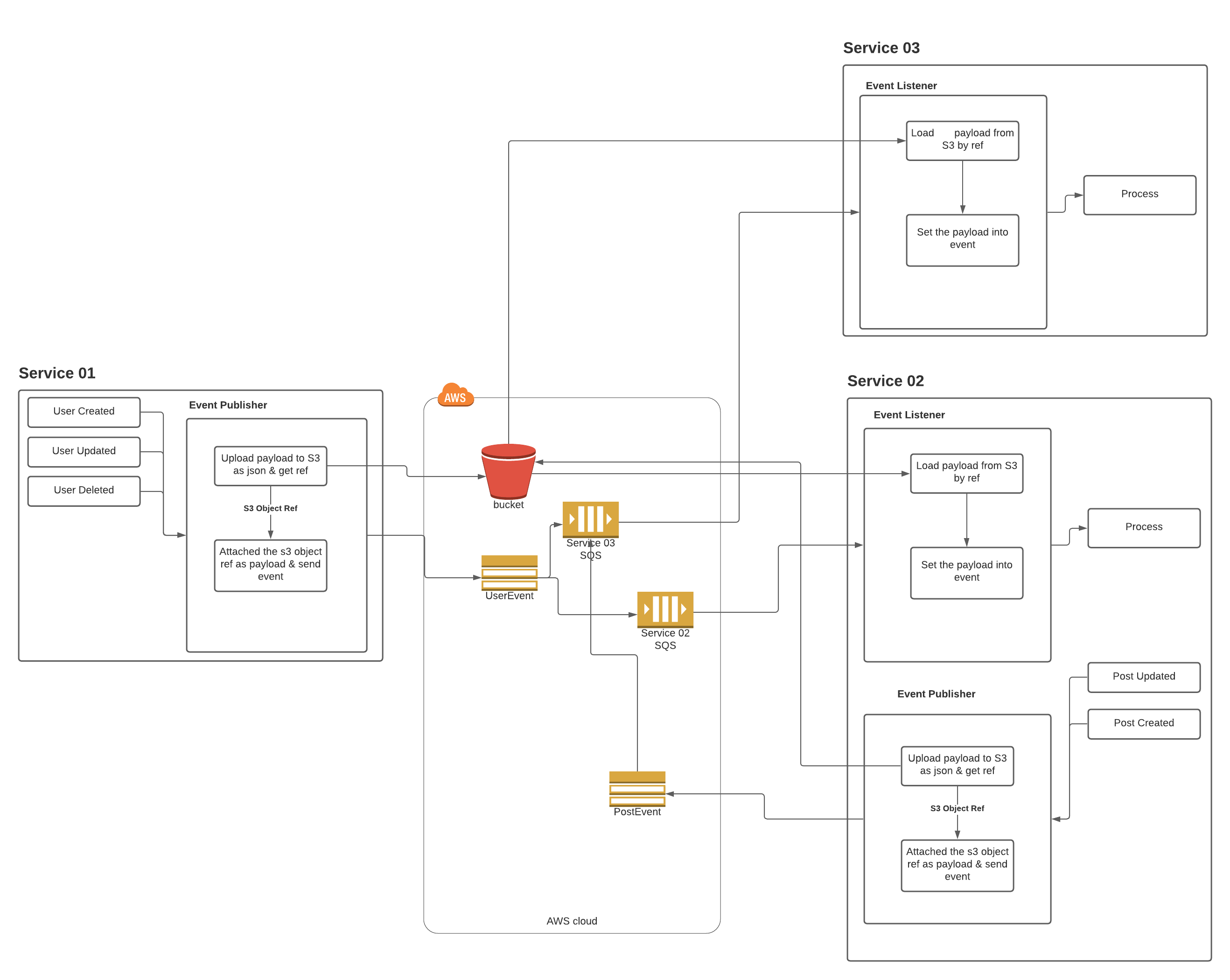
Diagram
This diagram will be describing how your microservices are communicating with help of this package
References
- Sign up for AWS -- Before you begin, you need an AWS account. For more information about creating an AWS account and retrieving your AWS credentials, see AWS Account and Credentials in the AWS SDK for PHP Developer Guide.
- Sign up for Amazon SQS -- Go to the Amazon SQS console to sign up for the service.
- Minimum requirements -- To use the sample application, you'll need PHP 7.0+ and Composer. For more information about the requirements, see the Getting Started section of the Amazon SQS Developer Guide.
- Further information - Read the API documentation and the SQS & S3 recommendations.
- SNS Large payload - Read the AWS Java SDK documentation
- SQS Large payload - Read the AWS Java SDK documentation
- Pub/Sub Messaging - Read the Documentation
Feedback
- Give us feedback here.
- If you'd like to contribute a new feature or bug fix, we'd love to see Github pull requests from you.
ratheeps/laravel-pub-sub-messaging 适用场景与选型建议
ratheeps/laravel-pub-sub-messaging 是一款 基于 PHP 开发的 Composer 扩展包,目前已累计 6 次下载、GitHub Stars 达 0, 最近一次更新时间为 2021 年 12 月 02 日, 在 PHP 生态内属于活跃度较高的组件。
它主要适用于以下技术方向: 「queue」 「aws」 「laravel」 「sqs」 「event-driven」 「SNS」 等业务场景。在实际项目中,围绕这些方向常见需要落地的问题包括:接口对接、性能调优、并发安全、与既有框架(Laravel / ThinkPHP / Yii / Webman 等)的兼容适配,以及生产环境的日志埋点与稳定性保障。
我们在过去多个企业项目中使用过 ratheeps/laravel-pub-sub-messaging 或与其功能相近的方案,如果你在选型或落地过程中遇到问题,例如 版本兼容、二次改造、私有化封装、与内部系统对接、生产 BUG 排查,欢迎联系我们协助评估。
基于 ratheeps/laravel-pub-sub-messaging 在你已有业务上做功能扩展、字段裁剪、UI 适配、与内部账号 / 权限 / 日志系统的深度对接。
线上偶发问题、内存泄漏、慢查询、并发异常等排查修复;针对高流量场景做缓存、队列、索引层面的调优。
承接完整的项目从需求 → 设计 → 开发 → 上线 → 长期运维;也可按月提供技术保姆服务。
与 ratheeps/laravel-pub-sub-messaging 相关的其它包
同方向 / 同关键字的高下载量 PHP Composer 包推荐,方便对比选型:
PHP AMQP Binding Library
This package includes a script and fail2ban configuration that allows you to use fail2ban when utilizing AWS elastic load balancer (ELB) and an apache webserver.
A Laravel package to monitor queue jobs.
Elastic Driver for Laravel Scout
simple api library.
A replica of the AWS Elastic Beanstalk worker SQS daemon (sqsd) in PHP
统计信息
- 总下载量: 6
- 月度下载量: 0
- 日度下载量: 0
- 收藏数: 0
- 点击次数: 3
- 依赖项目数: 0
- 推荐数: 0
其他信息
- 授权协议: MIT
- 更新时间: 2021-12-02