sensiolabs/gotenberg-bundle
Composer 安装命令:
composer require sensiolabs/gotenberg-bundle
包简介
A Symfony bundle that provides seamless integration with Gotenberg for generating PDFs and screenshots from various sources (HTML, Markdown, Office documents, URLs) with a clean, builder-based API.
README 文档
README

composer require sensiolabs/gotenberg-bundle


Generate PDFs and screenshots with Symfony!
This bundle allows you to generate, stream and save PDF locally from URL, HTML, Markdown or any Office file. Different options are available depending on the source.
It also helps you to generate, stream and save images locally from URL, HTML and Markdown by taking a screenshot.
Note
This bundle interacts with the amazing Gotenberg API which is used under the hood.
🔎 Profiler
✅ Testing
🙋 FAQ
❤️ Credits
📃 Licence
How to install
Note
You first need to install and configure Gotenberg 8.x by yourself.
Install the bundle using composer:
composer require sensiolabs/gotenberg-bundle
With Symfony Flex
If you accept the Symfony Flex recipe during installation:
- The bundle will be automatically registered.
- A configuration skeleton file will be created.
- Docker Compose will be updated with a new gotenberg service.
- The
.envfile will be updated with aGOTENBERG_DSNvalue pointing togotenberg:3000. You can update this value if your Gotenberg instance is hosted elsewhere.
Without Symfony Flex
Manually enable the bundle by adding it to the list of registered bundles in your config/bundles.php file:
// config/bundles.php

return [
    // ...
    Sensiolabs\GotenbergBundle\SensiolabsGotenbergBundle::class => ['all' => true],
];
Create a configuration and adapt to your needs:
# ./config/packages/sensiolabs_gotenberg.yaml

framework:
    http_client:
        scoped_clients:
            gotenberg.client:
                base_uri: 'http://gotenberg:3000'

sensiolabs_gotenberg:
    http_client: 'gotenberg.client'
Basic Usage
You can generate a PDF locally from URL, HTML, Markdown or any Office files.
URL
After injecting GotenbergPdfInterface you simply need to call the method url,
which will return a UrlPdfBuilder instance.
UrlPdfBuilder lets you pass the URL of the page you want to convert into PDF
to the method url.
namespace App\Controller;

use Sensiolabs\GotenbergBundle\GotenbergPdfInterface;

class YourController
{
    public function yourControllerMethod(GotenbergPdfInterface $gotenberg): Response
    {
        return $gotenberg->url()
            ->url('https://sensiolabs.com/fr/')
            ->generate()
            ->stream() // will return directly a stream response
        ;
    }
}
Tip
For more information go to Gotenberg documentations.
Twig
Warning
Every Twig template you pass to Gotenberg must have the following structure. Even Header or Footer parts.
<!DOCTYPE html>
<html lang="en">
    <head>
        <meta charset="utf-8" />
        <title>My PDF</title>
    </head>
    <body>
        <!-- Your code goes here -->
    </body>
</html>
namespace App\Controller;

use Sensiolabs\GotenbergBundle\GotenbergPdfInterface;

class YourController
{
    public function yourControllerMethod(GotenbergPdfInterface $gotenberg): Response
    {
        return $gotenberg->html()
            ->content('twig_simple_pdf.html.twig', [
                'my_var' => 'value'
            ])
            ->generate()
            ->stream() // will return directly a stream response
        ;
    }
}
If a template needs to link to a static asset (e.g. an image), this bundle
provides a {{ gotenberg_asset() }} Twig function to generate the correct
path AND add it to the builder automatically.
This function work as
asset() Twig function and
fetch your assets in the assets folder of your application.
If your files are in another folder, you can override the default value of assets_directory
in your configuration file config/sensiolabs_gotenberg.yml. The path provided
can be relative as well as absolute.
<!DOCTYPE html>
<html lang="en">
<head>
    <meta charset="utf-8"/>
    <title>PDF body</title>
</head>
<body>
    <main>
        <h1>Hello world!</h1>
        <img src="{{ gotenberg_asset('public/img/ceo.jpeg') }}" alt="CEO"/>
        <img src="{{ gotenberg_asset('public/img/admin.jpeg') }}" alt="Admin"/>
    </main>
</body>
</html>
Tip
For more information go to Gotenberg documentations.
Screenshot
You can generate a screenshot locally from URL, HTML and Markdown.
URL
After injecting GotenbergScreenshotInterface you simply need to call the
method url, which will return a UrlScreenshotBuilder instance.
UrlScreenshotBuilder lets you pass the URL of the page you want to convert
into screenshot to the method url.
namespace App\Controller;

use Sensiolabs\GotenbergBundle\GotenbergScreenshotInterface;

class YourController
{
    public function yourControllerMethod(GotenbergScreenshotInterface $gotenberg): Response
    {
        return $gotenberg->url()
             ->url('https://sensiolabs.com/fr/')
             ->generate()
             ->stream()
        ;
    }
}
Twig
After injecting GotenbergScreenshotInterface you simply need to call the method
html, which will return a HtmlScreenshotBuilder instance.
HtmlScreenshotBuilder lets you pass the content of the page you want to convert
into screenshot to the method content.
namespace App\Controller;

use Sensiolabs\GotenbergBundle\GotenbergScreenshotInterface;

class YourController
{
    public function yourControllerMethod(GotenbergScreenshotInterface $gotenberg): Response
    {
        return $gotenberg->html()
            ->content('twig_simple_pdf.html.twig', [
                 'my_var' => 'value'
            ])
            ->generate()
            ->stream()
        ;
    }
}
Tip
For more information go to Gotenberg documentations.
Advanced Usage
- Configuration
- Processing (saving for example)
- Working with assets
- Async & Webhooks
- Working with fonts
-
Office Builder (available extensions for conversion below)
📝
doc,docx,docm,dot,dotx,dotm,odt,ott,sdw,stw,sxw,sxg,fodt,rtf,txt,abw,zabw,cwk,psw,lwp,mcw,wpd,wps,pages,hwp,uof,uot📊
xls,xlsx,xlsm,xlsb,xlt,xltx,xltm,xlw,ods,ots,sdc,stc,sxc,uos,csv,dif,slk,123,wk1,wks,wb2📽️
ppt,pptx,pptm,pot,potx,potm,pps,odp,otp,sdd,sdp,sxi,sti,uop,key🖼️
svg,cdr,odg,otg,sda,sxd,std,svm,fodg,eps,emf,wmf,dxf,cgm,cmx,met,mml,vdx,vsd,vsdx,vsdm,vor,bmp,gif,jpeg,jpg,png,tif,tiff,pbm,pgm,ppm,ras,pcx,pcd,pct,psd,tga,xbm,xpm,wpg📚
epub,pdf,odd,odm,oth,html,htm,xhtml,xml,pub,pwp,bib,ltx🗃️
dbf,pdb,wb2,mw🧩
swf,smf🏗️
dxf,vdx,vsd,vsdx,vsdm🧪
sxm,mml,ltx,mw
Screenshot
Profiler
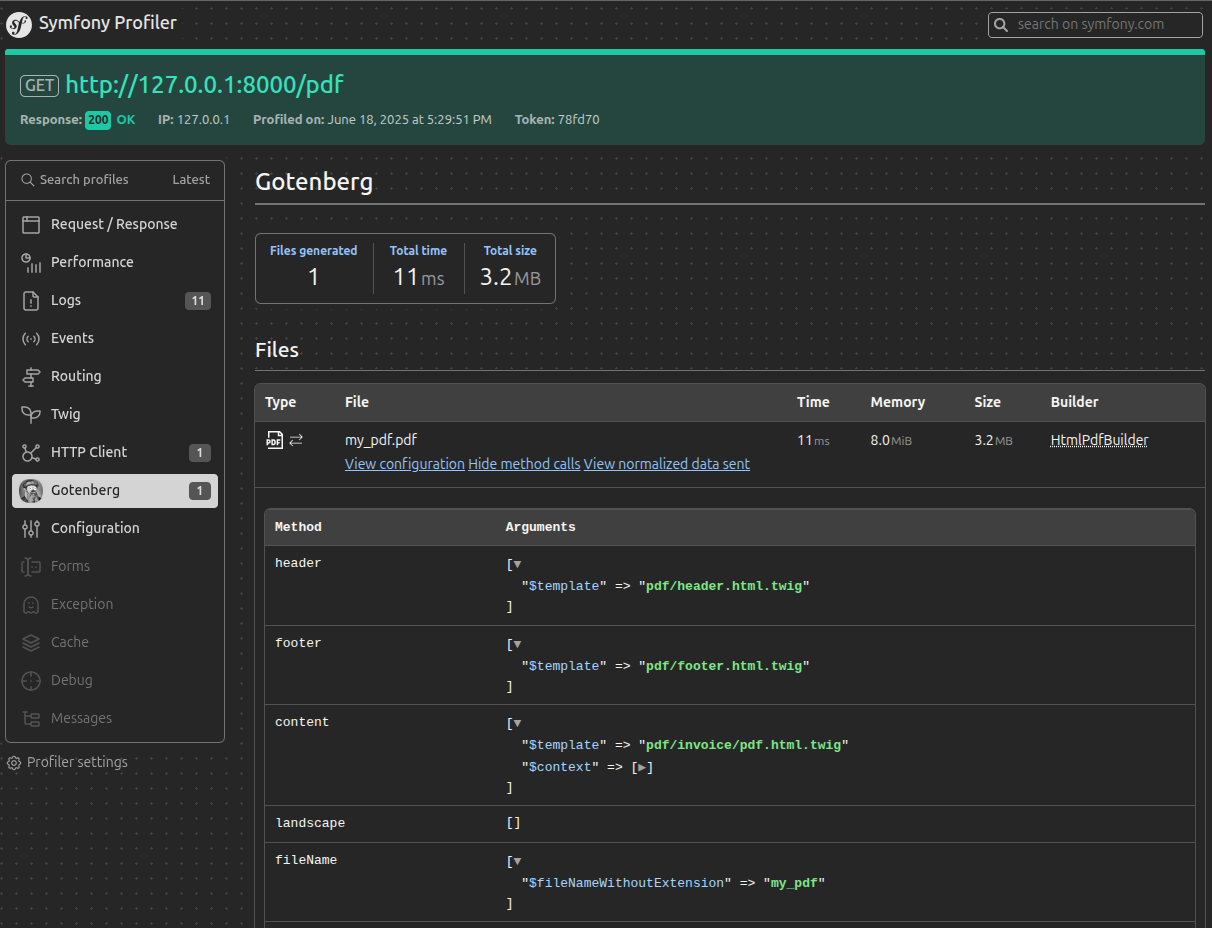
Comes with a built-in profiler panel to help you during your development.
Testing
This bundle provides classes to assist with testing when using PHPUnit.
FAQ
My PDF / Screenshot is blank but I have no errors!
It may be because Gotenberg is trying to access an invalid URL (when using the `->url()` or `->route()` modes). For example if Gotenberg tries to access a page on `https://localhost:8001` but the SSL is a local provided one. Then Chromium won't be able to authorize access to the website. To fix this you can update your Gotenberg Docker service as followed:--- a/compose.yaml +++ b/compose.yaml @@ -1,6 +1,9 @@ services: gotenberg: image: 'gotenberg/gotenberg:8' + command: + - 'gotenberg' + - '--chromium-ignore-certificate-errors'
It can also be because from Gotenberg PoV the
URL of your Symfony app is not reachable.
Let's say you are using symfony CLI to run your
project locally with Gotenberg running in Docker. You need to configure the
request_context like so:
--- a/config/packages/gotenberg.yaml
+++ b/config/packages/gotenberg.yaml
@@ -6,5 +6,5 @@ framework:

sensiolabs_gotenberg:
    http_client: 'gotenberg.client'
+    request_context:
+        base_uri: 'http://host.docker.internal:8000' # 8000 is the port Symfony CLI is running my app on.
Upgrade
- UPGRADE FROM 0.4.0 to 1.0.0
- UPGRADE FROM 1.0.0 to 1.1.0
- UPGRADE FROM 1.1.0 to 1.2.0
- UPGRADE FROM 1.2.0 to 1.3.0
Credits
This bundle was inspired by Gotenberg PHP.
Licence
MIT License (MIT): see the License File for more details.
sensiolabs/gotenberg-bundle 适用场景与选型建议
sensiolabs/gotenberg-bundle 是一款 基于 PHP 开发的 Composer 扩展包,目前已累计 391.51k 次下载、GitHub Stars 达 230, 最近一次更新时间为 2024 年 06 月 21 日, 在 PHP 生态内属于活跃度较高的组件。
它主要适用于以下技术方向: 「symfony」 「bundle」 「pdf」 「screenshot」 「office」 「Gotenberg」 等业务场景。在实际项目中,围绕这些方向常见需要落地的问题包括:接口对接、性能调优、并发安全、与既有框架(Laravel / ThinkPHP / Yii / Webman 等)的兼容适配,以及生产环境的日志埋点与稳定性保障。
我们在过去多个企业项目中使用过 sensiolabs/gotenberg-bundle 或与其功能相近的方案,如果你在选型或落地过程中遇到问题,例如 版本兼容、二次改造、私有化封装、与内部系统对接、生产 BUG 排查,欢迎联系我们协助评估。
基于 sensiolabs/gotenberg-bundle 在你已有业务上做功能扩展、字段裁剪、UI 适配、与内部账号 / 权限 / 日志系统的深度对接。
线上偶发问题、内存泄漏、慢查询、并发异常等排查修复;针对高流量场景做缓存、队列、索引层面的调优。
承接完整的项目从需求 → 设计 → 开发 → 上线 → 长期运维;也可按月提供技术保姆服务。
与 sensiolabs/gotenberg-bundle 相关的其它包
同方向 / 同关键字的高下载量 PHP Composer 包推荐,方便对比选型:
2lenet/EasyAdminPlusBundle
The bundle for easy using json-rpc api on your project
Provide a way to secure accesses to all routes of an symfony application.
DMS Meetup API Bundle, enables Meetup API clients in services
Bundle Symfony DaplosBundle
Provides a Data Grid tables for your Symfony project.
统计信息
- 总下载量: 391.51k
- 月度下载量: 0
- 日度下载量: 0
- 收藏数: 231
- 点击次数: 30
- 依赖项目数: 2
- 推荐数: 0
其他信息
- 授权协议: MIT
- 更新时间: 2024-06-21