sietse85/nova-button
Composer 安装命令:
composer require sietse85/nova-button
包简介
(Nova 4+) A Laravel Nova package for adding buttons to your resources.
README 文档
README
A Nova package for rendering buttons on index, detail and lens views.
Use buttons to trigger backend events, navigate Nova routes or visit links.

This package is a continuation of dillingham/nova-button.
Created to be compatible with Nova 4.0+
Requirements
| What | Minimum |
|---|---|
| PHP | >=7.4 |
| Laravel | >=8.0 |
| Nova | >=4.0 |
Installation
You can install this package by running the following command:
composer require sietse85/nova-button
To publish the config file, run the following command:
php artisan vendor:publish --tag="nova-button-config"
Usage
use Sietse85\NovaButton\Button;
public function fields(Request $request)
{
    return [
        ID::make('ID', 'id')->sortable(),
        Text::make('Name', 'name'),
        Button::make('Notify'),
    ];
}
Quick links
Confirm
You can require a confirmation for destructive actions:
Button::make('Cancel Account')->confirm('Are you sure?'),
Button::make('Cancel Account')->confirm('Confirmation', 'Are you sure you want to cancel your account?'),
Button::make('Cancel Account')->confirm('Confirmation', 'Are you sure you want to cancel your account?', 'Cancel'),
Reload
You can reload the page after all events have finished.
Button::make('Notify')->reload()
If you click multiple buttons, reloading will wait for all buttons to finish.
If an error occurs, the page will not be reloaded.
Action
You can trigger an action now. No ActionFields can be used. Will trigger for current resource only. Handle will be called immediately.
Button::make('Send mail')->action(SendConfirmationMail::class)
If for some reason the Model for the action is not resolved correctly you can use modelForAction to correct it.
Events
By default, clicking the button will trigger an event via AJAX.
Default event: Sietse85\NovaButton\Events\ButtonClick.
The event will receive the resource model it was triggered from and the key:
$event->resource=model$event->key="notify"
You can override the key:
Button::make('Notify', 'notify-some-user')
And also the event:
Button::make('Notify')->event(App\Events\NotifyRequested::class)
You can listen to the event by creating a listener and registering it in your EventServiceProvider.
Texts
Title
You can set the title attribute for the button:
Button::make('Notify')->title('Button title')
Label
You can set the label for the button, which is shown on the detail, create and update views:
Button::make('Notify')->label('Button label')
Index name
You can set the index name for the button, which is shown on the index view as the table header:
Button::make('Notify')->indexName('Actions')
Default is set to the button name. You can also pass null to have no index name.
State
Visibility
You can conditionally show the button:
Button::make('Activate')->visible($this->is_active === false),
Button::make('Deactivate')->visible($this->is_active === true),
Or, if you only want specific users to see the button:
Button::make('Notify')->visible($request->user()->can('notifyUser', $this))
Of course you can also use Nova's builtin methods, like for authorization or to limit visibility to specific views.
If you want to show a button on the create or update views you can simply use Nova's builtin methods:
Button::make('Notify')->showOnCreating()->showOnUpdating()
Disabled
You can disable the button:
Button::make('Notify')->disabled()
Button::make('Notify')->disabled($this->is_complete === false)
Feedback
When using events, you might want to provide visual feedback to the end user. This is especially useful for long running listeners.
Button::make('Notify')
    ->loadingText('Sending...')
    ->successText('Sent!')
    ->errorText('Something went wrong...')
There are 3 events and for each event you can provide the text and style:
| Event | Text | Style |
|---|---|---|
loading |
->loadingText('Sending...') |
->loadingStyle('grey-outline') |
success |
->successText('Done!') |
->successStyle('success') |
error |
->errorText('Something went wrong...') |
->errorStyle('danger') |
The defaults are defined in the config file.
Nova routes
You can also choose to navigate to any Nova route:
Button::make('Text')->index(App\Nova\User::class)
Button::make('Text')->detail(App\Nova\User::class, $this->user_id)
Button::make('Text')->create(App\Nova\User::class)
Button::make('Text')->edit(App\Nova\User::class, $this->user_id)
Button::make('Text')->lens(App\Nova\User::class, 'users-without-confirmation')
It's also possible to use a resource's filters:
Button::make('Text')
    ->index(App\Nova\Order::class)
    ->withFilters([
        App\Nova\Filters\UserOrders::class => $this->user_id,
        App\Nova\Filters\OrderStatus::class => 'active',
    ])
Links
You can configure the button to open external links:
Button::make('Text')->link('https://nova.laravel.com')
Button::make('Text')->link('https://nova.laravel.com', '_self')
Classes
The button uses the following classes that you can style to your liking:
.nova-button
.nova-button-{resource-name}
.nova-button-success
.nova-button-error
.nova-button-loading
You can also add more classes to a button:
// One class
Button::make('Notify')->classes(['some-class'])

// Or multiple classes
Button::make('Notify')->classes(['some-class', 'another-class'])
You can also add more classes to the confirm-modal inner-div:
// One class
Button::make('Notify')->confirm('sure?')->modalClasses(['some-class'])

// Or multiple classes
Button::make('Notify')->confirm('sure?')->modalClasses(['some-class', 'another-class'])
Styles
This package uses tailwind-css classes. The default class used is the link class.
You can define the class the button should use:
Button::make('Delete')->style('danger')
The default available classes are as follows:
| Fill | Outline | Link |
|---|---|---|
| primary | primary-outline | primary-link |
| success | success-outline | success-link |
| warning | warning-outline | warning-link |
| danger | danger-outline | danger-link |
| info | info-outline | info-link |
| grey | grey-outline | grey-link |
The passed key refers to one of the classes defined in the config file. You are free to change these classes or add your own.
Examples
Lenses
You can use a button with lenses.

First set up the lens:
<?php

namespace App\Nova\Lenses;

class UsersWithoutConfirmation extends Lens
{
    public static function query(LensRequest $request, $query)
    {
        return $query
            ->select(['users.id', 'users.name'])
            ->whereNull('email_verified_at');
    }

    public function fields(Request $request)
    {
        return [
            ID::make('ID', 'id'),
            Text::make('Name', 'name'),
            Button::make('Mark As Confirmed'),
        ];
    }
}
Next, register a listener for the Sietse85\NovaButton\Events\ButtonClick event in your EventServiceProvider:
<?php

namespace App\Listeners;

use Sietse85\NovaButton\Events\ButtonClick;

class ConfirmUser
{
    public function handle(ButtonClick $event)
    {
        if ($event->key == 'mark-as-confirmed') {
            $event->resource->email_verified_at = now();
            $event->resource->save();
        }
    }
}
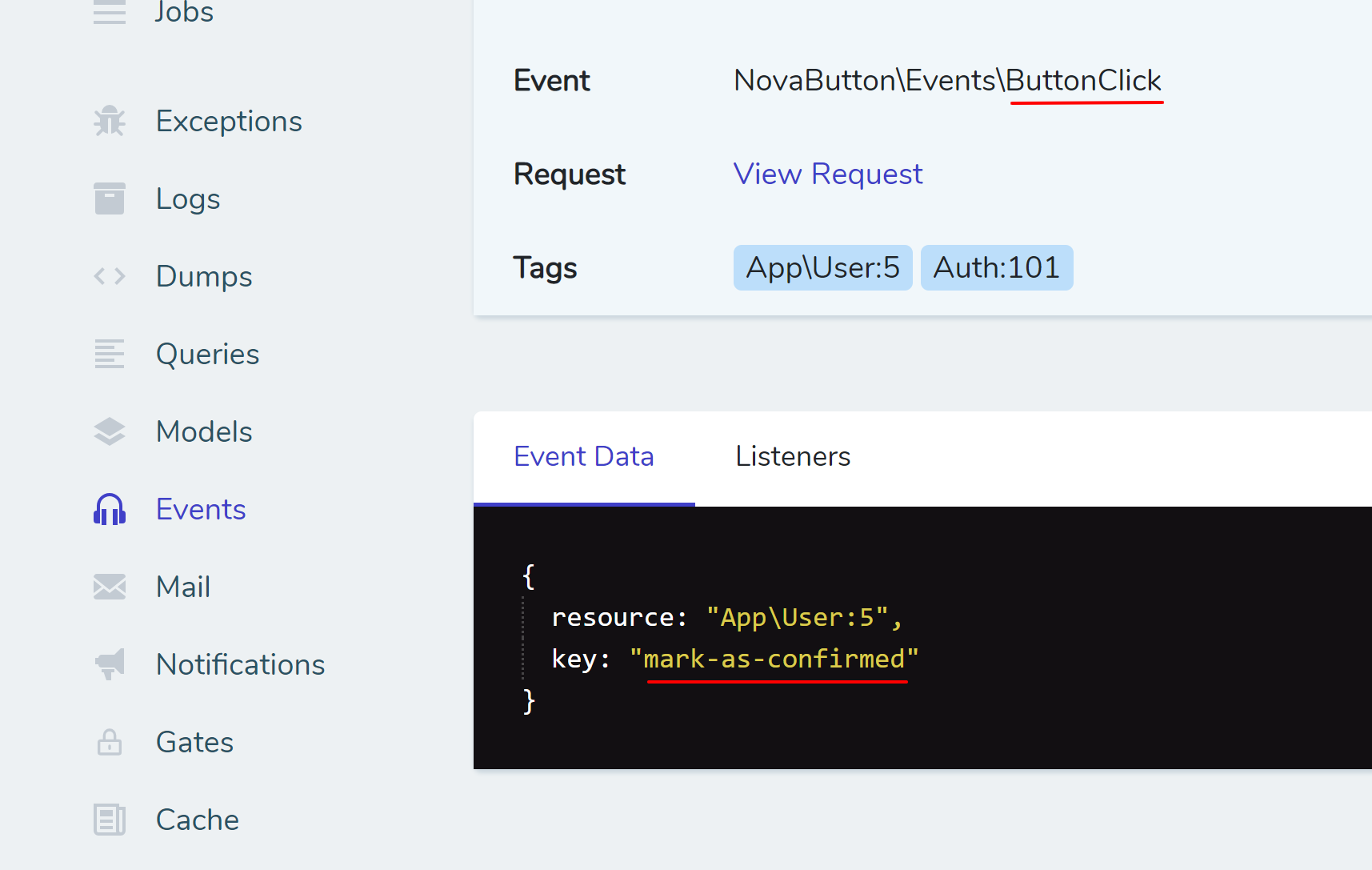
To confirm the event and event data used in above functionality, see the Telescope inspection below:
Changelog
Please see CHANGELOG for more information on what has changed recently.
Contributing
Please see CONTRIBUTING for details.
Credits
-
Nova 4 package sietse85
-
Author of Nova 3 package: dnwjn
-
Author of original package: dillingham
License
The MIT License (MIT). Please see License File for more information.
sietse85/nova-button 适用场景与选型建议
sietse85/nova-button 是一款 基于 PHP 开发的 Composer 扩展包,目前已累计 374.18k 次下载、GitHub Stars 达 37, 最近一次更新时间为 2022 年 05 月 20 日, 在 PHP 生态内属于活跃度较高的组件。
它主要适用于以下技术方向: 「nova」 「laravel」 「field」 「button」 「nova4」 等业务场景。在实际项目中,围绕这些方向常见需要落地的问题包括:接口对接、性能调优、并发安全、与既有框架(Laravel / ThinkPHP / Yii / Webman 等)的兼容适配,以及生产环境的日志埋点与稳定性保障。
我们在过去多个企业项目中使用过 sietse85/nova-button 或与其功能相近的方案,如果你在选型或落地过程中遇到问题,例如 版本兼容、二次改造、私有化封装、与内部系统对接、生产 BUG 排查,欢迎联系我们协助评估。
基于 sietse85/nova-button 在你已有业务上做功能扩展、字段裁剪、UI 适配、与内部账号 / 权限 / 日志系统的深度对接。
线上偶发问题、内存泄漏、慢查询、并发异常等排查修复;针对高流量场景做缓存、队列、索引层面的调优。
承接完整的项目从需求 → 设计 → 开发 → 上线 → 长期运维;也可按月提供技术保姆服务。
与 sietse85/nova-button 相关的其它包
同方向 / 同关键字的高下载量 PHP Composer 包推荐,方便对比选型:
A Laravel Nova card that shows you your system information.
A Laravel Nova card.
ConfirmationField is a form field for Atk14 applications. It's like the BooleanField (checkbox) but the ConfirmationField must be ticked.
Field for number with restricted count of digits and decimal places
A simple state dropdown field for SilverStripe forms
A Laravel Nova package for publishable fields
统计信息
- 总下载量: 374.18k
- 月度下载量: 0
- 日度下载量: 0
- 收藏数: 37
- 点击次数: 26
- 依赖项目数: 0
- 推荐数: 0
其他信息
- 授权协议: MIT
- 更新时间: 2022-05-20