slince/spike
Composer 安装命令:
composer create-project slince/spike
包简介
A fast reverse proxy that helps to expose your local services to the internet
关键字:
README 文档
README

Spike is a fast reverse proxy built on top of ReactPHP that helps to expose your local services to the internet.
Installation
Install via composer
composer global require slince/spike
Both the server and local machine need to install this.
Schematic diagram
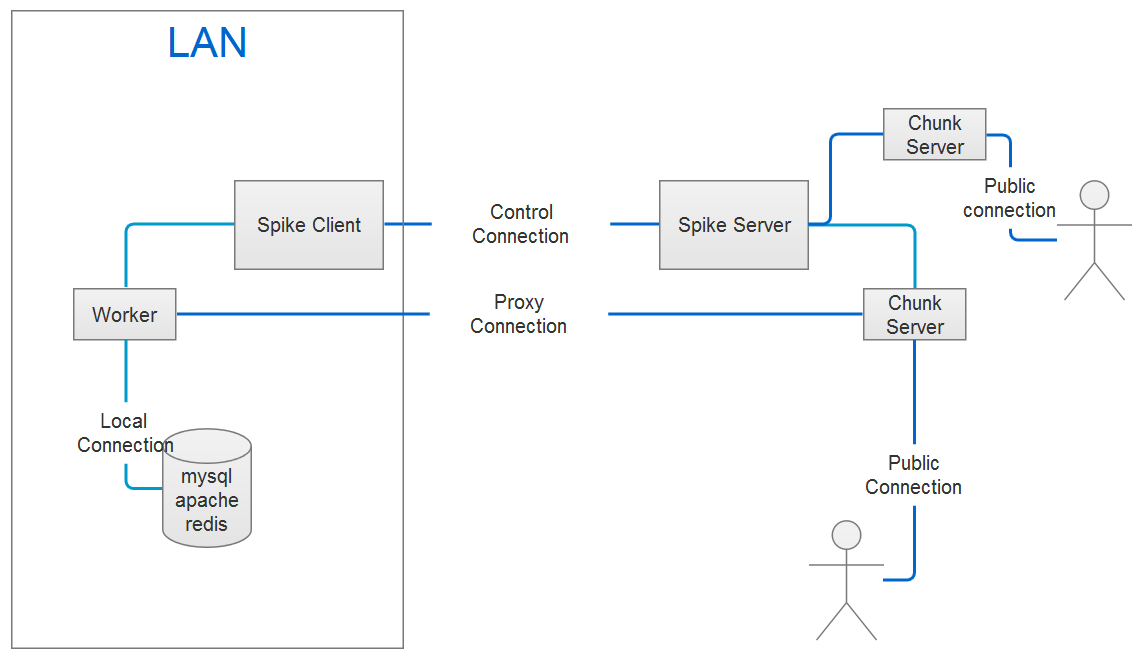
Configure the server
A public machine that can be accessed on the internet is needed. Assuming already. There are two ways to start the server
Based on defaults
Use the following command to start the server
$ spiked --address=127.0.0.1:8088
The above command can create a basic service. If you want to customize more information, you should start the server based on the configuration file.
Based on the configuration file.
- Creates a configuration file
Execute the following command to create it.
$ spiked init --dir=/home/conf --format=json
Yaml,Xml,Ini and Json(default) files are supported. Use the following command for help.
$ spiked init -h
-
Open the configuration file and modify the parameters.
-
Executes the following command to start the service.
$ spiked --config=/home/conf/spiked.json
Configure the client.
You should first create a configuration file for the client.
- Execute the following command to create it
$ spike init --dir=/home/conf --format=json
Use the following command for help about this command
$ spike init -h
-
Open the configuration file and modify the parameters.
-
Start the client service.
$ spike --config=/home/conf/spike.json
Tunnel
The definition of the tunnel only in the client, the server does not need to do any configuration, so as to achieve the most simplified configuration.
Now supports both http and tcp tunnels
Open the configuration file for the client and modify the parameters for "tunnel".
- Add an HTTP tunnel
{
    "protocol": "http",
    "serverPort": 8086,
    "proxyHosts": {
        "www.foo.com": "127.0.0.1:80",
        "www.bar.com": "192.168.1.101:8080"
    }
}
Restarts the client service. Visit "http://www.foo.com:8086", the service will be forwarded to the local "127.0.0.1:80"; Note that resolve "www.foo.com" to the server IP.
- Add a TCP tunnel
The services based on the tcp can use the tunnel, such as: mysql, redis, ssh and so on; The following is an example of proxy mysql service
{
    "protocol": "tcp",
    "serverPort": 8087,
    "host": "127.0.0.1:3306"
}
Execute the following command to visit the local mysql service.
$ mysql -h SERVER IP -P 8087
Client authentication
The authentication is not enabled on the server based on defaults.You should start the server based on configuration file, if you want to enable this.
- Enable authentication
Open the configuration file for the server and modify parameters for "auth" and restart the service.
Currently only supports a simple user name password authentication, more authentication methods will be added later.
- Modify the client identity information
Open the configuration file for the client and modify parameters for "auth". Keep the same parameters as the server.
Configure log
The default to open the console and file two forms of the log; the first will print the logs to the console; the second will write all the logs to the specified file; Default log level is "info"; You can adjust this in the configuration file.
List Commands
$ spike list
   _____   _____   _   _   _    _____
  /  ___/ |  _  \ | | | | / /  | ____|
  | |___  | |_| | | | | |/ /   | |__
  \___  \ |  ___/ | | | |\ \   |  __|
   ___| | | |     | | | | \ \  | |___
  /_____/ |_|     |_| |_|  \_\ |_____|

  Spike Client 0.0.1

  Usage:
    command [options] [arguments]

  Options:
    -h, --help            Display this help message
    -q, --quiet           Do not output any message
    -V, --version         Display this application version
        --ansi            Force ANSI output
        --no-ansi         Disable ANSI output
    -n, --no-interaction  Do not ask any interactive question
    -v|vv|vvv, --verbose  Increase the verbosity of messages: 1 for normal output, 2 for more verbose output and 3 for debug

  Available commands:
    help        Displays help for a command
    init        Create a configuration file in the specified directory
    list        Lists commands
    list-proxy  Lists all supported proxy hosts by the client
Changelog
See CHANGELOG.md
License
The MIT license. See MIT
统计信息
- 总下载量: 627
- 月度下载量: 0
- 日度下载量: 0
- 收藏数: 672
- 点击次数: 0
- 依赖项目数: 0
- 推荐数: 0
其他信息
- 授权协议: MIT
- 更新时间: 2017-06-26