soderlind/virtual-media-folders
Composer 安装命令:
composer require soderlind/virtual-media-folders
包简介
Virtual folder organization and smart management for the WordPress Media Library.
README 文档
README
Virtual folder organization for the WordPress Media Library.
Way back in 2006 (20 years ago!), I released ImageManager 2.0, a popular WordPress plugin for image management and editing. Virtual Media Folders is my modern take on media organization for WordPress, built with React and modern tooling.
Description
Virtual Media Folders brings folder organization to your WordPress Media Library. Organize your media files into hierarchical folders without moving files on disk—folders are virtual, so your URLs never change.
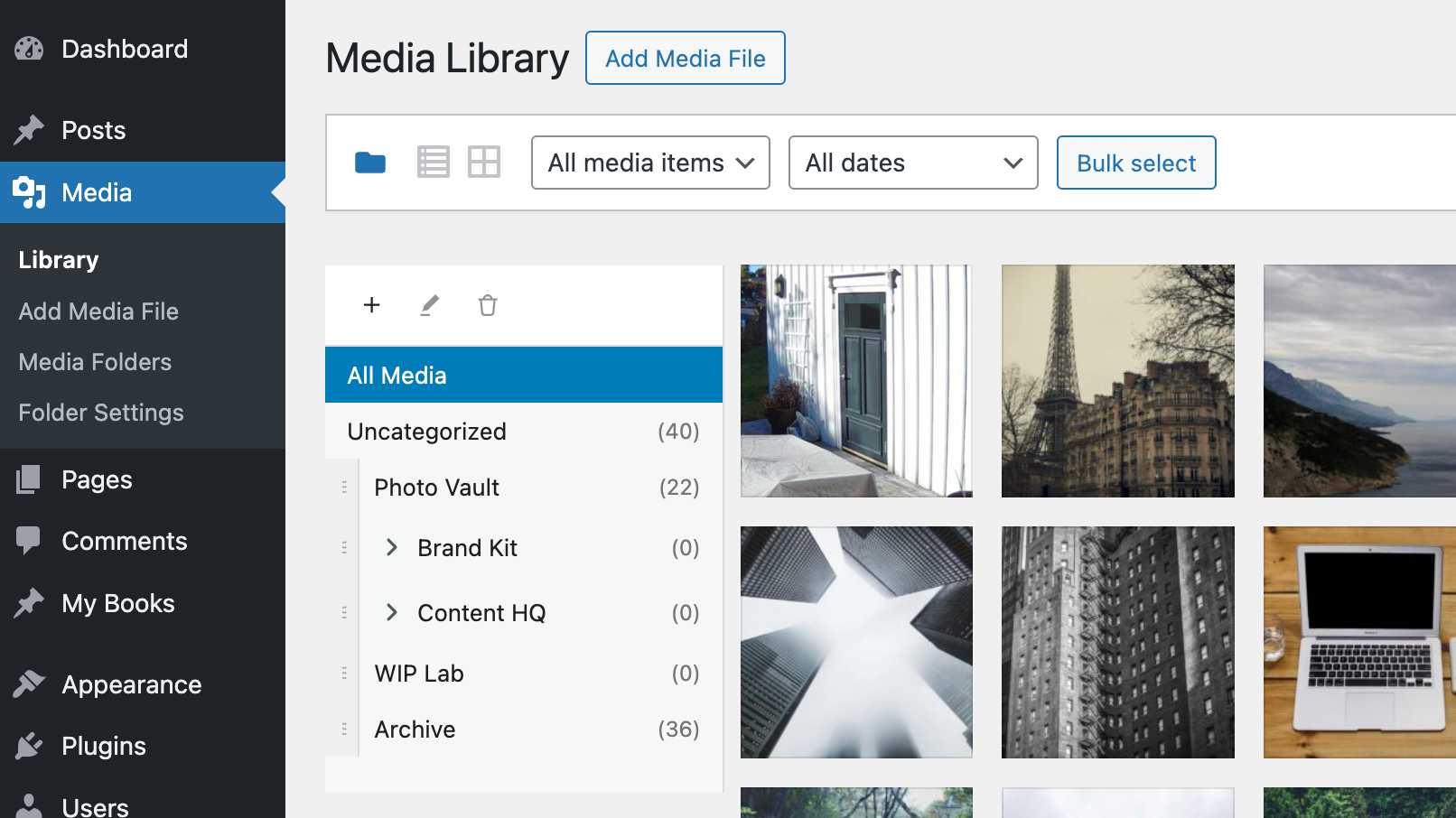 Click to watch demo video on YouTube
Features
- Virtual Folders – Create hierarchical folder structures to organize media
- Drag & Drop – Move media between folders with drag and drop
- Sticky Sidebar – Folder navigation stays visible while scrolling
- Gutenberg Integration – Filter media by folder in the block editor
- Bulk Actions – Move multiple media items at once
- Keyboard Accessible – Full keyboard navigation with screen reader support
- Internationalized – Translation ready (Norwegian Bokmål included)
Free add-ons
Use the add-on manager to install and manage add-ons that extend Virtual Media Folders from a dedicated admin screen:
- AI Ability – Registers MCP tools for AI agents via the WordPress Abilities API.
- AI Organizer – Uses vision-capable AI models to analyze actual image content and automatically organize your media library into virtual folders. This is add-on functionality requiring an API key from a supported AI service provider.
- Editorial Workflow – Role-based folder access, move restrictions, and Inbox workflow.
- Folder Exporter – Export folders (or subtrees) as ZIP archives with optional CSV manifests.
- Media Cleanup – Detect unused, duplicate, and oversized media — then archive, trash, or flag for review.
- Migrate – Migrate folder structures from other media folder plugins to Virtual Media Folders.
- Rules Engine – Rule-based automatic folder assignment for media uploads, based on metadata, file type, EXIF or IPTC data.
Requirements
- WordPress 6.8+
- PHP 8.3+
Installation
From GitHub
- Download `virtual-media-folders.zip`
- Go to Plugins > Add New > Upload Plugin
- Upload the zip file and activate
From WordPress.org
- Go to Plugins > Add New
- Search for "Virtual Media Folders"
- Click Install Now and Activate
Usage
Organizing Media
- Go to Media > Library
- Click the folder icon to show the sidebar
- Use + to create folders
- Drag media onto folders to organize / Bulk select media and use the "Move to Folder" action
- Click a folder to filter the view
Settings
Go to Media > Folder Settings to configure:
| Setting | Description |
|---|---|
| Show "All Media" | Display "All Media" option in sidebar |
| Show "Uncategorized" | Display folder for unassigned media |
| Jump to folder after move | Navigate to target folder after moving |
| Default folder for uploads | Auto-assign new uploads to a folder |
Block Editor
When inserting media from a block:
- Open the Media Library modal
- Use the folder sidebar to filter
- Select your media
AI Abilities
With the AI Ability add-on installed, the following Abilities API tools are available for AI agents and MCP adapters:
vmfo/list-folders(read-only): Lists folders withid,name,parent_id,path, andcount.vmfo/create-folder(write): Creates a folder withnameand optionalparent_id.vmfo/add-to-folder(write): Adds one or more attachments to a folder usingfolder_idandattachment_ids.
Recommended flow for AI clients:
- Call
vmfo/list-foldersto resolve folder names and paths to a stableid. - If needed, call
vmfo/create-folderto create the target folder. - Call
vmfo/add-to-folderwith thatfolder_idand one or moreattachment_ids.
This avoids ambiguity when folder names are duplicated under different parents.
Permission model:
vmfo/list-foldersandvmfo/add-to-folderrequire theupload_filescapability.vmfo/create-folderrequires themanage_categoriescapability.
WordPress MCP adapter (default server) example:
# Endpoint:
# /wp-json/mcp/mcp-adapter-default-server

# List tools
curl -X POST "https://example.com/wp-json/mcp/mcp-adapter-default-server" \
	-u "username:application-password" \
	-H "Content-Type: application/json" \
	-d '{"jsonrpc":"2.0","id":1,"method":"tools/list","params":{}}'

# Resolve folder id via gateway
curl -X POST "https://example.com/wp-json/mcp/mcp-adapter-default-server" \
	-u "username:application-password" \
	-H "Content-Type: application/json" \
	-d '{"jsonrpc":"2.0","id":2,"method":"tools/call","params":{"name":"mcp-adapter-execute-ability","arguments":{"ability_name":"vmfo/list-folders","parameters":{"search":"travel","hide_empty":false}}}}'

# Add attachments to folder via gateway
curl -X POST "https://example.com/wp-json/mcp/mcp-adapter-default-server" \
	-u "username:application-password" \
	-H "Content-Type: application/json" \
	-d '{"jsonrpc":"2.0","id":3,"method":"tools/call","params":{"name":"mcp-adapter-execute-ability","arguments":{"ability_name":"vmfo/add-to-folder","parameters":{"folder_id":2285,"attachment_ids":[101,205,309]}}}}'

# Create folder via gateway
curl -X POST "https://example.com/wp-json/mcp/mcp-adapter-default-server" \
	-u "username:application-password" \
	-H "Content-Type: application/json" \
	-d '{"jsonrpc":"2.0","id":4,"method":"tools/call","params":{"name":"mcp-adapter-execute-ability","arguments":{"ability_name":"vmfo/create-folder","parameters":{"name":"Travel","parent_id":0}}}}'
MCP_BASE_URL="https://example.com/wp-json/mcp/mcp-adapter-default-server" \
MCP_USER="per" \
MCP_APP_PASS="xxxx xxxx xxxx xxxx xxxx xxxx" \
./scripts/mcp-adapter-smoke-test.sh
Documentation
- Accessibility – Keyboard navigation and screen reader support
- Development – Setup, API reference, hooks, and contributing
- Add-on Development – Guide to building add-on plugins
- MCP Integration – Upload, find/create folder, and assign media via MCP
License
Virtual Media Folders is free software licensed under the GPL v2 or later.
Copyright 2025 Per Soderlind
soderlind/virtual-media-folders 适用场景与选型建议
soderlind/virtual-media-folders 是一款 基于 JavaScript 开发的 Composer 扩展包,目前已累计 204 次下载、GitHub Stars 达 23, 最近一次更新时间为 2025 年 12 月 03 日, 在 PHP 生态内属于活跃度较高的组件。
它主要适用于以下技术方向: 「media」 「wordpress」 「taxonomy」 「organization」 「drag-and-drop」 「folders」 等业务场景。在实际项目中,围绕这些方向常见需要落地的问题包括:接口对接、性能调优、并发安全、与既有框架(Laravel / ThinkPHP / Yii / Webman 等)的兼容适配,以及生产环境的日志埋点与稳定性保障。
我们在过去多个企业项目中使用过 soderlind/virtual-media-folders 或与其功能相近的方案,如果你在选型或落地过程中遇到问题,例如 版本兼容、二次改造、私有化封装、与内部系统对接、生产 BUG 排查,欢迎联系我们协助评估。
基于 soderlind/virtual-media-folders 在你已有业务上做功能扩展、字段裁剪、UI 适配、与内部账号 / 权限 / 日志系统的深度对接。
线上偶发问题、内存泄漏、慢查询、并发异常等排查修复;针对高流量场景做缓存、队列、索引层面的调优。
承接完整的项目从需求 → 设计 → 开发 → 上线 → 长期运维;也可按月提供技术保姆服务。
与 soderlind/virtual-media-folders 相关的其它包
同方向 / 同关键字的高下载量 PHP Composer 包推荐,方便对比选型:
Simple Sharing generates social media share links within CP entry pages, allowing you to quickly & easily share entries.
Icon support for Silverstripe taxonomy terms
Elemental Taxonomy module, provides a list of taxonomy terms under a selected type
WordPress plugin to automatically toggle the parent term when a sub term is selected.
Advanced taxonomies
Laravel Media Popup to upload/view the files
统计信息
- 总下载量: 204
- 月度下载量: 0
- 日度下载量: 0
- 收藏数: 23
- 点击次数: 34
- 依赖项目数: 0
- 推荐数: 0
其他信息
- 授权协议: GPL-2.0-or-later
- 更新时间: 2025-12-03