tamedevelopers/validator
Composer 安装命令:
composer require tamedevelopers/validator
包简介
PHP Form Validator is a small no-depencies library for PHP codes.
README 文档
README
Documentation
- Requirements
- Installation
- Instantiate
- Laravel Support
- Methods That Should Always Come First
- Global Configuration
- Csrf
- Usage
- Reset Error
- Only
- Except
- Has
- Old
- Merge
- Only Data
- Except Data
- GetForm
- Get Message and Class
- Collection
- Collection Methods
- toObject
- toArray
- toJson
- Helpers
- Useful links
Requirements
>= php 8.0+
Installation
Prior to installing validator package get the Composer dependency manager for PHP because it'll simplify installation.
composer require tamedevelopers/validator
Instantiate — Instantiate class using
- It's helper class can be called, using --
form()
require_once __DIR__ . '/vendor/autoload.php';

use \Tamedevelopers\Validator\Validator;

$form = new Validator();
Laravel Support
- Now supports Laravel and with same Functionalities no different
use Tamedevelopers\Validator\Validator;
public function save(Request $request){

    $form = new Validator();
    or
    $form = form();
}
Methods That Should Always Come First
- All are Optional
method- These methods are only mandatory on usage and should always come first before others.
| Methods | Description |
|---|---|
| ->errorType() | bool to format error's on display: single or multiple |
| ->token() | bool to Enable or Disable csrf_token for each request |
| ->post() | Convert Form request to POST only |
| ->get() | Convert Form request to GET only |
| ->all() | Convert Form request to any |
$form->post()->rules([
    //
]);
Global Configuration
- It's helper class can be called, using --
config_form()
| Keys | Description |
|---|---|
| request | String POST|GET|ALL Default POST |
| error_type | Boolean true|false Default false |
| csrf_token | Boolean true|false Default true |
| class | Assoc Array error|success error class type to be returned on both success and failure |
config_form(
    request       : 'POST',
    error_type    : true,
    csrf_token    : true,
    class         : [
        'error'     => 'alert alert-danger',
        'success'   => 'alert alert-success'
    ]
);
Csrf
- Implementing
Csrf(Cross-Site Request Forgery)- By default the form requires all request to have a token attached.
- You can disable the usage with the
config_form()Helper
- You can disable the usage with the
- By default the form requires all request to have a token attached.
Csrf Form Input
- This will create html input element with valid
csrf token- It's a function and you don't need to
echo- Use anywhere inside your HTML form
- It's a function and you don't need to
csrf();

<input type="hidden" name="_token" value="efef4c9360f26848f0d102b478e51859cfce4c9b197eb9d6473abfcaa2c6da38">
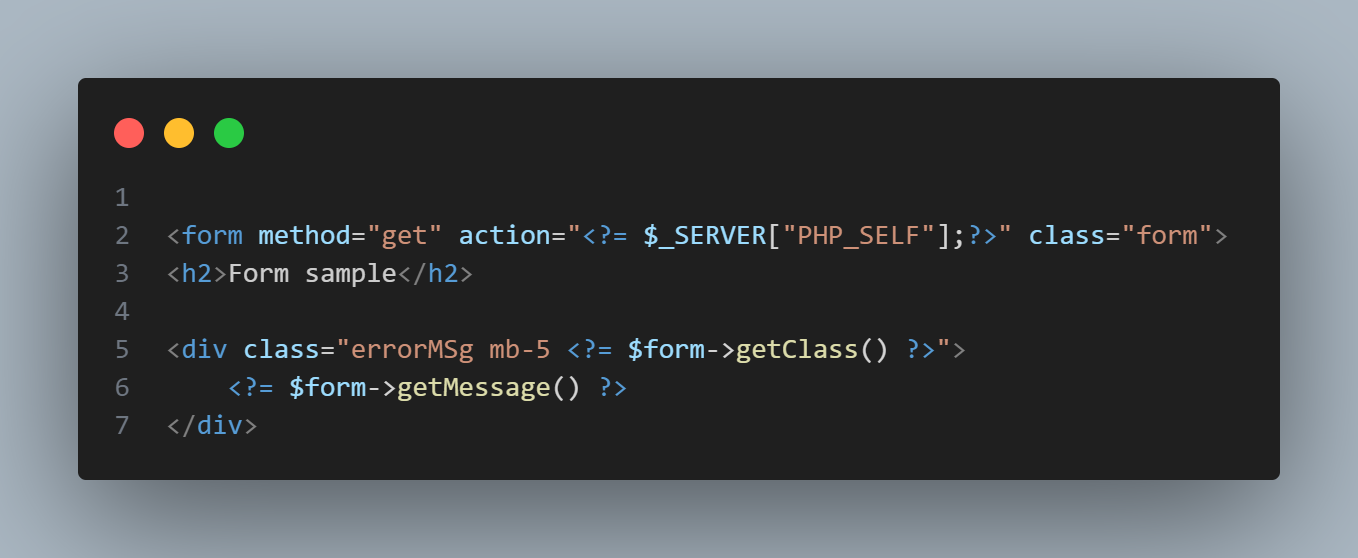
Csrf Token
- This will return the
csrf tokenstring
csrf_token();
USAGE
- All Methods of usage
Error Type
- Takes a param as
boolDefault isfalse- You can call separately or Call Before any other method, if intend to use.
| Error | Description |
|---|---|
| false | Default Errors displayed one after another |
| true | This allow all errors to be displayed once, as an array |
$form->errorType(false);
Token
- Takes a param as
boolDefault isfalse- Allow disability of
csrf_tokenon each form request
- Allow disability of
| Error | Description |
|---|---|
| false | Default Will disable csrf_token usage |
| true | This allow csrf_token per request only |
$form->token(false);
POST
- Set the Form Request to
POST- This will always override the
config_form()settings
- This will always override the
$form->post();
GET
- Set the Form Request to
GET
$form->get();
All
- Will automatically detect if request type is
GET\|POSTand get it's data.
$form->all()->rules([
    //
])
Any
- same as
all
$form->any()->rules([
    //
])
Rules
- By default only
DATA TYPEand[INPUT_NAME]is required- Always seperate each indicator with a 'colon'
:or 'pipe'|
- Always seperate each indicator with a 'colon'
| DATA TYPE | INPUT_NAME | COMPARISON OPERATOR | VALUE TO COMPARE |
|---|---|---|---|
| string | : country | : == | : 0 |
| : |
$form->rules([
    "string|country|==|0"   => 'Please Select a Country',
    "email:email"           => 'Please enter a valid email address',
])
- HTML FORM Structure
<form>
    <select name="country">
        <option value="0">Select Country</option>
        <option value="NGA">Nigeria</option>
        <option value="USA">United States of America</option>
    </select>

    <input type="hidden" name="_token" value="749c345a1d407f29e777349f5e46a8d6d2cd51454b6719228b5ee28f94c30432">
    <input type="email" name="email" placeholder="Email Address">
</form>
Validate
- Takes an [optional]
closurefunction as the param
$form->rules([
    "s:name" => 'Please enter a name',
])->validate(function($response){

    $response->param; //Collection of form data
    $response->getMessage(); //message property
});
Save
- Expects a
closurefunction as the param- Message property will be empty string on success
$response->message
- Message property will be empty string on success
$form->rules([
    "s:name" => 'Please enter a name',
])->save(function(){
    //on success
});
Data Types
Supports 9 Data Flags type
| Data types | abbr | Description |
|---|---|---|
| e | Email data validation |
|
| bool | b | Boolean data validation |
| string | s | String data validation |
| html | - | html CMS/Blog content validation |
| dev | - | dev CMS/Blog/Dev like content validation |
| raw | - | raw Collect content without validation |
| str_len | sl | String Length validation |
| enum | en | Enum Forms checkbox | radio or any form data that normally has no value when not checked |
| array | a | Array data validation |
| float | f | Float data validation |
| int | i | Int data validation |
| url | u | Url data validation |
Operators
Supports 10 operational statement
| sign | Description |
|---|---|
| == | Equal to |
| === | Strictly Equal to |
| != | Not Equal To |
| !== | Not Strictly Equal To |
| > | Greater than |
| >= | Greater than or Equal to |
| < | Less than |
| <= | Less than or Equal to |
| < or > | Less than or Greater than |
| < and > | Less than and Greater than |
noInterface
- Expects a
closurefunction as the param- have access to form data without any validation
$form->noInterface(function($response){

    if($response->has('amount')){
        // exec code
    }
});
Before
- Expects a
closurefunction as the param- Will only execute code within when Request is [GET]
- CSRF Token
does'ntapply to this method
- CSRF Token
- Will only execute code within when Request is [GET]
$form->rules([
    "s:name" => 'Please enter a name',
])->before(function($response){

    // execute code
});
After
- Expects a
closurefunction as the param- Will always execute no matter the request method type
- CSRF Token
does'ntapply to this method
- CSRF Token
- Will always execute no matter the request method type
$form->after(function(){
    // execute code
});
Has Error
- Returns bool
true\|false
$form->hasError();
Is Validated
- Returns bool
true\|false, When Form has already been validated
$form->isValidated();
Reset Error
- Even if you're inside the
success() method - With this helper, you can be able to reset the class, to error class
->save(function($response){

    $availableUserAmount = 900;

    <!-- Lets say for instance, users have wallet balance and the form request has no error -->
    <!-- But you need to perform another error validator before you allow request to pass through -->
    <!-- Don't forget the add the "return;" key to stop any other code from executing -->


    if($response->amount > $availableUserAmount){
        $response->reset();
        $response->message = "Your wallet balance is too low, Please recharge before you can Subscribe to Plan!";
        return;
    }

    // perform other request before
});
Only
- Takes a param as an
arraykeysof data only needed, from theform param
->save(function($response){
    //
    $data = $response->only(['password', 'username']);
});
Except
- Exact opposite of
only()method
->save(function($response){

    $data = $response->except(['_token']);
});
Has
- Takes a param as
stringinput name- Returns boolean as
true|\false
- Returns boolean as
->save(function($response){

    if($response->has('remeber_me')){
        // execute code
    }
});
Old
- Takes a param as
stringand return old inserted data- Second parameter is [optional]
mixed data. - It's helper class can be called, using --
old()
- Second parameter is [optional]
$form->rules([
    "s:password" => 'Please enter a name',
    "s:retype_pass:!==:{$form->old('password')}" => 'Password mismatch, Please enter same password',
]);
- or
<input type="email" name="email" value="<?= old('email', 'default_value')>">
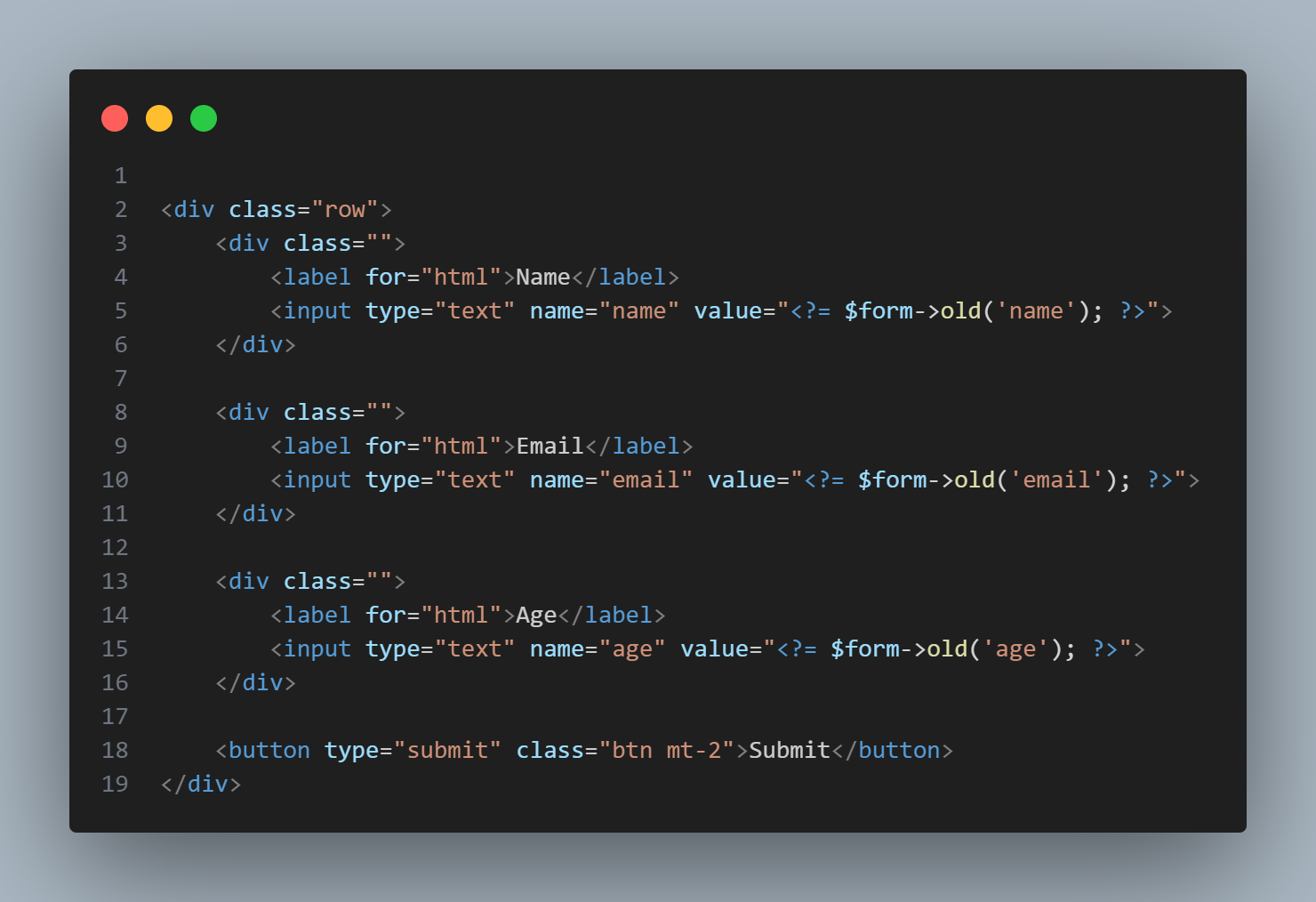
GetForm
- Return all submitted form data as an
array
->save(function($response){

    $data = $response->getForm();
});
Merge
- Same as PHP function
array_merge- Merge two array data together
- Second data will always repalace any matched key data in the first array
->save(function($response){

    $data = [
        'name' => 'Lorem Name',
        'user_id' => rand(10000, 99999),
    ];

    $param = $response->merge($data, [
        'password' => md5($param['password'])
    ]);
});
Only Data
- Return only
data passedfrom set of given array elements.
| Keys | Data |
|---|---|
array |
Main data to select from |
->save(function($response){

    $data = $response->onlyData(['email', 'password'], [
        'email'     => 'mailer@mail.com',
        '_token'    => md5('token'),
        'age'       => 17,
        'password'  => 'test',
    ]);

// Only ['email', 'password'] will be returned.
});
Except Data
- Exact opposite of
onlyData()method
| Keys | Data |
|---|---|
| Keys are array | Main data to select from |
->save(function($response){

    $data = $response->exceptData(['_token'], [
        'email'     => 'mailer@mail.com',
        '_token'    => md5('token'),
        'password'  => 'test'
    ]);

// Return all array element, except ['_token']
});
Get Message and Class
| key | Description |
|---|---|
| message | Message This convert all error messages and return as a string with <br> |
| class | Class name Class name on error and success |
$form->getMessage();
$form->getClass();
Collection
- Forms
paramreturns a Collection Class- This enable us access property as an
objectorarray index
- This enable us access property as an
$form->rules([
    "string:country:==:0"   => 'Please Select a Country',
    "email:email"           => 'Please enter a valid email address',
])->save(function($response){

    $param = $response->param;


    $param->country;
    $param['country']

// As you can see, we're able to access data in both ways without errors
});
Collection Methods
| Methods | Description |
|---|---|
| toArray() | array Convert items to array |
| toObject() | object Convert items to object |
| toJson() | string Convert items to json |
toObject
- Takes a param as
mixeddata- Converts to an
Objectdata
- Converts to an
$form->toObject([
    'food' => 'Basmati Rice'
]);
toArray
- Takes a param as
mixeddata- Converts to an
Arraydata
- Converts to an
$form->toArray([
    'food' => 'Basmati Rice'
]);
toJson
- Takes a param as
mixeddata- Converts to an
Jsondata
- Converts to an
$form->toJson([
    'food' => 'Basmati Rice'
]);
Helpers
| function | Description |
|---|---|
| old() | Inherit instance of (new Validator) old() method |
| form() | Return instance of (new Validator) class |
Useful links
- @author Fredrick Peterson (Tame Developers)
- Lightweight - PHP Form Validator
- If you love this PHP Library, you can Buy Tame Developers a coffee
- Link to Youtube Video Tutorial on usage will be available soon
tamedevelopers/validator 适用场景与选型建议
tamedevelopers/validator 是一款 基于 PHP 开发的 Composer 扩展包,目前已累计 118 次下载、GitHub Stars 达 4, 最近一次更新时间为 2023 年 09 月 23 日, 在 PHP 生态内属于活跃度较高的组件。
它主要适用于以下技术方向: 「php」 「form」 「Forms」 「form validator」 「php forms」 「easy validation」 等业务场景。在实际项目中,围绕这些方向常见需要落地的问题包括:接口对接、性能调优、并发安全、与既有框架(Laravel / ThinkPHP / Yii / Webman 等)的兼容适配,以及生产环境的日志埋点与稳定性保障。
我们在过去多个企业项目中使用过 tamedevelopers/validator 或与其功能相近的方案,如果你在选型或落地过程中遇到问题,例如 版本兼容、二次改造、私有化封装、与内部系统对接、生产 BUG 排查,欢迎联系我们协助评估。
基于 tamedevelopers/validator 在你已有业务上做功能扩展、字段裁剪、UI 适配、与内部账号 / 权限 / 日志系统的深度对接。
线上偶发问题、内存泄漏、慢查询、并发异常等排查修复;针对高流量场景做缓存、队列、索引层面的调优。
承接完整的项目从需求 → 设计 → 开发 → 上线 → 长期运维;也可按月提供技术保姆服务。
与 tamedevelopers/validator 相关的其它包
同方向 / 同关键字的高下载量 PHP Composer 包推荐,方便对比选型:
ConfirmationField is a form field for Atk14 applications. It's like the BooleanField (checkbox) but the ConfirmationField must be ticked.
Field for number with restricted count of digits and decimal places
Diese Contao 4 Erweiterung stellt Google reCAPTCHA V2 in Form eines neuen Formularfeldes im Formulargenerator bereit. This extension provides Google reCAPTCHA V2 in the form of a new form field in the form generator of Contao Open Source CMS.
HTML and form generation
Build forms from schema
A Laravel Filament Forms slug field.
统计信息
- 总下载量: 118
- 月度下载量: 0
- 日度下载量: 0
- 收藏数: 4
- 点击次数: 10
- 依赖项目数: 1
- 推荐数: 0
其他信息
- 授权协议: MIT
- 更新时间: 2023-09-23