tapp/filament-progress-bar-column
Composer 安装命令:
composer require tapp/filament-progress-bar-column
包简介
Add beautiful, color-coded progress bars to your Filament table columns. Perfect for inventory, tasks, storage, and any progress metrics without writing custom views.
关键字:
README 文档
README
Visualize progress at a glance with color-coded progress bars for your Filament table. Perfect for inventory tracking, task completion, storage usage, event capacity, budget monitoring, and more with customizable thresholds and automatic status indicators.
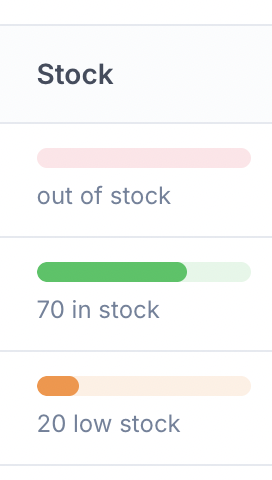
Features
- Visual progress bar representation
- Automatic status detection based on customizable thresholds
- Customizable colors for each status (danger/warning/success)
- Customizable labels for each status
- Works for any use case: inventory, tasks, storage, capacity, budgets, etc.
- Accessible with proper ARIA attributes
Installation
You can install the package via Composer:
composer require tapp/filament-progress-bar-column
Integrate plugin's Tailwind classes
Filament 3
To include the TailwindCSS plugin classes, add the plugin to content in your tailwindcss.config.js file:
export default {
    // ...
    content: [
        // ...
        './vendor/tapp/filament-progress-bar-column/resources/views/**/*.blade.php',
        './vendor/tapp/filament-progress-bar-column/src/**/*.php',
    ],
    // ...
}
Filament 4 or 5
Filament recommends developers create a custom theme to better support plugin's additional Tailwind classes. After you have created your custom theme, add the Filament Progress Bar vendor path to your theme.css file, usually located in resources/css/filament/admin/theme.css:
@source '../../../../vendor/tapp/filament-progress-bar-column';
Usage
The column is simple by design. Just two required things:
- The database column name (e.g.,
'stock','quantity','tasks_completed') - The
maxValue()method to calculate percentages
Everything else has sensible defaults but can be customized!
Basic Usage
Add the ProgressBarColumn column to your Filament table:
use Tapp\FilamentProgressBarColumn\Tables\Columns\ProgressBarColumn;

public static function table(Table $table): Table
{
    return $table
        ->columns([
            // ... other columns

            ProgressBarColumn::make('stock')
                ->maxValue(100),
        ]);
}
With Low Threshold
Define when the value should be considered "low" (warning state):
ProgressBarColumn::make('stock')
    ->maxValue(100)
    ->lowThreshold(10),
Custom Colors
Customize the colors for each status:
ProgressBarColumn::make('stock')
    ->maxValue(100)
    ->lowThreshold(10)
    ->dangerColor('rgb(239, 68, 68)')  // Red - when value ≤ 0
    ->warningColor('rgb(245, 158, 11)') // Amber - when value ≤ threshold
    ->successColor('rgb(34, 197, 94)'), // Green - when value > threshold
You can use any valid CSS color format (hex, rgb, rgba, etc.):
ProgressBarColumn::make('stock')
    ->maxValue(100)
    ->dangerColor('#ef4444')
    ->warningColor('#f59e0b')
    ->successColor('#22c55e'),
Custom Labels
Customize the labels displayed for each status:
ProgressBarColumn::make('stock')
    ->maxValue(100)
    ->lowThreshold(10)
    ->dangerLabel(fn ($state) => 'Out of stock')
    ->warningLabel(fn ($state) => "{$state} low stock")
    ->successLabel(fn ($state) => "{$state} in stock"),
Dynamic Values
Use closures for dynamic max values and thresholds:
ProgressBarColumn::make('stock')
    ->maxValue(fn ($record) => $record->warehouse_capacity)
    ->lowThreshold(fn ($record) => $record->reorder_point),
Multiple Use Cases
Inventory/Stock Tracking
ProgressBarColumn::make('quantity')
    ->label('Stock')
    ->maxValue(100)
    ->lowThreshold(15)
    ->dangerLabel(fn ($state) => 'Out of stock')
    ->warningLabel(fn ($state) => "{$state} low stock")
    ->successLabel(fn ($state) => "{$state} in stock"),
Task Completion
ProgressBarColumn::make('tasks_completed')
    ->label('Progress')
    ->maxValue(fn ($record) => $record->total_tasks)
    ->lowThreshold(fn ($record) => $record->total_tasks * 0.3)
    ->successLabel(fn ($state, $record) => "{$state}/{$record->total_tasks} tasks"),
Storage Usage
ProgressBarColumn::make('storage_used_gb')
    ->label('Storage')
    ->maxValue(fn ($record) => $record->storage_quota_gb)
    ->lowThreshold(fn ($record) => $record->storage_quota_gb * 0.8)
    ->successLabel(fn ($state, $record) => "{$state}GB / {$record->storage_quota_gb}GB"),
Event Capacity
ProgressBarColumn::make('registered_attendees')
    ->label('Capacity')
    ->maxValue(fn ($record) => $record->max_capacity)
    ->lowThreshold(fn ($record) => $record->max_capacity * 0.9)
    ->dangerLabel(fn ($state) => "No registration")
    ->warningLabel(fn ($state) => "{$state} - Almost full!")
    ->successLabel(fn ($state) => "{$state} registered"),
Complete Example
use Tapp\FilamentProgressBarColumn\Tables\Columns\ProgressBarColumn;

public static function table(Table $table): Table
{
    return $table
        ->columns([
            TextColumn::make('id'),

            TextColumn::make('name'),

            ProgressBarColumn::make('stock')
                ->label('Current Stock')
                ->maxValue(fn ($record) => $record->max_capacity)
                ->lowThreshold(20)
                ->dangerColor('#dc2626')
                ->warningColor('#f97316')
                ->successColor('#16a34a')
                ->dangerLabel(fn ($state) => 'Out of stock')
                ->warningLabel(fn ($state) => "{$state} low stock")
                ->successLabel(fn ($state) => "{$state} in stock"),

            TextColumn::make('price')
                ->money('usd'),
        ]);
}
Methods
maxValue(int | Closure $value)
Set the maximum value for the progress bar. This is used to calculate the percentage.
lowThreshold(int | Closure $value)
Set the threshold below which the status is considered "warning". If not set, only "danger" (≤0) and "success" (>0) states are used.
dangerColor(string | array | Closure $color)
Set the color for the danger state (when value ≤ 0). Default: rgb(244, 63, 94) (pink/red).
warningColor(string | array | Closure $color)
Set the color for the warning state (when value ≤ threshold). Default: rgb(251, 146, 60) (orange).
successColor(string | array | Closure $color)
Set the color for the success state (when value > threshold). Default: rgb(34, 197, 94) (green).
dangerLabel(string | Closure $label)
Set the label for danger state. The closure receives the current value as $state. Default: fn ($state) => "{$state}".
warningLabel(string | Closure $label)
Set the label for warning state. The closure receives the current value as $state. Default: fn ($state) => "{$state}".
successLabel(string | Closure $label)
Set the label for success state. The closure receives the current value as $state. Default: fn ($state) => "{$state}".
Status Logic
The column automatically determines the status based on the current value:
- Danger: Current value ≤ 0
- Warning: Current value > 0 AND current value ≤ low threshold (if set)
- Success: Current value > low threshold (or > 0 if no threshold is set)
Progress Bar Calculation
The progress bar width is calculated as:
percentage = (currentValue / maxValue) * 100
The percentage is clamped between 0 and 100.
Testing
composer test
Changelog
Please see CHANGELOG for more information on what has changed recently.
Contributing
Please see CONTRIBUTING for details.
Security Vulnerabilities
Please review our security policy on how to report security vulnerabilities.
Credits
License
The MIT License (MIT). Please see License File for more information.
tapp/filament-progress-bar-column 适用场景与选型建议
tapp/filament-progress-bar-column 是一款 基于 PHP 开发的 Composer 扩展包,目前已累计 11.77k 次下载、GitHub Stars 达 13, 最近一次更新时间为 2025 年 10 月 21 日, 在 PHP 生态内属于活跃度较高的组件。
它主要适用于以下技术方向: 「progressbar」 「laravel」 「progress」 「status」 「indicator」 「progress-bar」 等业务场景。在实际项目中,围绕这些方向常见需要落地的问题包括:接口对接、性能调优、并发安全、与既有框架(Laravel / ThinkPHP / Yii / Webman 等)的兼容适配,以及生产环境的日志埋点与稳定性保障。
我们在过去多个企业项目中使用过 tapp/filament-progress-bar-column 或与其功能相近的方案,如果你在选型或落地过程中遇到问题,例如 版本兼容、二次改造、私有化封装、与内部系统对接、生产 BUG 排查,欢迎联系我们协助评估。
基于 tapp/filament-progress-bar-column 在你已有业务上做功能扩展、字段裁剪、UI 适配、与内部账号 / 权限 / 日志系统的深度对接。
线上偶发问题、内存泄漏、慢查询、并发异常等排查修复;针对高流量场景做缓存、队列、索引层面的调优。
承接完整的项目从需求 → 设计 → 开发 → 上线 → 长期运维;也可按月提供技术保姆服务。
与 tapp/filament-progress-bar-column 相关的其它包
同方向 / 同关键字的高下载量 PHP Composer 包推荐,方便对比选型:
Zend Framework 1 ProgressBar package
A simple console progress bar for laravel 5
PACE (Progress Automatically Certain to Entertain) - Automatic page load progress bar for Yii PHP Framework
Zend Framework 1 ProgressBar package
Reusable progress bar components for Filament 5 tables and infolists.
Zend Framework ProgressBar Library
统计信息
- 总下载量: 11.77k
- 月度下载量: 0
- 日度下载量: 0
- 收藏数: 13
- 点击次数: 35
- 依赖项目数: 2
- 推荐数: 0
其他信息
- 授权协议: MIT
- 更新时间: 2025-10-21