tde/craft-commerce-product-bundles
Composer 安装命令:
composer require tde/craft-commerce-product-bundles
包简介
Combine multiple products into a purchasable bundle to sell these for a special price.
README 文档
README
Plugin for Craft CMS with Craft Commerce
Combine multiple products into a purchasable bundle to sell these for a special price. Thanks to the inspiration coming from the existing Commerce Bundles plugin, this plugin allows you to create bundles from products and not just their variants. Users can now order bundles and choose their desired variant, eg. shirt size M with trousers size L.
Requirements
This plugin requires:
- Craft CMS 4 or later
- Craft Commerce 4.1 or later
Installation
This plugin can either be installed through the Plugin Store or using Composer.
Plugin Store
- In the Craft Control Panel, go to Settings -> Plugins
- Search for 'Commerce Product Bundles'
- Hit the "Install" button
Composer
-
Open your terminal and go to your Craft project:
cd /path/to/project -
Download the plugin using Composer
composer require tde/commerce-product-bundles -
In the Craft Control Panel, go to Settings → Plugins
-
Hit the "Install" button for 'Commerce Product Bundles'.
Usage
The "Product bundles" navigation item will be added in the subnav of Commerce. Add your desired bundles and set the new price. Through the plugin settings it is also possible to add custom fields to enhance the user experience of the bundles and provide more information.
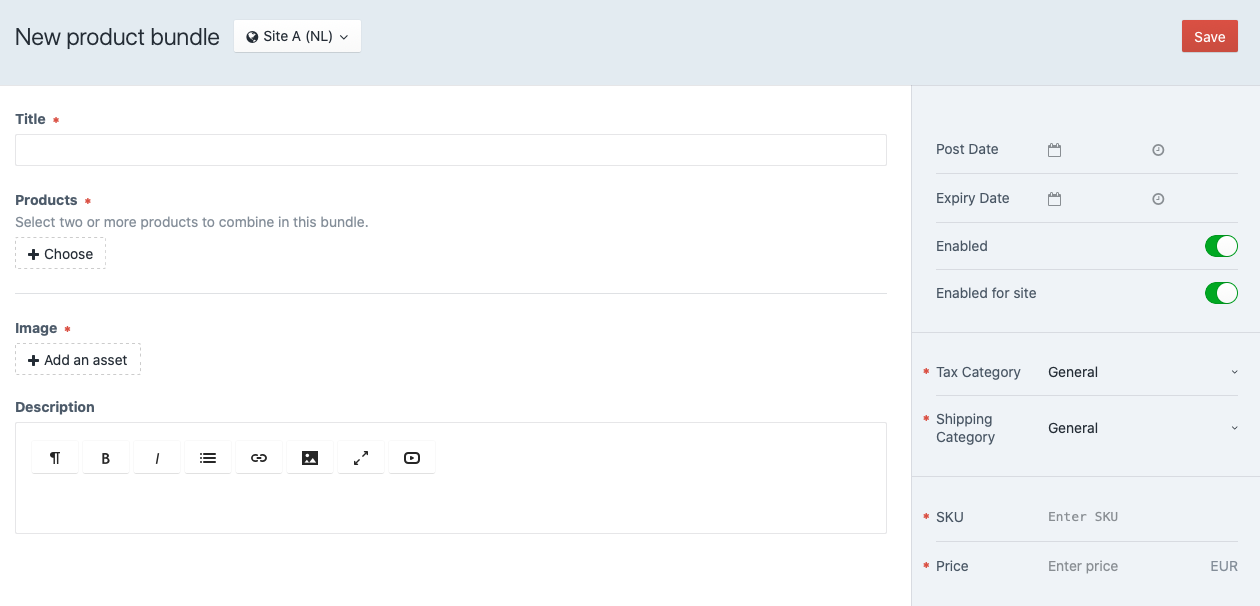
Twig example
The plugin is designed to promote product bundles from within the product detail page. When viewing product A, the user may be encouraged in buying a bundle containing product A and product B. The Twig example below illustrates how to render bundles in a product detail page:

{# templates/shop/products/_entry.html #}

{% set productBundles = craft.commerceProductBundles.getProductBundles(product) %}
{% if productBundles|length %}
    <h3>Bundle tips</h3>
    {% for productBundle in productBundles %}
        <form method="POST">
            {{ csrfInput() }}
            {{ redirectInput('shop/cart') }}
            {{ hiddenInput('action', 'commerce/cart/update-cart') }}
            {{ hiddenInput('qty', 1) }}
            {{ hiddenInput('purchasableId', productBundle.id) }}

            <h4>{{ productBundle.title }}</h4>

            {% for product in productBundle.getProducts() %}
                <h5>{{ product.title }}</h5>

                {% if product.variants|length > 1 %}
                    <select name="options[productBundleProductsVariantIds][]">
                        {% for purchasable in product.variants %}
                            <option value="{{ purchasable.id }}">{{ purchasable.description }}</option>
                        {% endfor %}
                    </select>
                {% else %}
                    {{ hiddenInput('options[productBundleProductsVariantIds][]', product.variants[0].id) }}
                {% endif %}

                {% if not loop.last %}
                    <span>+</span>
                {% endif %}
            {% endfor %}

            {{ productBundle.price|commerceCurrency(cart.currency) }}
            <input type="submit">Add to cart</button>
        </form>
    {% endfor %}
{% endif %}
Make sure to disable product variants if they are out of stock.
Field type
Since 1.0.3 there is also a custom field type available to add product bundles directly into your content.
Brought to you by TDE
统计信息
- 总下载量: 1.98k
- 月度下载量: 0
- 日度下载量: 0
- 收藏数: 0
- 点击次数: 2
- 依赖项目数: 0
- 推荐数: 0
其他信息
- 授权协议: proprietary
- 更新时间: 2019-10-30