tumtum/oxid-sql-logger
Composer 安装命令:
composer require tumtum/oxid-sql-logger
包简介
Returns all SQL queries in the browser.
README 文档
README
Returns all SQL queries into console of a Browser.
Install
composer require --dev tumtum/oxid-sql-logger
Usage
Just set the function StartSQLLog() somewhere and from that point on all SQLs will be logged.
\StartSQLLog();

$db = \OxidEsales\Eshop\Core\DatabaseProvider::getDb(\OxidEsales\Eshop\Core\DatabaseProvider::FETCH_MODE_ASSOC);
$list = $db->getAll('SELECT * FROM oxarticles WHERE oxprice < ? LIMIT 100', [49.99]);

\StopSQLLog();
Screenshots
Browser:
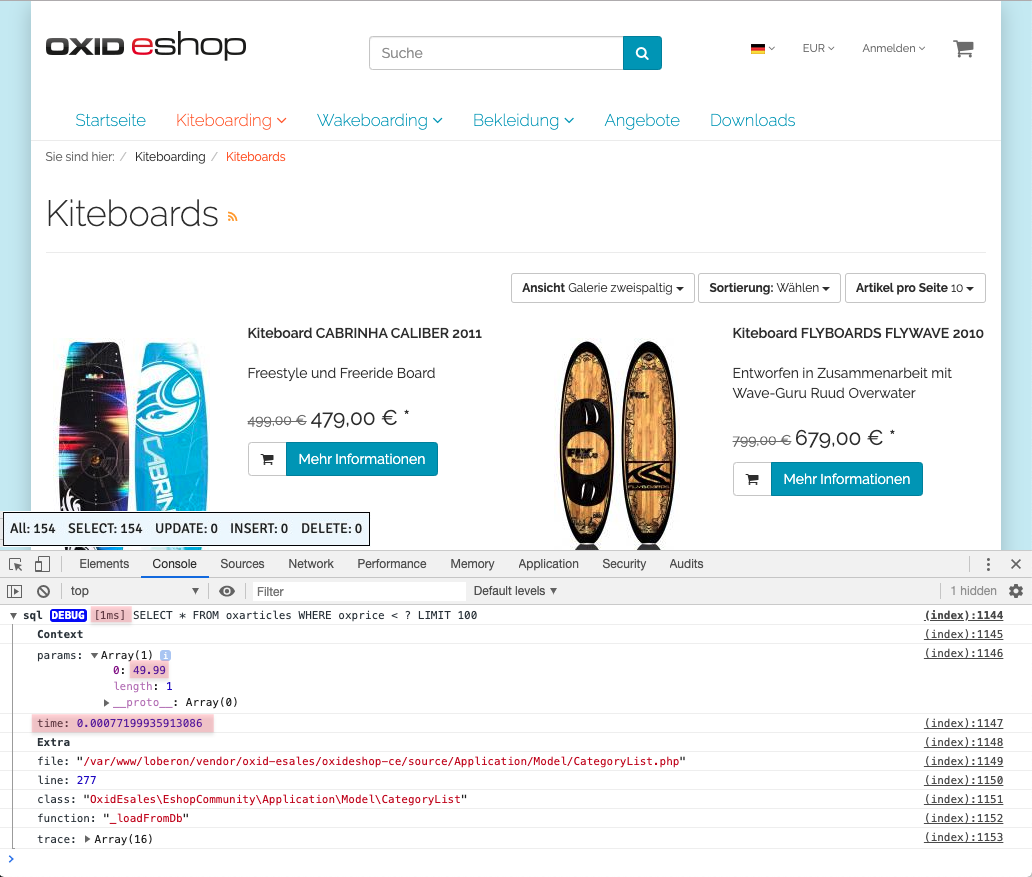
CLI:

SQL Query Status Monitor

See how many queries and which types of queries have been added to the database. To determine the amount.
Switch on
For this purpose, the parameter $this->blSQLStatusBox = true; must be stored in the file config.ing.php.
So you can turn it on and off temporarily.
Unique: Insert, at the end, the Smarty tag: [{tm_sql_status}] in the base.tpl file.
####### source/Application/views/flow/tpl/layout/base.tpl
        [{tm_sql_status}]
        </body>
    </html>
统计信息
- 总下载量: 1.06k
- 月度下载量: 0
- 日度下载量: 0
- 收藏数: 1
- 点击次数: 1
- 依赖项目数: 0
- 推荐数: 0
其他信息
- 授权协议: GPL-3.0
- 更新时间: 2019-08-20