ui-awesome/html-core
Composer 安装命令:
composer require ui-awesome/html-core
包简介
Core HTML tag rendering foundation for PHP: abstract bases for block, inline, input, and void elements, lifecycle hooks, simple factory, and defaults/theme providers.
关键字:
README 文档
README

Html Core
A type-safe PHP library for standards-compliant HTML tag rendering
Build and render block, inline, input, and void elements with immutable fluent APIs.
Features
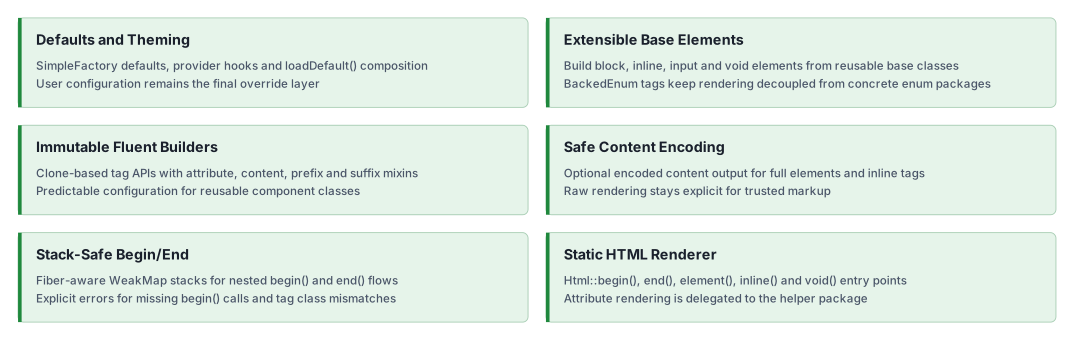
Installation
composer require ui-awesome/html-core:^0.6
Quick start
Rendering HTML tags with enums
Renders begin/end tags and full elements using standards-compliant tag enums.
<?php

declare(strict_types=1);

namespace App;

use UIAwesome\Html\Core\Html;
use UIAwesome\Html\Interop\{Block, Inline, Voids};

echo Html::begin(Block::DIV, ['class' => 'container']);
// <div class="container">

echo Html::inline(Inline::SPAN, 'Hello');
// <span>Hello</span>

echo Html::end(Block::DIV);
// </div>
Rendering a full element (with optional content encoding)
<?php declare(strict_types=1); namespace App; use UIAwesome\Html\Core\Html; use UIAwesome\Html\Interop\Block; $content = '<span>Test Content</span>'; echo Html::element(Block::DIV, $content, ['class' => 'test-class']); // <div class="test-class"> // <span>Test Content</span> // </div> echo Html::element(Block::DIV, $content, ['class' => 'test-class'], true); // <div class="test-class"> // <span>Test Content</span> // </div>
Rendering void elements with structured attributes
Void tags render without closing tags. Complex attributes (like class arrays and data arrays) are rendered via the
installed ui-awesome/html-helper dependency.
<?php

declare(strict_types=1);

namespace App;

use UIAwesome\Html\Core\Html;
use UIAwesome\Html\Interop\Voids;

echo Html::void(
    Voids::IMG,
    [
        'class' => ['void'],
        'data' => ['role' => 'presentation'],
    ],
);

// <img class="void" data-role="presentation">
Input elements with prefix/suffix templates
Input elements render the input tag with optional prefix and suffix segments through the same template primitives used by inline elements.
<?php

declare(strict_types=1);

namespace App;

use BackedEnum;
use UIAwesome\Html\Core\Element\BaseInput;
use UIAwesome\Html\Interop\{Inline, Voids};

final class SearchInput extends BaseInput
{
    protected function getTag(): BackedEnum
    {
        return Voids::INPUT;
    }

    protected function run(): string
    {
        return $this->buildElement();
    }
}

echo SearchInput::tag()
    ->type('search')
    ->name('q')
    ->prefix('Search')
    ->prefixTag(Inline::LABEL)
    ->render();

// <label>Search</label>
// <input name="q" type="search">
Building custom elements with immutable fluent APIs
Create your own element classes by extending the provided base elements.
<?php

declare(strict_types=1);

namespace App;

use UIAwesome\Html\Core\Element\BaseBlock;
use UIAwesome\Html\Interop\Block;
use BackedEnum;

final class Div extends BaseBlock
{
    protected function getTag(): BackedEnum
    {
        return Block::DIV;
    }
}

echo Div::tag()
    ->class('card')
    ->content('Content')
    ->render();

// <div class="card">
// Content
// </div>
Nested rendering with begin() / end()
BaseBlock supports stack-based begin/end rendering, with protection against mismatched tags.
<?php

declare(strict_types=1);

namespace App;

use UIAwesome\Html\Core\Element\BaseBlock;
use UIAwesome\Html\Interop\Block;
use BackedEnum;

final class Div extends BaseBlock
{
    protected function getTag(): BackedEnum
    {
        return Block::DIV;
    }
}

echo Div::tag()->begin();
echo 'Nested Content';
echo Div::end();

// <div>
// Nested Content
// </div>
Inline elements with prefix/suffix and templates
Inline elements can render prefix and suffix segments, optionally wrapped in their own tags.
<?php

declare(strict_types=1);

namespace App;

use UIAwesome\Html\Core\Element\BaseInline;
use UIAwesome\Html\Interop\Inline;
use BackedEnum;

final class Span extends BaseInline
{
    protected function getTag(): BackedEnum
    {
        return Inline::SPAN;
    }

    protected function run(): string
    {
        return $this->buildElement($this->getContent());
    }
}

echo Span::tag()
    ->content('Content')
    ->prefix('Prefix')
    ->prefixTag(Inline::STRONG)
    ->suffix('Suffix')
    ->suffixTag(Inline::EM)
    ->render();

// <strong>Prefix</strong>
// <span>Content</span>
// <em>Suffix</em>
Defaults and theming via providers
You can apply configuration through global defaults, per-instance defaults, and optional default/theme providers.
<?php

declare(strict_types=1);

namespace App;

use UIAwesome\Html\Core\Base\BaseTag;
use UIAwesome\Html\Core\Element\BaseInline;
use UIAwesome\Html\Core\Factory\SimpleFactory;
use UIAwesome\Html\Core\Provider\{DefaultsProviderInterface, ThemeProviderInterface};
use UIAwesome\Html\Interop\Inline;
use BackedEnum;

final class Span extends BaseInline
{
    protected function getTag(): BackedEnum
    {
        return Inline::SPAN;
    }

    protected function run(): string
    {
        return $this->buildElement($this->getContent());
    }
}

final class Defaults implements DefaultsProviderInterface
{
    public function getDefaults(BaseTag $tag): array
    {
        return ['class' => 'badge'];
    }
}

final class Theme implements ThemeProviderInterface
{
    public function apply(BaseTag $tag, string $theme): array
    {
        return $theme === 'muted' ? ['class' => 'text-muted'] : [];
    }
}

SimpleFactory::setDefaults(Span::class, ['title' => 'from-global']);

echo Span::tag(['id' => 'badge-1'])
    ->addDefaultProvider(Defaults::class)
    ->addThemeProvider('muted', Theme::class)
    ->content('New')
    ->render();

// <span class="badge text-muted" id="badge-1" title="from-global">New</span>
Class-level defaults with loadDefault()
For a simpler approach without separate provider classes, override loadDefault() in your tag class. These defaults are
applied automatically when tag() is called.
<?php

declare(strict_types=1);

namespace App;

use UIAwesome\Html\Core\Element\BaseBlock;
use UIAwesome\Html\Interop\Block;
use BackedEnum;

final class Container extends BaseBlock
{
    protected function getTag(): BackedEnum
    {
        return Block::DIV;
    }

    protected function loadDefault(): array
    {
        return [
            'class' => 'container',
        ];
    }
}

echo Container::tag()->render();
// <div class="container">
// </div>

echo Container::tag(['class' => 'container-fluid'])->render();
// <div class="container container-fluid">
// </div>
Configuration priority (from weakest to strongest):
- Global defaults via
SimpleFactory::setDefaults() - Class defaults from
loadDefault() - User defaults passed to
tag()
Extensibility
This library is agnostic and designed to be extended. You can define your own tag collections (for example, for SVG, MathML, or Web Components) with custom string-backed enums.
Html::element()handles generic open/content/close rendering.Html::inline()handles inline rendering.Html::void()handles void rendering.
You can create a custom enum for your specific domain and use it with html-core.
enum SvgTag: string
{
    case SVG = 'svg';
    case G = 'g';
    // ... add other SVG block tags as needed
}

// now you can use it with the Html renderer or your custom classes
echo Html::element(SvgTag::G, '...');
// <g>...</g>
Documentation
For detailed configuration options and advanced usage.
Package information
Quality code
Our social networks
License
ui-awesome/html-core 适用场景与选型建议
ui-awesome/html-core 是一款 基于 PHP 开发的 Composer 扩展包,目前已累计 28.71k 次下载、GitHub Stars 达 1, 最近一次更新时间为 2024 年 03 月 30 日, 在 PHP 生态内属于活跃度较高的组件。
它主要适用于以下技术方向: 「php」 「html」 「factory」 「Rendering」 「providers」 「ui-awesome」 等业务场景。在实际项目中,围绕这些方向常见需要落地的问题包括:接口对接、性能调优、并发安全、与既有框架(Laravel / ThinkPHP / Yii / Webman 等)的兼容适配,以及生产环境的日志埋点与稳定性保障。
我们在过去多个企业项目中使用过 ui-awesome/html-core 或与其功能相近的方案,如果你在选型或落地过程中遇到问题,例如 版本兼容、二次改造、私有化封装、与内部系统对接、生产 BUG 排查,欢迎联系我们协助评估。
基于 ui-awesome/html-core 在你已有业务上做功能扩展、字段裁剪、UI 适配、与内部账号 / 权限 / 日志系统的深度对接。
线上偶发问题、内存泄漏、慢查询、并发异常等排查修复;针对高流量场景做缓存、队列、索引层面的调优。
承接完整的项目从需求 → 设计 → 开发 → 上线 → 长期运维;也可按月提供技术保姆服务。
与 ui-awesome/html-core 相关的其它包
同方向 / 同关键字的高下载量 PHP Composer 包推荐,方便对比选型:
Texy converts plain text in easy to read Texy syntax into structurally valid (X)HTML. It supports adding of images, links, nested lists, tables and has full support for CSS. Texy supports hyphenation of long words (which reflects language rules), clickable emails and URL (emails are obfuscated again
Testing object factory for PHP
Testing object factory for PHP
Laravel 5 Model Factory Generator.
HTML and form generation
A model factory package for Laravel 4 with expressive API for creating custom tailored dummy objects
统计信息
- 总下载量: 28.71k
- 月度下载量: 0
- 日度下载量: 0
- 收藏数: 1
- 点击次数: 23
- 依赖项目数: 4
- 推荐数: 0
其他信息
- 授权协议: BSD-3-Clause
- 更新时间: 2024-03-30