vildanbina/livewire-wizard
Composer 安装命令:
composer require vildanbina/livewire-wizard
包简介
Laravel Livewire Wizard (Multi-Step Form) component
README 文档
README
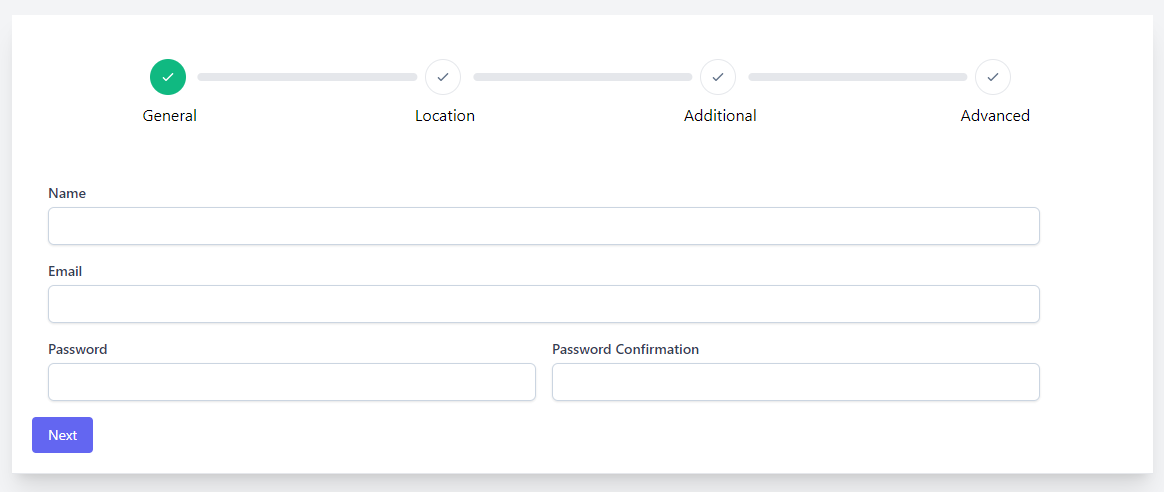
A dynamic Laravel Livewire component for multi steps form.
Installation
You can install the package via composer:
composer require vildanbina/livewire-wizard
For UI design this package require WireUI package for details.
Alpine
Livewire Wizard requires Alpine. You can use the official CDN to quickly include Alpine:
<!-- Alpine v2 -->
<script src="https://cdn.jsdelivr.net/gh/alpinejs/alpine@v2.x.x/dist/alpine.min.js" defer></script>

<!-- Alpine v3 -->
<script defer src="https://unpkg.com/alpinejs@3.x.x/dist/cdn.min.js"></script>
TailwindCSS
The base modal is made with TailwindCSS. If you use a different CSS framework I recommend that you publish the modal template and change the markup to include the required classes for your CSS framework.
php artisan vendor:publish --tag=livewire-wizard-views
Usage
Creating a wizard form
You can create livewire component php artisan make:livewire UserWizard to make the initial Livewire component. Open your component class and make sure it extends the WizardComponent class:
<?php

namespace App\Livewire;

use Vildanbina\LivewireWizard\WizardComponent;
use App\Models\User;

class UserWizard extends WizardComponent
{
    // My custom class property
    public $userId;

    /*
     * Will return App\Models\User instance or will create empty User (based on $userId parameter)
     */
    public function model()
    {
        return User::findOrNew($this->userId);
    }
}
When you need to display wizard form, based on above example we need to pass $userId value and to display wizard form:
<livewire:user-wizard user-id="3"/>
Or when you want to create new user, let blank user-id attribute, or don't put that.
When you want to reset form, ex. To reset to the first step, and clear filled fields. You can use:
$wizardFormInstance->resetForm();
When you want to have current step instance. You can use:
$wizardFormInstance->getCurrentStep();
When you want to go to specific step. You can use:
$wizardFormInstance->setStep($step);
Or, you want to go in the next step:
$wizardFormInstance->goToNextStep();
Or, you want to go in the prev step:
$wizardFormInstance->goToPrevStep();
Creating a wizard step
You can create wizard form step. Open or create your step class (at App\Steps folder) and make sure it extends the Step class:
<?php

namespace App\Steps;

use Vildanbina\LivewireWizard\Components\Step;
use Illuminate\Validation\Rule;

class General extends Step
{
    // Step view located at resources/views/steps/general.blade.php
    protected string $view = 'steps.general';

    /*
     * Initialize step fields
     */
    public function mount()
    {
        $this->mergeState([
            'name'                  => $this->model->name,
            'email'                 => $this->model->email,
        ]);
    }

    /*
    * Step icon
    */
    public function icon(): string
    {
        return 'check';
    }

    /*
     * When Wizard Form has submitted
     */
    public function save($state)
    {
        $user = $this->model;

        $user->name     = $state['name'];
        $user->email    = $state['email'];

        $user->save();
    }

    /*
     * Step Validation
     */
    public function validate()
    {
        return [
            [
                'state.name'     => ['required', Rule::unique('users', 'name')->ignoreModel($this->model)],
                'state.email'    => ['required', Rule::unique('users', 'email')->ignoreModel($this->model)],
            ],
            [],
            [
                'state.name'     => __('Name'),
                'state.email'    => __('Email'),
            ],
        ];
    }

    /*
     * Step Title
     */
    public function title(): string
    {
        return __('General');
    }
}
Note: Remember to use the prefix state. in the wire:model attribute in views, for example: wire:model="state.name"
In Step class, you can use livewire hooks example:
use Vildanbina\LivewireWizard\Components\Step;

class General extends Step
{
    public function onStepIn($newStep)
    {
        // Something you want
    }

    public function onStepOut($oldStep)
    {
        // Something you want
    }

    public function updating($name, $value)
    {
        // Something you want
    }

    public function updatingState($name, $value)
    {
        // Something you want
    }

    public function updated($name, $value)
    {
        // Something you want
    }

    public function updatedState($name, $value)
    {
        // Something you want
    }
}
Each step need to have view, you can pass view path in $view property.
After create step class, you need to put that step to wizard form:
<?php

namespace App\Livewire;

use App\Steps\General;
use Vildanbina\LivewireWizard\WizardComponent;

class UserWizard extends WizardComponent
{
    public array $steps = [
        General::class,
        // Other steps...
    ];

    ...
}
Building Tailwind CSS for production
Because some classes are dynamically build and to compile js you should add some classes to the purge safelist so your tailwind.config.js should look something like this:
module.exports = {
    presets: [
        require("./vendor/wireui/wireui/tailwind.config.js")
    ],
    content: [
        "./resources/**/*.blade.php",
        "./resources/**/*.js",
        "./resources/**/*.vue",

        "./vendor/vildanbina/livewire-wizard/resources/views/*.blade.php",
        "./vendor/wireui/wireui/resources/**/*.blade.php",
        "./vendor/wireui/wireui/ts/**/*.ts",
        "./vendor/wireui/wireui/src/View/**/*.php"
    ],
    plugins: [
        require("@tailwindcss/forms"),
    ],
};
If you haven't installed tailwindcss/forms plugin, install it: npm install -D @tailwindcss/forms
Contributing
Please see CONTRIBUTING for details.
Security Vulnerabilities
Please e-mail vildanbina@gmail.com to report any security vulnerabilities instead of the issue tracker.
Credits
License
The MIT License (MIT). Please see License File for more information.
vildanbina/livewire-wizard 适用场景与选型建议
vildanbina/livewire-wizard 是一款 基于 PHP 开发的 Composer 扩展包,目前已累计 19.69k 次下载、GitHub Stars 达 349, 最近一次更新时间为 2022 年 02 月 26 日, 在 PHP 生态内属于活跃度较高的组件。
它主要适用于以下技术方向: 「form」 「wizard」 「laravel」 「livewire」 「multi-steps」 等业务场景。在实际项目中,围绕这些方向常见需要落地的问题包括:接口对接、性能调优、并发安全、与既有框架(Laravel / ThinkPHP / Yii / Webman 等)的兼容适配,以及生产环境的日志埋点与稳定性保障。
我们在过去多个企业项目中使用过 vildanbina/livewire-wizard 或与其功能相近的方案,如果你在选型或落地过程中遇到问题,例如 版本兼容、二次改造、私有化封装、与内部系统对接、生产 BUG 排查,欢迎联系我们协助评估。
基于 vildanbina/livewire-wizard 在你已有业务上做功能扩展、字段裁剪、UI 适配、与内部账号 / 权限 / 日志系统的深度对接。
线上偶发问题、内存泄漏、慢查询、并发异常等排查修复;针对高流量场景做缓存、队列、索引层面的调优。
承接完整的项目从需求 → 设计 → 开发 → 上线 → 长期运维;也可按月提供技术保姆服务。
与 vildanbina/livewire-wizard 相关的其它包
同方向 / 同关键字的高下载量 PHP Composer 包推荐,方便对比选型:
Provides methods to create, validate and render HTML forms in PHP.
Site generator / tree model duplicator used to generate mini-website or duplicate tree model
Diese Contao 4 Erweiterung stellt Google reCAPTCHA V2 in Form eines neuen Formularfeldes im Formulargenerator bereit. This extension provides Google reCAPTCHA V2 in the form of a new form field in the form generator of Contao Open Source CMS.
A Laravel Filament Forms slug field.
A jQuery augmented PHP library for creating and validating HTML forms
Multi step wizard widget using tabs to guide a user through steps to complete a task. Based on the Form wizard (using tabs) from lukepzak (see http://bootsnipp.com/snippets/featured/form-wizard-using-tabs).
统计信息
- 总下载量: 19.69k
- 月度下载量: 0
- 日度下载量: 0
- 收藏数: 350
- 点击次数: 20
- 依赖项目数: 0
- 推荐数: 0
其他信息
- 授权协议: MIT
- 更新时间: 2022-02-26