webvpf/wn-christmas-plugin
Composer 安装命令:
composer require webvpf/wn-christmas-plugin
包简介
Christmas - plugin for Winter CMS.
README 文档
README
Christmas
Christmas decorations for Winter CMS sites.
Installing Composer
composer require webvpf/wn-christmas-plugin
Features
- there is no interaction with database
- without jQuery
Components
- Christmas garland
- Falling snow
Christmas garland
[ChristmasGarland]
dateOn = "01-01"
dateOff = "12-31"
==
{% component 'ChristmasGarland' %}
The date of turning on and off the garland is indicated in the format mm-dd.
Snow
[ChristmasSnow]
amount = 50
size = 5
speed = 1.5
wind = 0
color = "#fff"
opacity = 0.8
swing = 1
==
{% component 'ChristmasSnow' %}
amount- Number of snowflakes displayed at the same time. Default:50size- snowflake size. Default: 5speed- The speed of falling snowflakes vertically. The higher the value, the faster the snowflakes fall. Default:1.5wind- Horizontal wind energy. The wind will blow to the right if it is a positive number, and a negative number causes the wind to blow to the left. Default: 0color- The color of the snowflakes. This parameter accepts the color code HEX or RGB, example#fff,#fffffforrgb (255,255,255). Default:#fffopacity- Maximum transparency of snowflakes. The plugin will generate snowflakes with different opacity from 0 to this number. Default:0.8swing- Swinging snowflakes. If you don't want the snowflakes to wobble, set this parameter to0. Default:1
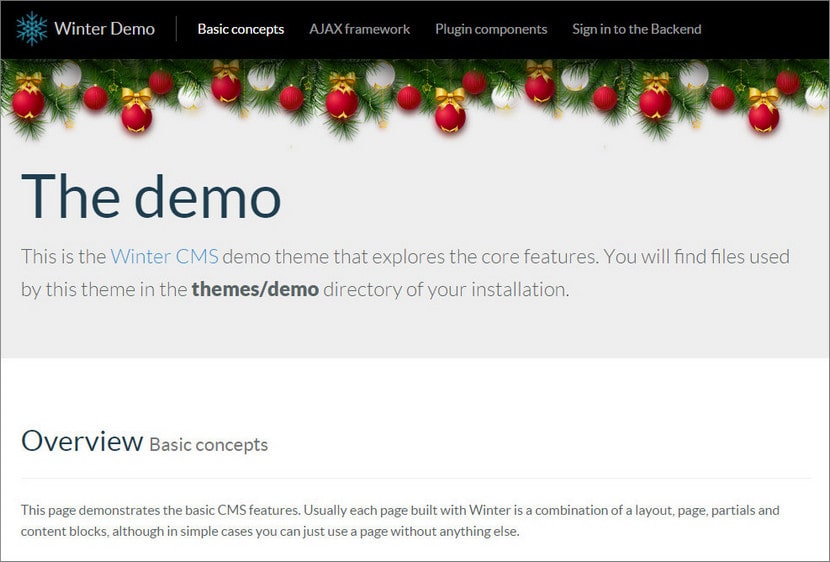
Example of garland output in the Winter CMS Demo theme
Below is an example of how to insert a garland in a demo template on the main page of the site right below the menu. According to this principle, you can insert a garland not on the page, but into the template (for display on all pages).
Go to CMS and open Demonstration page. At the very beginning of the markup, insert Christmas garland component by dragging and dropping. To make the garland display correct, add the styles before the twig with the ChristmasGarland component as in this example:
<style>.jumbotron{padding-top:100px}.b-page_newyear{position:absolute;width:100%;height:100px;top:71px}</style>

{% component 'ChristmasGarland' %}

demo page content...
统计信息
- 总下载量: 29
- 月度下载量: 0
- 日度下载量: 0
- 收藏数: 3
- 点击次数: 1
- 依赖项目数: 0
- 推荐数: 0
其他信息
- 授权协议: MIT
- 更新时间: 2021-12-12