zenphp/termwind
Composer 安装命令:
composer require zenphp/termwind
包简介
Its like Tailwind CSS, but for the console.
README 文档
README

Termwind
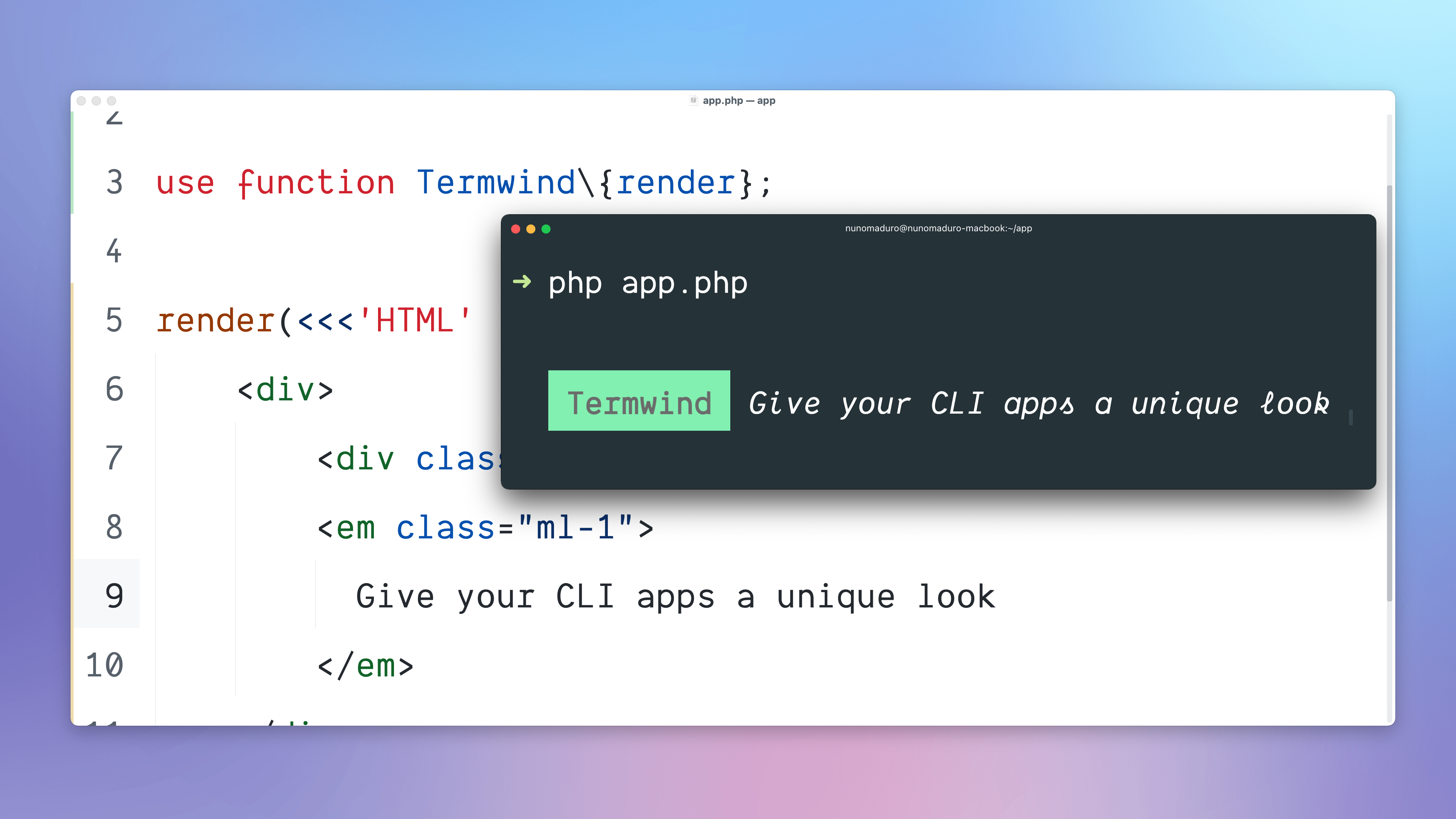




This is a clone of the original Termwind package written and maintained by Nuno Maduro. This package ONLY supports ZenPHP applications.
Termwind allows you to build unique and beautiful PHP command-line applications, using the Tailwind CSS API. In short, it's like Tailwind CSS, but for the PHP command-line applications.
Installation
Requires PHP 8.3+
Require Termwind using Composer:
composer require zenphp/termwind
Usage
use function Zen\Termwind\{render};

// single line html...
render('<div class="px-1 bg-green-300">Termwind</div>');

// multi-line html...
render(<<<'HTML'
    <div>
        <div class="px-1 bg-green-600">Termwind</div>
        <em class="ml-1">
          Give your CLI apps a unique look
        </em>
    </div>
HTML);

// Zen console commands...
class UsersCommand extends Command
{
    public function handle()
    {
        render(
            view('users.index', [
                'users' => User::all()
            ])
        );
    }
}
style()
The style() function may be used to add own custom styles and also update colors.
use function Zen\Termwind\{style};

style('green-300')->color('#bada55');
style('btn')->apply('p-4 bg-green-300 text-white');

render('<div class="btn">Click me</div>');
ask()
The ask() function may be used to prompt the user with a question.
use function Zen\Termwind\{ask};

$answer = ask(<<<HTML
    <span class="mt-1 ml-2 mr-1 bg-green px-1 text-black">
        What is your name?
    </span>
HTML);
The return provided from the ask method will be the answer provided from the user.
terminal()
The terminal() function returns an instance of the Terminal class, with the following methods:
->width(): Returns the full width of the terminal.->height(): Returns the full height of the terminal.->clear(): It clears the terminal screen.
Classes Supported
All the classes supported use exactly the same logic that is available on tailwindcss.com/docs.
- Background Color:
bg-{color}-{variant}. - Text Color:
text-{color}-{variant}. - Font Weight:
font-bold,font-normal. - Font Style:
italic. - Text Decoration:
underline,line-through. - Text Transform:
uppercase,lowercase,capitalize,snakecase. - Text Overflow:
truncate. - Text Alignment:
text-left,text-center,text-right. - Margin:
m-{margin},ml-{leftMargin},mr-{rightMargin},mt-{topMargin},mb-{bottomMargin},mx-{horizontalMargin},my-{verticalMargin}. - Padding:
p-{padding},pl-{leftPadding},pr-{rightPadding},pt-{topPadding},pb-{bottomPadding},px-{horizontalPadding},py-{verticalPadding}. - Space:
space-y-{space},space-x-{space}. - Width:
w-{width},w-full,w-auto. - Min Width:
min-w-{width}. - Max Width:
max-w-{width}. - Justify Content:
justify-between,justify-around,justify-evenly,justify-center. - Visibility:
invisible. - Display:
block,flex,hidden. - Flex:
flex-1. - List Style:
list-disc,list-decimal,list-square,list-none. - Content:
content-repeat-['.'].
Responsive Design
Like TailwindCSS we also support Responsive Design media queries and this are the breakpoints supported:
sm: 64 spaces (640px)md: 76 spaces (768px)lg: 102 spaces (1024px)xl: 128 spaces (1280px)2xl: 153 spaces (1536px)
render(<<<'HTML'
    <div class="bg-blue-500 sm:bg-red-600">
        If bg is blue is sm, if red > than sm breakpoint.
    </div>
HTML);
All the sizes for the CLI are based on Font Size 15.
HTML Elements Supported
All the elements have the capability to use the class attribute.
<div>
The <div> element can be used as a block type element.
Default Styles: block
render(<<<'HTML'
    <div>This is a div element.</div>
HTML);
<p>
The <p> element can be used as a paragraph.
Default Styles: block
render(<<<'HTML'
    <p>This is a paragraph.</p>
HTML);
<span>
The <span> element can be used as an inline text container.
render(<<<'HTML'
    <p>
        This is a CLI app built with <span class="text-green-300">Termwind</span>.
    </p>
HTML);
<a>
The <a> element can be used as a hyperlink. It allows to use the href attribute to open the link when clicked.
render(<<<'HTML'
    <p>
        This is a CLI app built with Termwind. <a href="/">Click here to open</a>
    </p>
HTML);
<b> and <strong>
The <b>and <strong> elements can be used to mark the text as bold.
Default Styles: font-bold
render(<<<'HTML'
    <p>
        This is a CLI app built with <b>Termwind</b>.
    </p>
HTML);
<i> and <em>
The <i> and <em> elements can be used to mark the text as italic.
Default Styles: italic
render(<<<'HTML'
    <p>
        This is a CLI app built with <i>Termwind</i>.
    </p>
HTML);
<s>
The <s> element can be used to add a line through the text.
Default Styles: line-through
render(<<<'HTML'
    <p>
        This is a CLI app built with <s>Termwind</s>.
    </p>
HTML);
<br>
The <br> element can be used to do a line break.
render(<<<'HTML'
    <p>
        This is a CLI <br>
        app built with Termwind.
    </p>
HTML);
<ul>
The <ul> element can be used for an unordered list. It can only accept <li> elements as childs, if there is another element provided it will throw an InvalidChild exception.
Default Styles: block, list-disc
render(<<<'HTML'
    <ul>
        <li>Item 1</li>
        <li>Item 2</li>
    </ul>
HTML);
<ol>
The <ol> element can be used for an ordered list. It can only accept <li> elements as childs, if there is another element provided it will throw an InvalidChild exception.
Default Styles: block, list-decimal
render(<<<'HTML'
    <ol>
        <li>Item 1</li>
        <li>Item 2</li>
    </ol>
HTML);
<li>
The <li> element can be used as a list item. It should only be used as a child of <ul> and <ol> elements.
Default Styles: block, list-decimal
render(<<<'HTML'
    <ul>
        <li>Item 1</li>
    </ul>
HTML);
<dl>
The <dl> element can be used for a description list. It can only accept <dt> or <dd> elements as childs, if there is another element provided it will throw an InvalidChild exception.
Default Styles: block
render(<<<'HTML'
    <dl>
        <dt>🍃 Termwind</dt>
        <dd>Give your CLI apps a unique look</dd>
    </dl>
HTML);
<dt>
The <dt> element can be used as a description title. It should only be used as a child of <dl> elements.
Default Styles: block, font-bold
render(<<<'HTML'
    <dl>
        <dt>🍃 Termwind</dt>
    </dl>
HTML);
<dd>
The <dd> element can be used as a description title. It should only be used as a child of <dl> elements.
Default Styles: block, ml-4
render(<<<'HTML'
    <dl>
        <dd>Give your CLI apps a unique look</dd>
    </dl>
HTML);
<hr>
The <hr> element can be used as a horizontal line.
render(<<<'HTML'
    <div>
        <div>🍃 Termwind</div>
        <hr>
        <p>Give your CLI apps a unique look</p>
    </div>
HTML);
<table>
The <table> element can have columns and rows.
render(<<<'HTML'
    <table>
        <thead>
            <tr>
                <th>Task</th>
                <th>Status</th>
            </tr>
        </thead>
        <tr>
            <th>Termwind</th>
            <td>✓ Done</td>
        </tr>
    </table>
HTML);
<pre>
The <pre> element can be used as preformatted text.
render(<<<'HTML'
    <pre>
        Text in a pre element
        it preserves
        both      spaces and
        line breaks
    </pre>
HTML);
<code>
The <code> element can be used as code highlighter. It accepts line and start-line attributes.
render(<<<'HTML'
    <code line="22" start-line="20">
        try {
            throw new \Exception('Something went wrong');
        } catch (\Throwable $e) {
            report($e);
        }
    </code>
HTML);
Termwind is an open-sourced software licensed under the MIT license.
zenphp/termwind 适用场景与选型建议
zenphp/termwind 是一款 基于 PHP 开发的 Composer 扩展包,目前已累计 11 次下载、GitHub Stars 达 0, 最近一次更新时间为 2024 年 08 月 14 日, 在 PHP 生态内属于活跃度较高的组件。
它主要适用于以下技术方向: 「package」 「php」 「cli」 「css」 「console」 「style」 等业务场景。在实际项目中,围绕这些方向常见需要落地的问题包括:接口对接、性能调优、并发安全、与既有框架(Laravel / ThinkPHP / Yii / Webman 等)的兼容适配,以及生产环境的日志埋点与稳定性保障。
我们在过去多个企业项目中使用过 zenphp/termwind 或与其功能相近的方案,如果你在选型或落地过程中遇到问题,例如 版本兼容、二次改造、私有化封装、与内部系统对接、生产 BUG 排查,欢迎联系我们协助评估。
基于 zenphp/termwind 在你已有业务上做功能扩展、字段裁剪、UI 适配、与内部账号 / 权限 / 日志系统的深度对接。
线上偶发问题、内存泄漏、慢查询、并发异常等排查修复;针对高流量场景做缓存、队列、索引层面的调优。
承接完整的项目从需求 → 设计 → 开发 → 上线 → 长期运维;也可按月提供技术保姆服务。
与 zenphp/termwind 相关的其它包
同方向 / 同关键字的高下载量 PHP Composer 包推荐,方便对比选型:
Simple ASCII output of array data
Slim starter / Slim skeleton package to boost your development with Slim framework
Generates a trait to help ease the access of custom repo methods
Alfabank REST API integration
Eco CLI for Laravel .env syncing
统计信息
- 总下载量: 11
- 月度下载量: 0
- 日度下载量: 0
- 收藏数: 0
- 点击次数: 17
- 依赖项目数: 1
- 推荐数: 0
其他信息
- 授权协议: MIT
- 更新时间: 2024-08-14