zofe/rapyd-livewire
Composer 安装命令:
composer require zofe/rapyd-livewire
包简介
rapyd-livewire
关键字:
README 文档
README

requirements: laravel ^8.65 | 9.* | 10.*
Demo: rapyd.dev
What is it?
is a laravel library of blade components, livewire traits, and modules scaffolder that you can use to generate administration interfaces in a concise, reusable, uncluttered, and testable manner.
It also bundles standard frontend libraries like Bootstrap, Vue, Alpine, Tom Select and Quill to be used as fast boilerplate for your laravel admin panels.
The idea is to speed up and organize the development of large laravel applications:
- modular approach (you can organize your backends into reusable modules, isolating everything, components, views, tests, but also translations, migrations, jobs, each module can be like an isolated laravel application)
- livewire component based (no needed controllers, each component is naturally reactive, you can get away with few pure livewire classes and blade views, easily testable and maintainable)
- blade component based (dozens of available anonymous components to standardize frontend in few "bootstrap based" spacialized tags, which you can eventually extend)
Modules
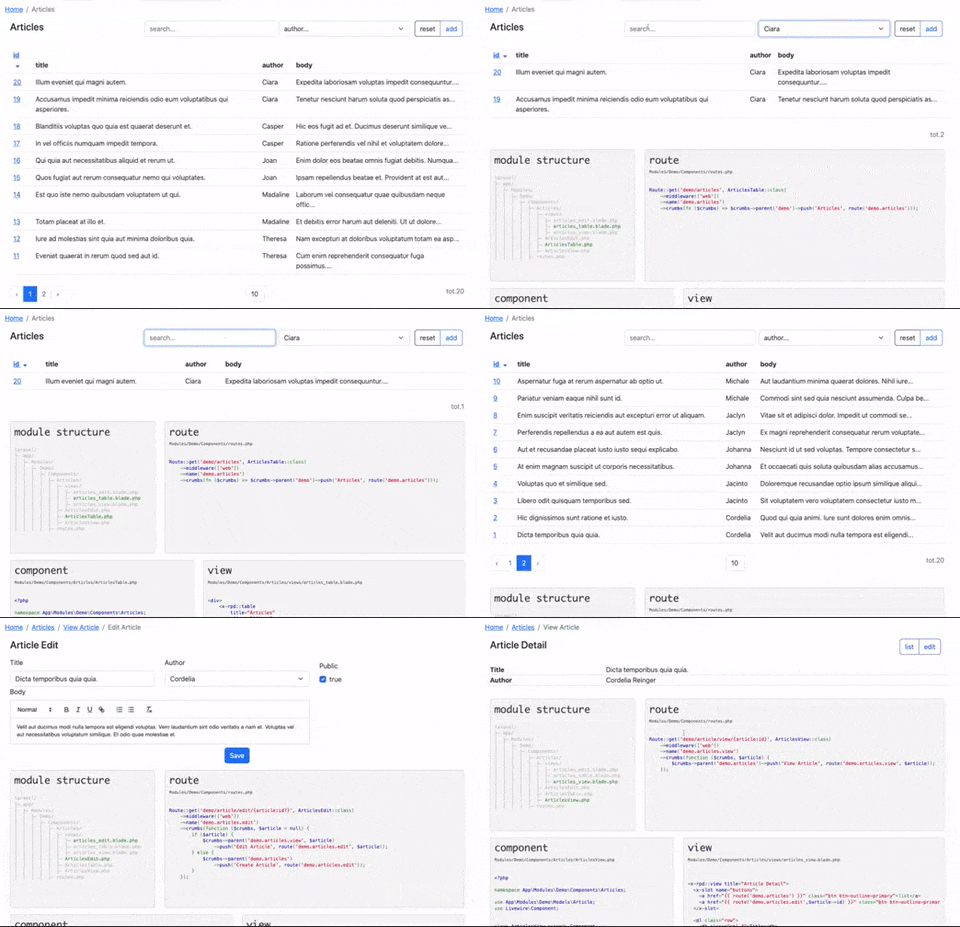
example of out of the box module structure you can use after installing rapyd.
- You can create "Modules" folder in you app/ directory of your laravel application.
- Then you can create your Module Folder i.e.:
Blog - Livewire components will be searched in the
Componentssubfolder - You can refer to the views in your module using intuitive shortcut i.e.:
blog::Articles.views.articles_edit - Inside your Module folder you can reply (if needed) the laravel application folder structure (controllers, migrations, jobs, etc..)
laravel/
├─ app/
│  ├─ Modules/
│  │  ├─ Blog/
│  │  │  ├─ Components/
│  │  │  │  ├─ Articles/
│  │  │  │  │  ├─ views/
│  │  │  │  │  │  ├─ articles_edit.blade.php
│  │  │  │  │  │  ├─ articles_table.blade.php
│  │  │  │  │  │  ├─ articles_view.blade.php
│  │  │  │  │  ├─ ArticlesEdit.php
│  │  │  │  │  ├─ ArticlesTable.php
│  │  │  │  │  ├─ ArticlesView.php
│  │  │  │  ├─ routes.php
Rapyd has also some public modules available via "composer require":
-
zofe/demo-module demo
-
zofe/knowledgebase-module knowledgebase
-
zofe/auth-module auth
-
zofe/layout-module layout
Rapyd has a "module installer": zofe/rapyd-module-installer
this means that you can plan to create & distribute your modules as packages including it as dependency and following a simple naming convention, for example with a composer.json file like this:
{
    "name": "yourname/mymodule-module",
    "description": "my custom module for laravel application",
    "license": "mit",
    "type": "rapyd-module",
    "authors": [
        {
            "name": "Me",
            "email": "me@email.com"
        }
    ],
    "require": {
        "php": "^7.4|^8.0|^8.1|^8.2",
        "illuminate/config": "^8.65|^9.0|^10.0",
        "illuminate/contracts": "^8.65|^9.0|^10.0",
        "livewire/livewire": "^2.0",
        "zofe/rapyd-livewire": "dev-main|^0.8",
        "zofe/rapyd-module-installer": "^0.0|^0.1",
        "zofe/layout-module": "dev-main|^0.0|^0.1"
    },
    "config": {
        "allow-plugins": {
            "zofe/rapyd-module-installer": true
        }
    },
    "minimum-stability": "dev",
    "prefer-stable": true
}
then you can include your own modules using composer require "yourname/mymodule-module" and this will install your dependency in
app/Modules/Mymodule
Please check for example zofe/knowledgebase-module knowledgebase module to get an idea of how to structure it.
Installation
You can install the package via composer:
composer require zofe/rapyd-livewire
You can publish static assets using:
php artisan vendor:publish --provider="Zofe\Rapyd\RapydServiceProvider" --tag="public"
if you want you can download the demo module in your laravel-rapyd application try the zofe/demo-module
Usage
DataTable
A DataTable is a "listing component" with these features:
- "input filters" to search in a custom data set
- "buttons" (for example "add" record or "reset" filters)
- "pagination links"
- "sort links"
<x-rpd::table
    title="Article List"
    :items="$items"
>

    <x-slot name="filters">
      <x-rpd::input col="col-8" debounce="350" model="search"  placeholder="search..." />
      <x-rpd::select col="col-4" model="author_id" :options="$authors" placeholder="author..." addempty />
    </x-slot>

    <table class="table">
        <thead>
        <tr>
            <th>
                <x-rpd::sort model="id" label="id" />
            </th>
            <th>title</th>
            <th>author</th>
            <th>body</th>
        </tr>
        </thead>
        <tbody>
        @foreach ($items as $article)
        <tr>
            <td>
                <a href="{{ route('articles.view',$article->id) }}">{{ $article->id }}</a>
            </td>
            <td>{{ $article->title }}</td>
            <td>{{ $article->author->firstname }}</td>
            <td>{{ Str::limit($article->body,50) }}</td>
        </tr>
        @endforeach
        </tbody>
    </table>

</x-rpd::table>
props
title: the heading title for this crud
content/slots
- should be a html table that loops model $items
buttons: buttons panel
example: rapyd.dev/demo/articles
DataView
a DataView is a "detail page component" with :
- "buttons" slot (for example back to "list" or "edit" current record)
- "actions" any link that trigger a server-side
    <x-rpd::view title="Article Detail">

        <x-slot name="buttons">
            <a href="{{ route('articles') }}" class="btn btn-outline-primary">list</a>
            <a href="{{ route('articles.edit',$model->getKey()) }}" class="btn btn-outline-primary">edit</a>
        </x-slot>

        <div>Title: {{ $article->title }}</div>
        <div>Author: {{ $article->author->firstname }} {{ $model->author->lastname }}</div>
        <div><a wire:click.prevent="someAction">Download TXT version</a></div>

    </x-rpd::view>
props
title: the heading title for this crud
content/slots
- should be a detail of $model
buttons: buttons panelactions: buttons panel
example: rapyd.dev/demo/article/view/1
DataEdit
DataEdit is a "form component" usually binded to a model with:
- "buttons" and "actions" (undo, save, etc..)
- form "fields"
- automatic errors massages / rules management
    <x-rpd::edit title="Article Edit">

       <x-rpd::input model="article.title" label="Title" />
       <x-rpd::rich-text model="article.body" label="Body" />

    </x-rpd::edit>
props
title: the heading title for this crud
content/slots
- form fields binded with public/model properties
example: rapyd.dev/demo/article/edit/1
Fields
inside some widget views you can drastically semplify the syntax using predefined blade components that interacts with livewire
<x-rpd::input model="search" debounce="350" placeholder="search..." />
<x-rpd::select model="author_id" lazy :options="$authors" />
<!-- tom select dropdown -->
<x-rpd::select-list model="roles" multiple :options="$available_roles" label="Roles" />
or
<x-rpd::select-list model="roles" multiple endpoint="/ajax/roles" label="Roles" />
<!-- date, datetime and date-range components -->
<x-rpd::date-time model="date_time" format="dd/MM/yyyy HH:mm:ss" value-format="yyyy-MM-dd HH:mm:ss" label="DateTime" />

<x-rpd::date model="date" format="dd/MM/yyyy" value-format="yyyy-MM-dd" label="Date" />

<x-rpd::date-range
    model_from="date_from"
    model_to="date_to"
    range-separator="-"
    start-placeholder="from"
    end-placeholder="to"
    type="daterange"
    format="dd/MM/yyyy"
    value-format="yyyy-MM-dd"
/>
<x-rpd::textarea model="body" label="Body" rows="5" :help="__('the article summary')"/>
<!-- quill wysiwyg editor -->
<x-rpd::rich-text model="body" label="Body" />
props
label: label to display above the inputplaceholder: placeholder to use for the empty first optionmodel: Livewire model property keyoptions: array of options e.g. (used in selects)debounce: Livewire time in ms to bind data on keyuplazy: Livewire bind data only on changeprepend: addon to display before input, can be used via named slotappend: addon to display after input, can be used via named slothelp: helper label to display under the inputicon: Font Awesome icon to show before input e.g.cog,envelopesize: Bootstrap input size e.g.sm,lgrows: rows numsmultiple: allow multiple option selection (used in select-list)endpoint: a remote url for fetch optioms (used in select-list)format: the client-side field format (used in date and date-time)value-format: the server-side field value format (used in date and date-time)
special tags
<!-- sort ascending/descending link actions (in a datatable view context)-->
<x-rpd::sort model="id" label="id" />
navigation
Nav Tabs: bootstrap nav-link menu with self-determined active link
<ul class="nav nav-tabs">
    <x-rpd::nav-link label="Home" route="home" />
    <x-rpd::nav-link label="Articles" route="articles" />
    <x-rpd::nav-link label="Article Detail" route="articles.view" :params="1"/>
    <x-rpd::nav-link label="Article edit" route="articles.edit" />
</ul>
Nav Items: boostrap vertical menu items / single or grouped (collapsed)
<x-rpd::nav-dropdown icon="fas fa-fw fa-book" label="KnowledgeBase" active="/kb">
    <x-rpd::nav-link label="Edit Categories" route="kb.admin.categories.table" type="collapse-item" />
    <x-rpd::nav-link label="Edit Articles" route="kb.admin.articles.table" type="collapse-item" />
</x-rpd::nav-dropdown>
Nav Sidebar: bootstrap sidebar with self-determined or segment-based active link
<x-rpd::sidebar title="Rapyd.dev" class="p-3 text-white border-end">
   <x-rpd::nav-item label="Demo" route="demo" active="/rapyd-demo" />
   <x-rpd::nav-item label="Page" route="page"  />
</x-rpd::sidebar>
minimal application layout
there are some css/js dependencies (livewire, bootstrap, alpinejs, vuejs) but rapyd has two directive to simplify all needed inclusions.
Consider to use {{ $slot }} as entry-point if you plan to use
Full-page components
don't forget to add "app" class to your main div if you plan to use vuejs components
<!DOCTYPE html>
<html lang="en">
<head>
    <meta charset="utf-8">
    @rapydLivewireStyles
</head>
<body>
<div id="app">
   <!-- your main content blade section -->
   {{ $slot ??'' }}
</div>

@rapydLivewireScripts
</body>
</html>
layout module
If you want to isolate the layout as well and make it a module, reusable in multiple projects, rapyd does that as well, and it has a default module that you can customize or take as an example:
- zofe/layout-module layout module
To-do
- component generators (with custom stub for DataTable,DataEdit,DataView)
- "plugin" architecture (a way to download a module from a public or private repository.. or just a composer way to deploy in app/Modules)
Credits
Inspirations:
- rapyd-laravel my old laravel library (150k downloads)
- livewire widely used "full-stack framework" to compose laravel application by widgets
- laravel-bootstrap-components smart library which reduced the complexity of this one
License & Contacts
Rapyd is licensed under the MIT license
Please join me and review my work on Linkedin
thanks
zofe/rapyd-livewire 适用场景与选型建议
zofe/rapyd-livewire 是一款 基于 PHP 开发的 Composer 扩展包,目前已累计 809 次下载、GitHub Stars 达 34, 最近一次更新时间为 2021 年 01 月 11 日, 在 PHP 生态内属于活跃度较高的组件。
它主要适用于以下技术方向: 「zofe」 「rapyd-livewire」 等业务场景。在实际项目中,围绕这些方向常见需要落地的问题包括:接口对接、性能调优、并发安全、与既有框架(Laravel / ThinkPHP / Yii / Webman 等)的兼容适配,以及生产环境的日志埋点与稳定性保障。
我们在过去多个企业项目中使用过 zofe/rapyd-livewire 或与其功能相近的方案,如果你在选型或落地过程中遇到问题,例如 版本兼容、二次改造、私有化封装、与内部系统对接、生产 BUG 排查,欢迎联系我们协助评估。
基于 zofe/rapyd-livewire 在你已有业务上做功能扩展、字段裁剪、UI 适配、与内部账号 / 权限 / 日志系统的深度对接。
线上偶发问题、内存泄漏、慢查询、并发异常等排查修复;针对高流量场景做缓存、队列、索引层面的调优。
承接完整的项目从需求 → 设计 → 开发 → 上线 → 长期运维;也可按月提供技术保姆服务。
与 zofe/rapyd-livewire 相关的其它包
同方向 / 同关键字的高下载量 PHP Composer 包推荐,方便对比选型:
统计信息
- 总下载量: 809
- 月度下载量: 0
- 日度下载量: 0
- 收藏数: 34
- 点击次数: 12
- 依赖项目数: 3
- 推荐数: 0
其他信息
- 授权协议: MIT
- 更新时间: 2021-01-11