adultdate/filament-panel-switch
Composer 安装命令:
composer require adultdate/filament-panel-switch
包简介
Easily Switch between your Filament Panels
README 文档
README
Panel Switch
The Panel Switch Plugin for Filament offers a robust and customizable component for switching between panels in applications built with FilamentPHP.
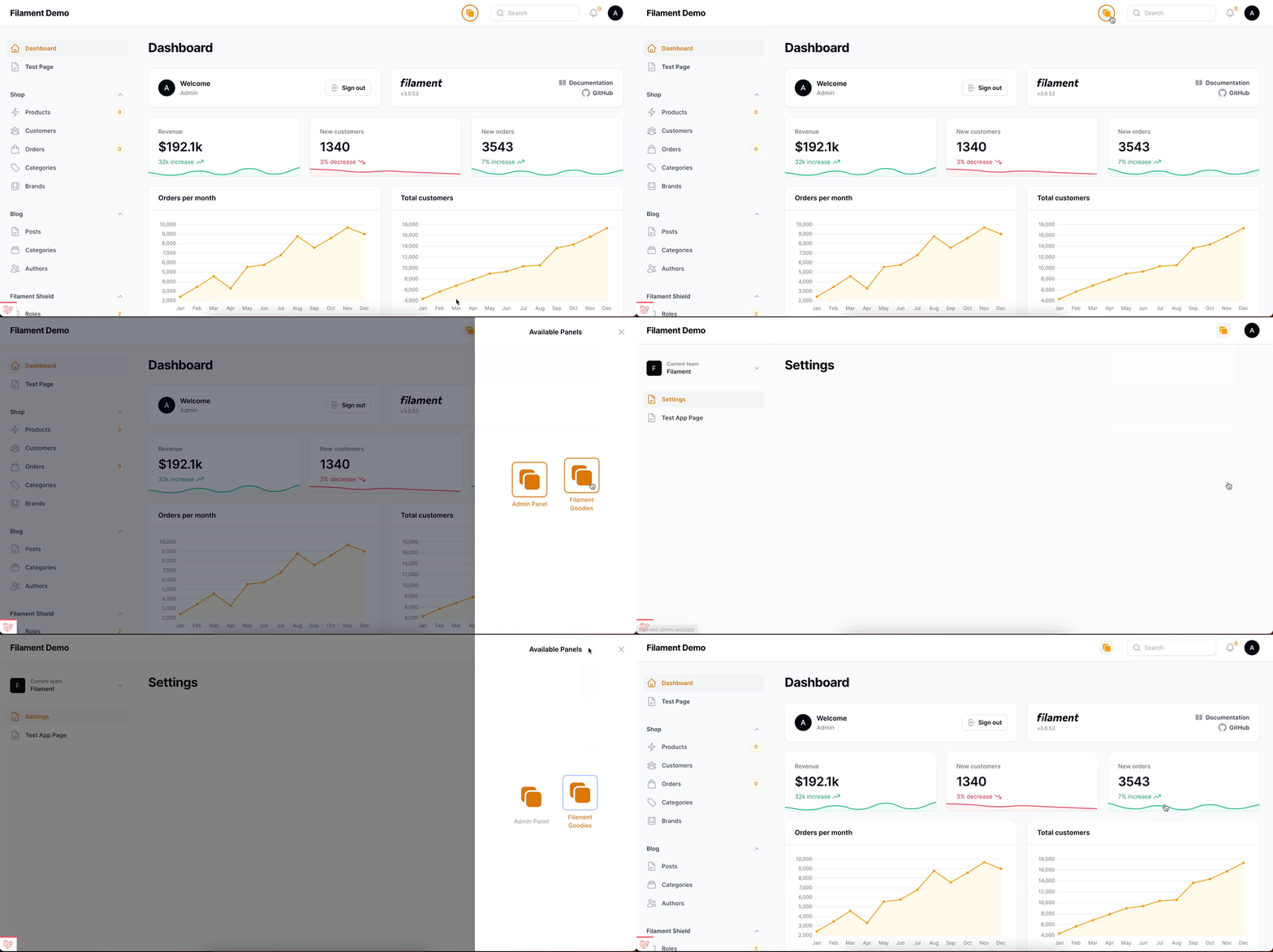
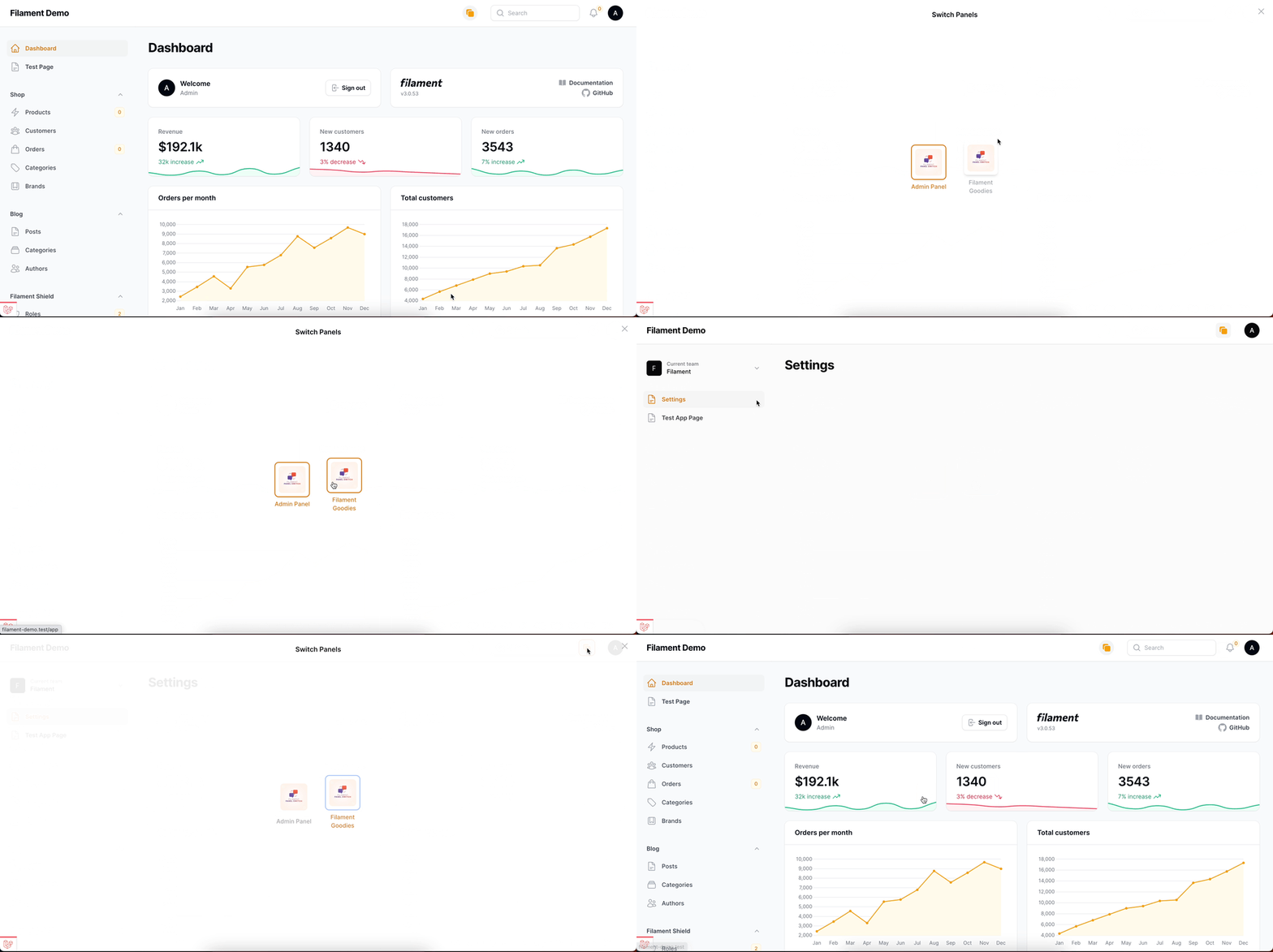
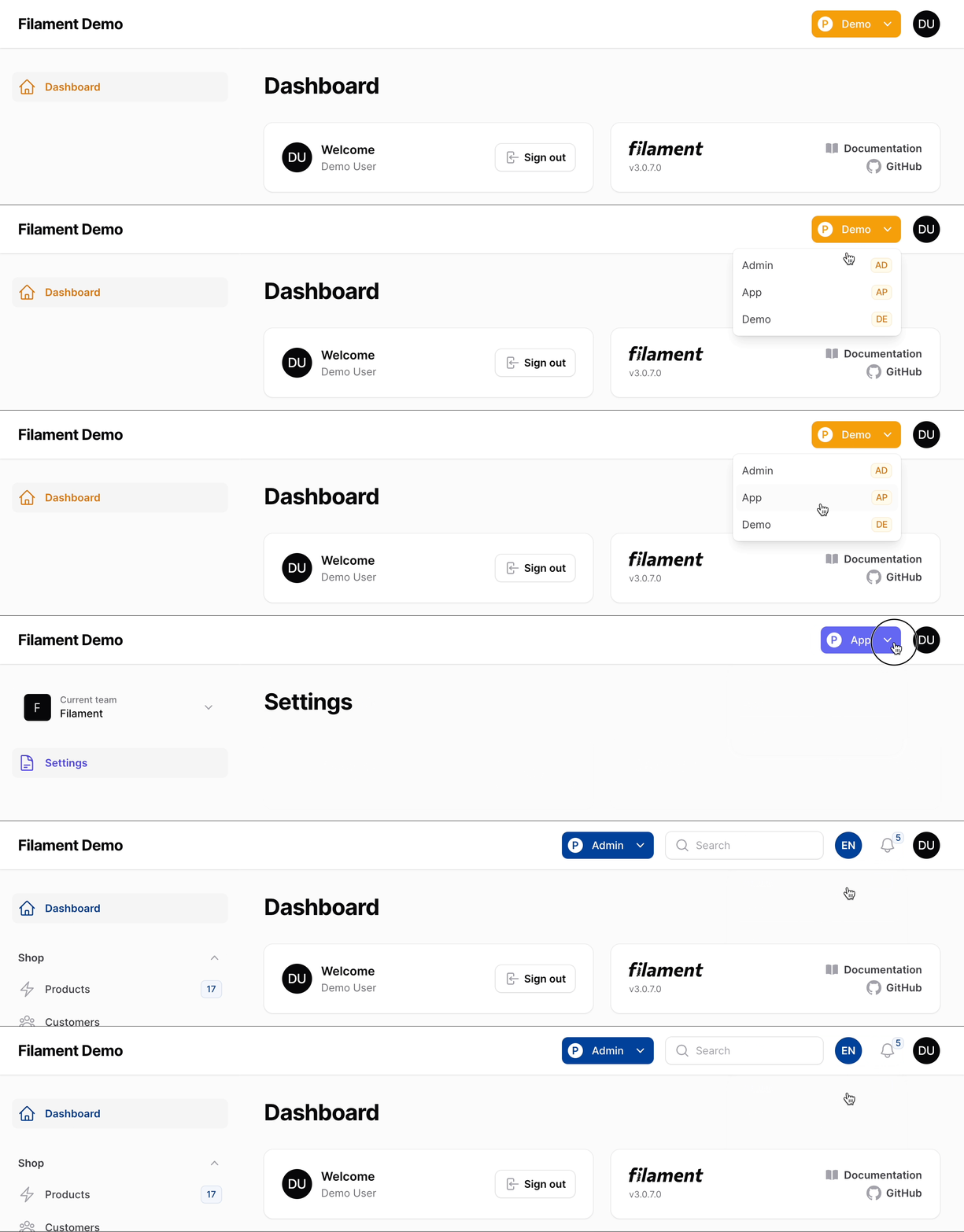
Table Of Contents
Compatibility
| Package Version | Filament Version |
|---|---|
| v1 | v3 |
| v2 | v4 |
Installation
You can install the package via composer:
composer require adultdate/filament-panel-switch
Important
The plugin follows Filament's theming rules. So, to use the plugin create a custom theme if you haven't already, and add the following line to your theme.css file:
@source '../../../../vendor/adultdate/filament-panel-switch/resources/views/**/*.blade.php';
Now build your theme using:
npm run build
Upon installation, the Plugin seamlessly integrates with Filament without any further setup. Though the plugin works out-of-the-box, it's designed for customization. Delve into the Configuration section below for detailed customization options.
Configuration
Start your custom configuration using the configureUsing method in your service provider's boot method:
use BezhanSalleh\PanelSwitch\PanelSwitch;

PanelSwitch::configureUsing(function (PanelSwitch $panelSwitch) {
    // Custom configurations go here
});
Design or Style
By default, the Plugin uses Filament's Modal Blade component as the modern design for the panel switch menu. But you can change it to the simple design by using the simple() method.
-
Modern
-
Modal Heading
Set a custom Modal Heading for the Panel Switcher. By default, the modal heading is set toSwitch Panels.use BezhanSalleh\PanelSwitch\PanelSwitch; PanelSwitch::configureUsing(function (PanelSwitch $panelSwitch) { $panelSwitch->modalHeading('Available Panels'); });
-
Modal Width
By default, the modal width is set toscreenbut you can use the options avaialbel for Modal Blade component.use BezhanSalleh\PanelSwitch\PanelSwitch; PanelSwitch::configureUsing(function (PanelSwitch $panelSwitch) { $panelSwitch->modalWidth('sm'); });
-
Slide-Over
You can use theslideOver()method to open aslide-overdialog instead of the modal.use BezhanSalleh\PanelSwitch\PanelSwitch; PanelSwitch::configureUsing(function (PanelSwitch $panelSwitch) { $panelSwitch->slideOver(); });
-
-
Simple
Thesimple()method transforms the panel switch menu to a dropdown list, allowing users to switch between panels directly from the list.use BezhanSalleh\PanelSwitch\PanelSwitch; PanelSwitch::configureUsing(function (PanelSwitch $panelSwitch) { $panelSwitch->simple(); });
Labels
By using labels() method you can provide textual representation for each panel. The keys of the array should be valid panel IDs, and the values can be either regular strings or Laravel's translatable strings:
use BezhanSalleh\PanelSwitch\PanelSwitch;

PanelSwitch::configureUsing(function (PanelSwitch $panelSwitch) {
    $panelSwitch
        ->labels([
            'admin' => 'Custom Admin Label',
            'general_manager' => __('General Manager')
        ]);
});
Icons/Images
Define icons/images for available panels using the icons() method which accepts an array. The keys of the array should be valid panel IDs. If using images instead of icons, set the $asImage parameter to true and the value of the array should be the path to the image meaning a valid url:
- Icons
use BezhanSalleh\PanelSwitch\PanelSwitch;

PanelSwitch::configureUsing(function (PanelSwitch $panelSwitch) {
    $panelSwitch->icons([
        'validPanelId1' => 'heroicon-o-square-2-stack',
        'validPanelId2' => 'heroicon-o-star',
    ], $asImage = false);
});
- Images
use BezhanSalleh\PanelSwitch\PanelSwitch;

PanelSwitch::configureUsing(function (PanelSwitch $panelSwitch) {
    $panelSwitch->icons([
        'validPanelId1' => 'https://raw.githubusercontent.com/bezhanSalleh/filament-panel-switch/3.x/art/banner.jpg',
        'validPanelId2' => 'https://raw.githubusercontent.com/bezhanSalleh/filament-panel-switch/3.x/art/banner.jpg',
    ], $asImage = true);
});
Icon/Image Size
Use the iconSize() method to set the size of the icons/images. The default size is 128px. The value provided will be multiplied by 4 and then used as the size of the icon/image.
use BezhanSalleh\PanelSwitch\PanelSwitch;

PanelSwitch::configureUsing(function (PanelSwitch $panelSwitch) {
    // This would result in an icon/image size of 128 pixels.
    $panelSwitch->iconSize(32);
});
Visibility
By default, the package checks whether the user can access the panel if so the switch will be visible. You can further customize whether the panel switch should be shown.
use BezhanSalleh\PanelSwitch\PanelSwitch;

PanelSwitch::configureUsing(function (PanelSwitch $panelSwitch) {
    $panelSwitch
        ->visible(fn (): bool => auth()->user()?->hasAnyRole([
            'admin',
            'general_manager',
            'super_admin',
        ]));
});
Who Can Switch Panels?
You might want an option in a situation where you want a group of your users to see the panel but not be able to switch panels. You can do that by using the canSwitchPanels() method.
use BezhanSalleh\PanelSwitch\PanelSwitch;

PanelSwitch::configureUsing(function (PanelSwitch $panelSwitch) {
    $panelSwitch
        ->canSwitchPanels(fn (): bool => auth()->user()?->can('switch_panels'));
});
Panels
By default all the panels available will be listed in the panel switch menu. But by providing an array of panel ids to the panels() method you can limit the panels that will be listed.
PanelSwitch::configureUsing(function (PanelSwitch $panelSwitch) {
    $panelSwitch->panels([
        'admin',
        'dev',
        'app'
    ]);
});
Then panels() method also accepts a closure that returns an array of panel ids. This is useful when you want to dynamically determine the panels that will be listed. The plugin will also validate the panels to ensure that they are valid filament panels. If any of the panels provided are invalid, the plugin will throw an InvalidArgumentException.
Sort Order
By default the panels will be listed in the order they were registered in config/app.php's providers array or in the order they are provided through the panels() method. But you can opt-in to sort the panels either in asc or desc order via sort() method.
PanelSwitch::configureUsing(function (PanelSwitch $panelSwitch) {
    $panelSwitch
        ...
        ->panels(['admin', 'dev', 'app']) // default order if `sort()` method not used
        ->sort() // ['admin', 'app', 'dev']
        // ->sort(order: 'desc') // ['dev', 'app', 'admin']
        ...
        ;
});
Placement
You can choose where the panel switch menu should be placed. By default panel switch menu is rendered via 'panels::global-search.before' Hook. But you can change it to anyone of the other available Filament Render Hooks.
use BezhanSalleh\PanelSwitch\PanelSwitch;

PanelSwitch::configureUsing(function (PanelSwitch $panelSwitch) {
    $panelSwitch->renderHook('panels::global-search.after');
});
Usage
The Panel Switch Plugin has a fluent api so you can chain the methods together and configure everything in one go.
use BezhanSalleh\PanelSwitch\PanelSwitch;

PanelSwitch::configureUsing(function (PanelSwitch $panelSwitch) {
    $panelSwitch
        ->panels(['admin', 'app', 'dev'])
        ->heading('Available Panels')
        ->modalWidth('sm')
        ->slideOver()
        ->icons([
            'admin' => 'heroicon-o-square-2-stack',
            'app' => 'heroicon-o-star',
        ])
        ->iconSize(16)
        ->labels([
            'admin' => 'Admin Panel',
            'app' => 'SaaS Application'
        ]);

});
Panel Exclusion
@deprecated use panels() method instead.
By default all the panels available will be listed in the panel switch menu. But you can exclude some of them by using the excludes() method.
PanelSwitch::configureUsing(function (PanelSwitch $panelSwitch) {
    $panelSwitch->excludes([
        'saas'
    ]);
});
Optionally, you can publish the views using
php artisan vendor:publish --tag="filament-panel-switch-views"
Testing
composer test
Changelog
Please see CHANGELOG for more information on what has changed recently.
Contributing
If you want to contribute to this packages, you may want to test it in a real Filament project:
- Fork this repository to your GitHub account.
- Create a Filament app locally.
- Clone your fork in your Filament app's root directory.
- In the
/filament-panel-switchdirectory, create a branch for your fix, e.g.fix/error-message.
Install the packages in your app's composer.json:
"require": {
    "adultdate/filament-panel-switch": "dev-fix/error-message as main-dev",
},
"repositories": [
    {
        "type": "path",
        "url": "filament-panel-switch"
    }
]
Now, run composer update.
Security Vulnerabilities
Please review our security policy on how to report security vulnerabilities.
Credits
License
The MIT License (MIT). Please see License File for more information.
adultdate/filament-panel-switch 适用场景与选型建议
adultdate/filament-panel-switch 是一款 基于 PHP 开发的 Composer 扩展包,目前已累计 2 次下载、GitHub Stars 达 0, 最近一次更新时间为 2025 年 12 月 17 日, 在 PHP 生态内属于活跃度较高的组件。
它主要适用于以下技术方向: 「filament」 「bezhanSalleh」 「panel-switch」 「filament-panel-switch」 「panel-changer」 「panel-navigation」 等业务场景。在实际项目中,围绕这些方向常见需要落地的问题包括:接口对接、性能调优、并发安全、与既有框架(Laravel / ThinkPHP / Yii / Webman 等)的兼容适配,以及生产环境的日志埋点与稳定性保障。
我们在过去多个企业项目中使用过 adultdate/filament-panel-switch 或与其功能相近的方案,如果你在选型或落地过程中遇到问题,例如 版本兼容、二次改造、私有化封装、与内部系统对接、生产 BUG 排查,欢迎联系我们协助评估。
基于 adultdate/filament-panel-switch 在你已有业务上做功能扩展、字段裁剪、UI 适配、与内部账号 / 权限 / 日志系统的深度对接。
线上偶发问题、内存泄漏、慢查询、并发异常等排查修复;针对高流量场景做缓存、队列、索引层面的调优。
承接完整的项目从需求 → 设计 → 开发 → 上线 → 长期运维;也可按月提供技术保姆服务。
与 adultdate/filament-panel-switch 相关的其它包
同方向 / 同关键字的高下载量 PHP Composer 包推荐,方便对比选型:
Easily Switch between your Filament Panels
A Set of Filament Component Addons with different designs and extra functionalities
A Simple & Beautiful Pluggable Exception Viewer for FilamentPHP's Admin Panel
Filament support for `spatie/laravel-permission`.
A Simple & Beautiful Pluggable Exception Viewer for FilamentPHP's Admin Panel
Google Analytics integration with Filamentphp (FilamentAdmin)
统计信息
- 总下载量: 2
- 月度下载量: 0
- 日度下载量: 0
- 收藏数: 0
- 点击次数: 25
- 依赖项目数: 0
- 推荐数: 0
其他信息
- 授权协议: MIT
- 更新时间: 2025-12-17