timoetting/kirby-builder
最新稳定版本:2.0.16
Composer 安装命令:
composer require timoetting/kirby-builder
包简介
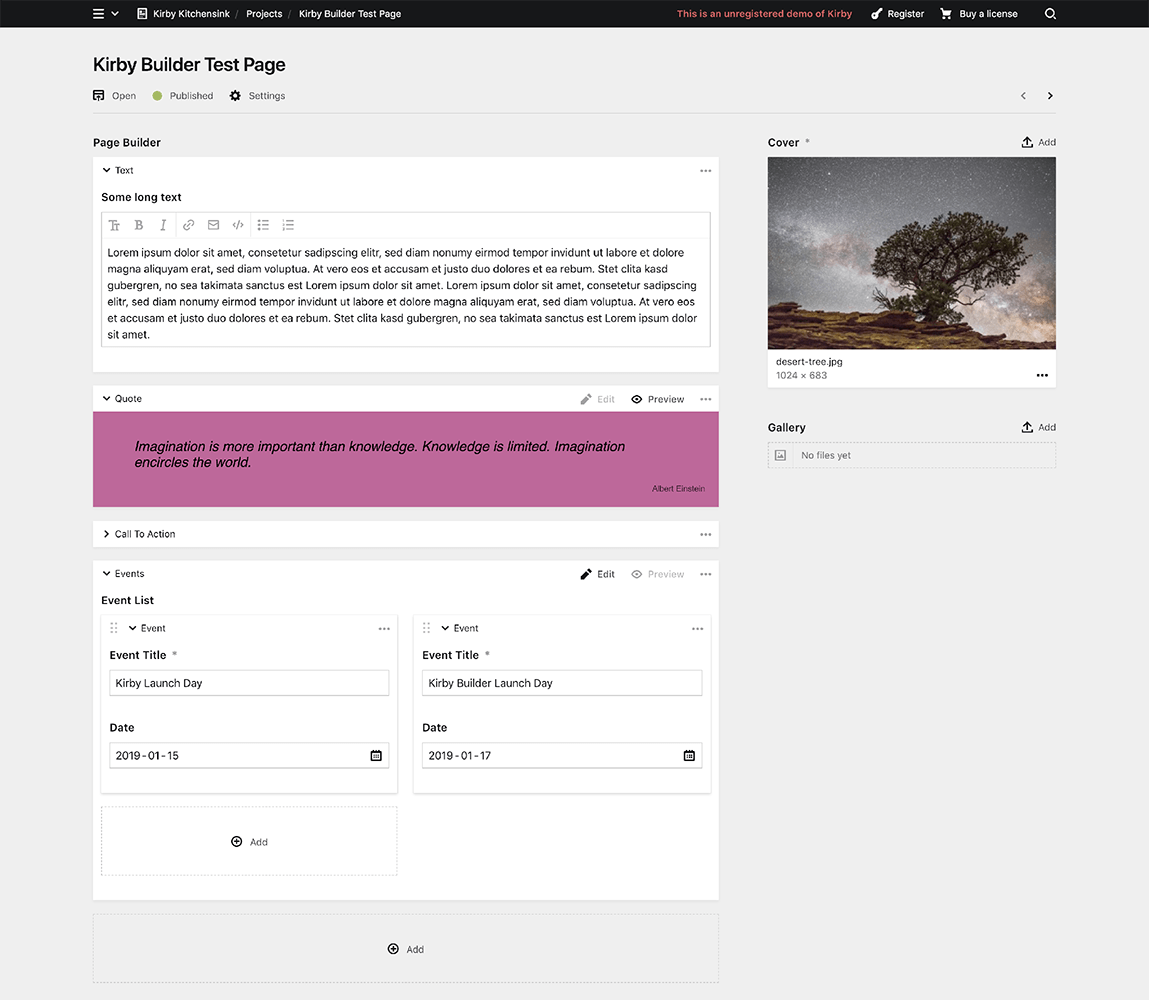
This versatile plugin for Kirby CMS (v3) lets you predefine content blocks with different field sets that can then be added, edited and arranged inside Kirby's panel.
README 文档
README
⚠️⚠️⚠️
This Plugin is deprecated and is no longer maintained, as its functionality can be replaced by the native Blocks Field and Layout Field
⚠️⚠️⚠️
This versatile plugin for Kirby CMS (>= v3.0.1) lets you predefine content blocks with different field sets that can then be added, edited and arranged inside Kirby's panel.
The legacy version for Kirby 2 can be found under this branch.
Commercial Use
Kirby Builder can be used in so many different extents. You know best how big the value is that you get out of this plugin. Please pay what (and if) you want.
Another way to support this plugin is to buy a Kirby Licence via this affiliate link with no extra costs for you. You need that licence anyway, right? 😉
Preview
Installation
Git
From the root of your kirby project:
git clone https://github.com/TimOetting/kirby-builder.git site/plugins/kirby-builder
Composer
composer require timoetting/kirby-builder
Direct Download
Alternatively you can download the zip file, unzip it's contents into site/plugins/kirby-builder.
Example Blueprint Structure
# inside the fields section of your blueprint:
mybuilder:
  label: Page Builder
  type: builder
  columns: 1 # Optional. If set to 2 or more, the builder blocks will be placed in a grid.
  max: 10 # Optional. Limits the number of builder blocks that can be added.
  fieldsets:
    quote: # This is a field set. It contains a group of kirby fields. The user can select from these sets to build the content.
      name: Quote # The name option is used as a label for the buttons to add new fieldsets. It is also used as a label in the header of the fieldset, if the label option is not set explicitly (see next line).
      label: Quote by {{citation}} # Optional. The label option can be used to override the header text of the fieldset. The 'mustache' syntax can be used to include the value of any field of the fieldset.
      preview: # Optional. If defined, a preview of the fieldset can be rendered by the specified snippet from within the snippets folder.
        snippet: blocks/quote
        css: /assets/css/blocks/quote.css
      defaultView: preview # Optional. If the value "preview" is set, the block will show the preview when the page is loaded in the panel. If the value is a tab name, the respective tab is preselected when the page is loaded. Newly created blocks ignore this value and have the edit mode or the first tab preselected.
      fields:
        text:
          label: Quote Text
          type: textarea
        citation:
          label: Citation
          type: text
    bodytext:
      name: Text
      tabs: # Optional. Tabs can be used to group the fields of a field set. In this example, we use one tab to contain the content related fields and one for styling settings. It makes no difference for the content handling in the template if there are tabs or not.
        content:
          label: Content
          icon: edit # Optional. This icon appears next to the tab. The icon name can be chosen from the Kirby's icon set getkirby.com/docs/reference/ui/icon
          fields:
            text:
              label: text
              type: textarea
        style:
          label: Style
          icon: cog
          fields:
            fontfamily:
              label: Font
              type: select
              options:
                helvetica: Helvetica
                comicsans: Comic Sans
            fontsize:
              label: Font Size
              type: number
    events:
      name: Events
      preview:
        snippet: blocks/events
        css: /assets/css/blocks/events.css
      fields:
        eventlist: # The Builder Field can even be nested!
          type: builder
          label: Event List
          columns: 2
          fieldsets:
            event:
              label: Event
              fields:
                title:
                  label: Title
                  type: text
                text:
                  label: Description
                  type: textarea
                date:
                  label: Date
                  type: date
    calltoaction: blocks/calltoaction # the Builder Field blueprint can be rather complex. It is therefore recommended to organize your fieldsets in single files. This example would take the content of the file /site/blueprints/blocks/calltoaction.yml and use it for the fieldset "calltoaction".
Template Usage
There are different ways to use the builder field inside a template. A clean approach for this is to use different snippets inside site/snippets/blocks/ that have the same file name like the field set names in the blueprint. In this case, we use the same snippet that we used for the preview inside the panel.
<?php # /site/templates/yourtemplate.php
foreach($page->mybuilder()->toBuilderBlocks() as $block):
  snippet('blocks/' . $block->_key(), array('data' => $block));
endforeach;
?>
The toBuilderBlocks method converts the builder field to a Kirby Collection which makes it possible to use Kirby's chaining syntax. Under the hood it is an alias for the toStructure method.
The quote snippet, for example, could then be rendered by this snippet:
<php # /site/snippets/blocks/quote.php ?>
<section class="quote">
  <blockquote>
    <?= $data->text() ?>
  </blockquote>
  <div class="citation">
    <?= $data->citation() ?>
  </div>
</section>
Licence
timoetting/kirby-builder 适用场景与选型建议
timoetting/kirby-builder 是一款 基于 Vue 开发的 Composer 扩展包,目前已累计 35.96k 次下载、GitHub Stars 达 405, 最近一次更新时间为 2019 年 01 月 18 日, 在 PHP 生态内属于活跃度较高的组件。
它主要适用于以下技术方向: 「builder」 「page-builder」 「kirby3」 「kirby3-cms」 「kirby3-plugin」 「kirby-builder」 等业务场景。在实际项目中,围绕这些方向常见需要落地的问题包括:接口对接、性能调优、并发安全、与既有框架(Laravel / ThinkPHP / Yii / Webman 等)的兼容适配,以及生产环境的日志埋点与稳定性保障。
我们在过去多个企业项目中使用过 timoetting/kirby-builder 或与其功能相近的方案,如果你在选型或落地过程中遇到问题,例如 版本兼容、二次改造、私有化封装、与内部系统对接、生产 BUG 排查,欢迎联系我们协助评估。
基于 timoetting/kirby-builder 在你已有业务上做功能扩展、字段裁剪、UI 适配、与内部账号 / 权限 / 日志系统的深度对接。
线上偶发问题、内存泄漏、慢查询、并发异常等排查修复;针对高流量场景做缓存、队列、索引层面的调优。
承接完整的项目从需求 → 设计 → 开发 → 上线 → 长期运维;也可按月提供技术保姆服务。
与 timoetting/kirby-builder 相关的其它包
同方向 / 同关键字的高下载量 PHP Composer 包推荐,方便对比选型:
A Sphinx Query Builder extension for the Laravel Database package
Anax Database Active Record module for model classes.
Comprehensive PHPStan stubs for Elementor and Elementor Pro WordPress page builder - auto-generated, self-contained, plug & play
A visual drag-and-drop page builder for Filament admin panels, powered by GrapeJS v3. Build landing pages, marketing sites, and custom content pages without writing code.
Courier offers a convenient and painless solution for creating emails tailored for your Kirby website.
A image cropping field for kirby.
统计信息
- 总下载量: 35.96k
- 月度下载量: 0
- 日度下载量: 0
- 收藏数: 405
- 点击次数: 25
- 依赖项目数: 1
- 推荐数: 0
其他信息
- 授权协议: MIT
- 更新时间: 2019-01-18